On this page
- Why does an agent’s podcast need a written SOP?
- Who owns each stage, and what do they hand off?
- How should you name and file every episode asset?
- What goes on each stage checklist?
- What are the approval steps before an episode goes live?
- How far ahead should each step happen?
- Copy-paste per-episode tracker
- What breaks most often, and how do you fix it?
- Next step
A podcast production workflow for real estate agents is a written SOP that moves each episode through six stages: book, prep, record, edit, approve and publish, then promote and log. Each stage has one owner, a handoff file and a “done when” test. Two approval gates, content and compliance, sit before release, and one tracker row follows every episode.
Treat what follows as the operating manual: checklists, file names, approvals and a tracker you can paste into a spreadsheet today. The reasons behind each stage live in the real estate podcast production overview, and the hours are estimated in weekly podcast time by stage.
Why does an agent’s podcast need a written SOP?
Because the show breaks at handoffs, not at the microphone. An episode fails when the editor doesn’t know which take to use, when nobody checked the release was signed, or when the clips sit in a download folder for three weeks.
A written SOP fixes that in three ways:
- Anyone can step in. If your assistant is out, a freelancer can pick up episode 14 from the folder and the tracker.
- Nothing ships unchecked. Brokerage and Fair Housing checks become a gate, not a memory test.
- You see the jam early. A tracker row stuck at “Edit” for six days tells you to act before release day.
Generic podcast checklists stop at “upload and share.” An agent’s version also needs a guest release, a brokerage disclosure, a Fair Housing listen, show notes written for local search and a CRM log. Those are built into the stages below.
Who owns each stage, and what do they hand off?
Every stage gets one owner and ends with a named file or record passed to the next owner. If a stage has two owners, it has none.
The table assumes a solo agent with either an assistant or an outside editor. If you do everything yourself, you still use the handoff files. They become your notes to your future self.
| Stage | Owner | Handoff artifact | Done when |
|---|---|---|---|
| 1. Book | Host or assistant | Guest record in tracker, signed release, guest brief sent | Release is in 06_admin and the guest has the recording link |
| 2. Prep | Host | Run-of-show with questions and timings | The host has read it once out loud |
| 3. Record | Host | Raw files (separate tracks plus video) and a recording log | Files are uploaded to 02_raw the same day |
| 4. Edit | Editor | First cut, draft title, show notes and clip timestamps | All four files are in 03_edit and the tracker says “Ready for Gate A” |
| 5. Approve | Host, then broker if needed | Approval notes and the final files | Gate A and Gate B are both ticked and dated |
| 6. Publish, promote, log | Assistant or editor, then host | Live links, guest share kit, CRM entry | Tracker row is closed with links and lead notes |
How should you name and file every episode asset?
Use one folder per episode and one naming pattern for every file. The pattern below sorts correctly in any file system and tells you what a file is without opening it.
Pattern: SHOWCODE_E###_YYYY-MM-DD_GuestLastName_asset_v#.ext
- SHOWCODE: a 3 or 4 letter code for your show, e.g.
CHPfor “Cedar Hills Property Podcast”. - E###: episode number with leading zeros, so E009 sorts before E010.
- YYYY-MM-DD: the planned release date, not the recording date. It’s the date everyone works toward.
- GuestLastName: or
Solofor solo episodes. - asset: a fixed word list, e.g.
raw-host,raw-guest,raw-video,cut,master,notes,clip01,thumb,release. - v#: version number. Never use “final,” because there is always a final-final.
Keep 06_admin for anything you’d need to show a broker later: the signed release, client permission if a past client appears, and the approvals note with dates. If the release date moves, rename the folder and the files at once. A mismatched date is how the wrong file gets published.
What goes on each stage checklist?
Each stage below ends with an exit gate. Don’t start the next stage until every box is ticked.
Stage 1: Book
- Episode goal written in one line (e.g. “referral relationship with a local mover”)
- Guest confirmed, with date, time and time zone in writing
- Tracker row created with episode number and planned release date
- Guest release sent and signed; for clients, lenders or home tours, add the right rider from the podcast guest release template
- Guest brief sent: goal, three or four topics, length, recording link, what they’ll get afterward
- Short note in the brief asking guests to talk about places, prices and amenities, not who lives where
Exit gate: release filed in 06_admin. No release, no recording
Stage 2: Prep
- Run-of-show drafted with timings, with questions edited for your market
- Brokerage disclosure line written into the intro or outro, word for word as your broker approved it
- Call to action chosen, with its own tracking link
- Local terms listed for show notes: city, neighborhoods, landmarks, street names you’ll mention
- Any listing mention cleared with the seller first
Exit gate: host has read the run-of-show aloud once
Stage 3: Record
- Separate tracks for each speaker, plus video
- Ten-second test recorded and played back
- Disclosure line said on the recording
- Recording log started with timestamps for highlights and anything to cut
- Raw files renamed and uploaded to
02_rawthe same day
Exit gate: tracker status set to “Edit” and the editor notified
Stage 4: Edit
- Cut made from the recording log, not from scratch
- Intro, outro and disclosure line in place
- Draft title leads with what a local listener would search, then the guest name
- Show notes drafted: two-sentence summary, timestamps, guest links, your contact details, brokerage line and the local terms from Stage 2
- Three to five clip timestamps picked, each with a one-line hook
- Audio checked against your host’s specs. Apple’s audio requirements page recommends overall loudness around -16 dB LKFS (plus or minus 1 dB) with true peak no higher than -1 dB FS
Exit gate: cut, notes, title and clip list are all in 03_edit
Stage 5: Approve
This stage is the two gates in the next section. Approvals go in 06_admin as a dated note.
Stage 6: Publish, promote and log
- Audio uploaded to your podcast host and scheduled
- Full video uploaded to YouTube with the same title, notes and disclosure
- Episode page published on your website with the player, video, notes and local terms
- Live check within an hour of release: plays in Apple and Spotify, links work, disclosure visible
- Guest share kit sent within one day (see the guest promotion kit for contents)
- Clips posted on schedule, each with the brokerage line where it promotes your services
- Guest thanked and a follow-up booked
- Leads and referrals tagged in your CRM with the episode number
Exit gate: tracker row closed with links and a lead note, even if the note says “none yet”
What are the approval steps before an episode goes live?
Use two gates, in order: Gate A for content, Gate B for compliance. Splitting them keeps the compliance check focused on the final files instead of a cut that will still change.
Gate A: content approval (host, about T-7)
- The episode meets its one-line goal
- Nothing in it would embarrass you or the guest
- Title, summary and clip hooks approved
- All changes sent back in one list, with timestamps
Give the editor one consolidated list per round. Scattered texts create versions nobody can track. If you work with a producer, check how many revision rounds your agreement includes before you start sending notes.
Gate B: compliance sign-off (host, broker when needed, about T-5)
Run this on the master files, not the cut.
- Brokerage disclosure present in audio, show notes, YouTube description and episode page
- Full Fair Housing listen, guest included, using the Fair Housing listening checklist for episodes
- Signed release on file, plus client permission if a past client appears
- Any listing details match the current listing status
- No lender or partner arrangement that your broker hasn’t reviewed
- Clips checked separately, because they travel without the rest of the episode
For the rules behind these boxes, including state advertising rules and disclosure scripts, see real estate podcast compliance. This is not legal advice. Your broker decides what your show needs, so ask whether they want to approve every episode or only the format.
Write the approval down. One line in CHP_E014_..._approvals.txt is enough: “Gate A approved 2026-10-28 KR. Gate B approved 2026-10-30 KR, broker OK by email 2026-10-30.”
How far ahead should each step happen?
Each step should land on a fixed day counted back from release, with recording about two weeks out. That gap leaves room for an edit, two approval gates and a reschedule without missing the date.
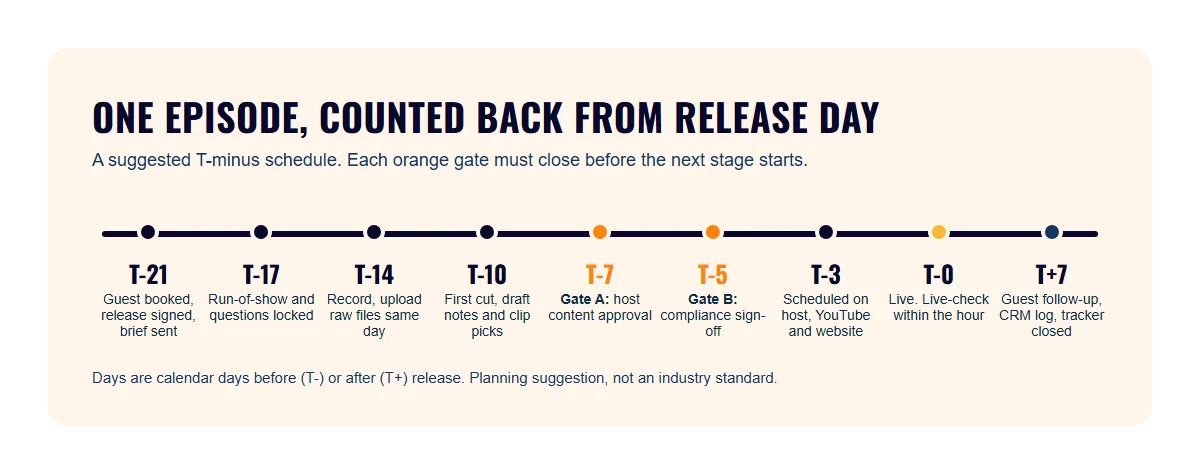
- Book (T-21): guest confirmed, release signed, brief sent.
- Lock prep (T-17): run-of-show and questions final.
- Record (T-14): raw files uploaded the same day.
- First cut (T-10): edit, draft notes, title and clip picks delivered.
- Gate A (T-7): content approval.
- Gate B (T-5): compliance sign-off.
- Schedule (T-3): queued on your host, YouTube and website.
- Release (T-0): episode live, then the live check.
- Share (T+1): kit to the guest, first clip posted.
- Close (T+7): guest follow-up, CRM log, tracker row closed.
These are planning suggestions, not an industry rule. If your broker reviews every episode, add their turnaround between T-7 and T-5. If you batch-record two episodes, the second one simply runs the same schedule two weeks later.
Copy-paste per-episode tracker
Paste the header row into a spreadsheet and add one row per episode. Status moves left to right; a row never skips a status.
Two columns do most of the work. “Owner now” tells you who is holding the episode. “Release signed” stops a recording from going ahead without paperwork. Use conditional formatting to turn a row red when today is within five days of the release date and Gate B is still blank.
The “CRM tag” column should match the source tag in your CRM exactly, so you can later count leads by episode. The setup on the CRM side is in counting leads by episode in your CRM.
What breaks most often, and how do you fix it?
Most broken workflows fail at the same five points. Each has a simple rule.
| Failure | What it looks like | Rule that fixes it |
|---|---|---|
| Raw files go missing | “Did you send the guest track?” three days later | Upload to 02_raw the same day, or the tracker can’t move to Edit |
| Endless revisions | Notes arrive by text, email and voice memo | One consolidated list per round, with timestamps |
| Wrong file published | An older cut goes live | Only 04_final files with the highest v# get uploaded |
| Compliance checked on the wrong version | A cut line comes back in the master | Gate B runs on the master files only |
| Episode published, then forgotten | No share kit, no follow-up, no CRM entry | The row isn’t closed until T+7 tasks are done |
If you would rather hand this SOP to a team, a done-for-you podcast production service runs most stages for you. The two approval gates should still be yours.
Next step
Create the folder structure and paste the tracker header today. Then fill in one row for your next episode, set its release date, and count back to find the day the guest release must be signed.
Frequently asked questions
Do I need project management software to run this workflow?
No. A shared folder and one spreadsheet are enough for a show releasing two to four episodes a month. Move to a task tool only when more than two people touch each episode.
Who should do the compliance sign-off?
The host signs off, using the checklist, and anything unclear goes to the broker or compliance contact. Ask your broker whether they want to review every episode or only the format and disclosure wording.
What if a guest cancels after the release date is announced?
Keep one finished backup episode in the folder at all times, such as a solo market update. Swap it in, move the guest to the next open slot and update the tracker.
Can a virtual assistant run this SOP?
Yes, for booking, filing, uploads and the tracker. Keep the two approval gates with you, because only the licensed agent can own what goes out under their name.
Sources
- Audio requirements — Apple Podcasts for Creators (accessed October 6, 2026)
Done-for-you podcast production
Want a podcast that brings in referrals, not just downloads?
Icons of Real Estate plans, produces and publishes business-growing podcasts for agents. You record. We handle the rest.
Launch Your Podcast
Written by
Co-Founder and Podcast Guru, Icons of Real Estate
Tomás Fonseca co-founded Icons of Real Estate in 2021 and is its Podcast Guru. He has a background in marketing, with stints at companies like Nintendo and Ardor SEO, and is one of the hosts of the Icons of Real Estate Podcast.

How we research, write, fact-check and correct articles: our editorial standards.