To give feedback on a podcast edit, watch the whole cut once, then send one list of notes, each pinned to a timecode and stating what to change. Group notes by must-fix and nice-to-have, agree how many rounds you get, and sign off each version with a clear status: approved or needs changes.
Most editing delays don’t come from the editor. They come from notes like “the middle part drags” that send the editor back through the whole episode. What follows is the approval gate from the episode production workflow, expanded into something you can do at your desk in one sitting. Where editing sits in the bigger picture is covered in the real estate podcast production overview.
What does good feedback on a podcast edit look like?
Good feedback on a podcast edit is specific, complete and sent once. Specific means every note has a timecode and a requested change. Complete means the editor gets everything in one round. Sent once means no “one more thing” text two days later.
Compare the notes hosts usually send with the notes an editor can act on without asking a question.
| What hosts often send | What the editor can act on |
|---|---|
| “The middle part drags” | “14:20 to 17:05: cut the second inspection story. Keep the radon tip at 16:40.” |
| “Can you fix the intro?” | “00:00 to 00:12: trim the silence before my first line.” |
| “Something’s off with the sound” | “22:10: the guest’s audio drops. Raise it to match mine.” |
| “Check the spelling” | “08:33, lower third: ‘Pinewood Realty Group’, not ‘Pinewood Reality’.” |
Notes in the left column cost the editor a full re-listen each. Notes on the right cost one jump to a timecode. Frame.io’s own guidance for reviewers says the same thing: pause at the exact timecode of your note, because that timecode is what the editor needs to be accurate.
How do you review a podcast edit in six steps?
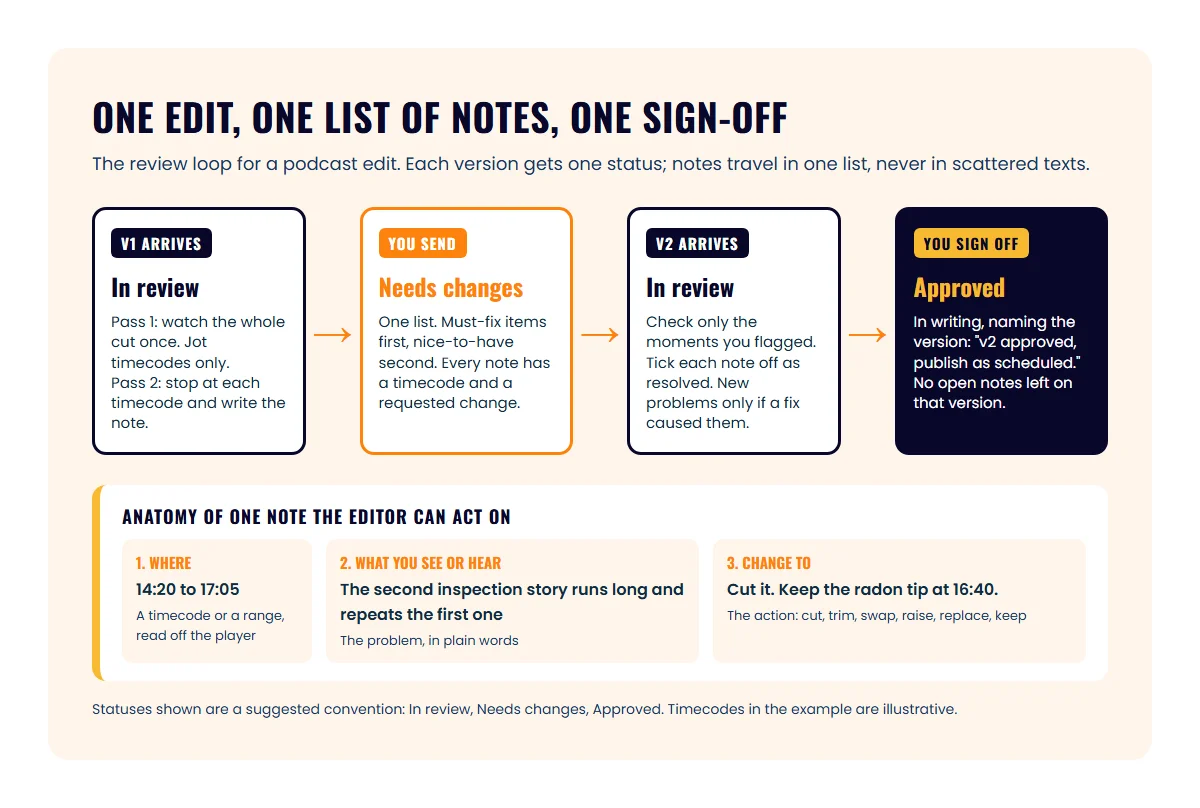
Reviewing a podcast edit takes two passes and one message: a straight-through watch, a note-writing pass, then a single list with a status. Here is the routine in order.
- Block about twice the episode length. A 40-minute cut needs roughly 80 minutes: one watch, one note pass. Do it on headphones, not laptop speakers.
- Watch the whole cut once without stopping. Keep a scratch list and write only timecodes with a word or two: “14:20 long”, “22:10 sound”, “08:33 name”. Stopping to write full notes on the first pass makes you lose the shape of the episode.
- Go back to each timecode and write the full note. Use the three-part format in the next section. Read the timecode off the player, not from memory.
- Sort the list. Must-fix first: wrong names, compliance problems, broken audio, anything that would embarrass the guest. Nice-to-have second: pacing preferences, a cleaner cut, a different music bed.
- Send one list with the version number and a status. “v1: Needs changes. 7 notes, 4 must-fix.” If you are working with a producer, check how many revision rounds your agreement includes before you send round one. Extra rounds are often billed, as the podcast editing cost guide shows.
- When the next version arrives, check only your notes. Jump to each flagged moment, confirm the fix, and tick it off. Then approve in writing, naming the version.
How do you write a note an editor can act on?
A usable edit note has three parts: where, what you see or hear, and what to change it to. Leave any one of them out and the editor has to guess or ask.
- Where. A timecode such as 14:20, or a range such as 14:20 to 17:05 when the note covers a stretch. Take it from the player’s counter.
- What you see or hear. The problem in plain words: the story repeats, the audio drops, the name is misspelled.
- Change to. Use a verb the editor can execute: cut, trim, swap, raise, lower, replace, move, keep.
“Keep” matters as much as “cut.” If a four-minute stretch has one great line in it, say which line to keep, or the editor will cut the whole thing.
Two habits keep the notes clean. Say “that’s everything” at the end of the list, so the editor knows the round is closed. And if you spot something after sending, hold it for the next round unless it’s a must-fix.
What should you check in a podcast edit?
Check a podcast edit in four passes: content, names and compliance, sound and picture, then captions and clips. Running the passes separately keeps you from watching for everything at once and catching nothing.
Content
- The episode does the one job you recorded it for (a lender explains pre-approval, an inspector explains what fails most)
- The cold open is the strongest moment, not just the first one
- Nothing in the cut would embarrass you or the guest
- The intro and outro name the right episode and guest
Names, facts and compliance
- Your name, your brokerage and the guest’s name and title are spelled correctly in every lower third and in the show notes
- Any number you quoted on air is still right; if you misspoke, ask for it to be cut rather than left in
- No neighborhood is described by who lives there, and no lender guest drifted into rate promises. The podcast compliance guide lists what to listen for; your broker decides what your show needs. None of this is legal advice.
- No client deal details appear that the client hasn’t approved
Sound and picture
- Your level and the guest’s level match, and music sits under the voices rather than over them
- Camera cuts land on the person speaking
- No jump cut leaves a half-word or a visible skip
Captions and clips
- Captions match the words, especially names, street names and numbers. Automatic captions get local names wrong most often.
- If you publish captions as a file, it is in a format your platforms accept; YouTube accepts SRT and VTT among others, and each line carries the time codes for when it should show
- The clip picks fit your market, not just the algorithm. The moments that start conversations are covered in choosing podcast clips that bring in messages.
How do you track versions and sign off?
Track versions by giving every cut a number and exactly one status, and by approving in writing with the version named. Without that, nobody can say which cut the “looks good” text referred to.
A simple three-status convention that works in email, a shared document or a review tool looks like this:
| Status | What it means | Who sets it |
|---|---|---|
| In review | A new version is out and the host hasn’t finished notes | Editor, when sending the cut |
| Needs changes | Notes are sent; the editor is working on the next version | Host, with the list of notes |
| Approved | This exact version can be published | Host, in writing, naming the version |
Three rules keep the convention honest:
- One list per version. Notes for v1 don’t get added to after the editor starts on v2.
- Never approve a version with open notes. If a must-fix is still unresolved, the status stays Needs changes.
- Write the approval down where the files live. A line such as “v2 approved 2026-11-02, KR” in the episode folder or the review thread is enough. The production workflow SOP shows where that line goes in a per-episode tracker.
If your broker reviews episodes, send them the version after your content notes are resolved, so they check final files. Their approval goes in the same written record.
Which tools can you use to review a podcast edit?
You can review a podcast edit with nothing more than a shared video file and a written list, or with a review tool that pins each comment to the timecode for you. Which one fits depends on how many people touch each episode.
| Route | How notes get pinned | Does the reviewer need an account? | Fits when |
|---|---|---|---|
| Shared file plus an email or document | You type the timecodes yourself from the player | No | One host, one editor, audio-only or simple video |
| Frame.io share link | Pause at the timecode and type; mark in and out points with I and O for a range; draw on the frame | No; the first comment asks for a name and email | A producer or team already using it |
| Vimeo review link | Reviewers click on the timeline to leave time-coded comments; a “Change status” toggle lets them mark the video Approved | No | Shows that already host video on Vimeo |
| Dropbox Replay | Timestamp comments that are frame-accurate; new versions kept together; comments can be resolved | No | Teams that already keep files in Dropbox |
| ICONS Review | Pause and comment and the note is pinned to that frame and timecode; mark in and out points for a range; draw on the frame; each new cut becomes v2, v3 with its own status | No; you give your name the first time you comment | Shows produced by Icons of Real Estate; included for ICONS production clients |
Frame.io’s row comes from its commenting guide and its share links page for clients. Vimeo’s row is from its video review links help page, which also notes that free plans include one review link per video. Dropbox’s row is from the Dropbox Replay overview. Features and plans change, so check each vendor’s current page before you commit.
A shared file plus a written list is fine for a solo show. It breaks when a second reviewer joins, because two people’s timecode lists have to be merged by hand. That is the point where a tool that pins comments to the frame pays for itself.
ICONS Review is included for ICONS production clients, and it is how you approve the episodes the Icons team edits. When an edit is ready, the team sends you a share link. You open it without creating an account and give your name the first time you comment. Every comment is pinned to the exact frame and timecode, or to an in and out point for a stretch, and you can draw an arrow or a circle on a paused frame when that says it faster than a sentence. Each new cut is kept as a numbered version marked In review, Needs changes or Approved. If the episode has subtitles, you can cross out or replace words on a subtitle line, much like suggesting mode in a document, and the team downloads the corrected subtitle file. Your comments also export as DaVinci Resolve timeline markers, so nothing gets retyped on the way to the editor’s timeline. Review sits inside Ongoing Production, alongside the editing itself; what a producer handles and what stays your job is laid out in done-for-you podcasting for agents.
Next step
Open the last edit you approved and write the notes you would have sent, using the three-part format. When every note has a timecode, a problem and an action, you’re ready for the next cut. Otherwise, paste the template above into your episode folder and use it on round one of the next episode. Clients whose show the Icons team produces get their edits as ICONS Review links, where the same three-part note works with the timecode filled in for you.
Frequently asked questions
How long should reviewing a podcast edit take?
Plan about twice the episode length: one uninterrupted watch, then a second pass to write notes at the moments you flagged. A 40-minute episode is roughly 80 minutes of review time.
Should I review the audio or the video version?
Review the video if you publish one, because it carries everything the audio does plus the lower thirds, cuts and captions. If the show is audio only, review the audio with headphones.
Can I send my edit feedback as a voice note?
You can, but turn it into a written list with timecodes before it reaches the editor. A voice note still has to be transcribed, and the timecodes in it are guesses.
What if my broker needs to review the episode too?
Send the broker the same version after your content notes are resolved, so they check files that won't change. Add their turnaround to your schedule and keep their approval in writing with yours.
Do ICONS production clients need an account to review an edit?
No. The Icons team sends a share link. You open it, and the first time you comment you give your name, with an email optional, so the team knows who wrote each note.
Sources
- Supported subtitle and closed caption files — YouTube Help (accessed October 9, 2026)
- Commenting on your media — Frame.io V4 Knowledge Center (accessed October 9, 2026)
- Share links explained for clients — Frame.io V4 Knowledge Center (accessed October 9, 2026)
- How to use and manage video review links — Vimeo Help Center (accessed October 9, 2026)
- What is Dropbox Replay? — Dropbox Learn (accessed October 9, 2026)
Done-for-you podcast production
Want a podcast that brings in referrals, not just downloads?
Icons of Real Estate plans, produces and publishes business-growing podcasts for agents. You record. We handle the rest.
Launch Your Podcast
Written by
Co-Founder and Podcast Guru, Icons of Real Estate
Tomás Fonseca co-founded Icons of Real Estate in 2021 and is its Podcast Guru. He has a background in marketing, with stints at companies like Nintendo and Ardor SEO, and is one of the hosts of the Icons of Real Estate Podcast.

How we research, write, fact-check and correct articles: our editorial standards.