To book a podcast recording slot with an ICONS host, open the host’s booking page on the ICONS Hub, choose your time zone, pick a date and an open time, confirm your email with a 6-digit code, fill in your guest details and submit. The confirmation page gives you the meeting link and calendar buttons. No account is needed.
Booking is the self-serve part of the ICONS Hub that needs the least setup: no plan, no profile, no pitch. It works only with hosts who have switched on bookings, which means hosts on the ICONS network who are set up to take them. For everything that happens before and after the recording, start with the agent’s podcast guesting playbook.
Where do you find a host’s booking page?
A host’s booking page is reached from a “Book with [host]” link on the podcast’s page in the ICONS Hub podcast directory, or from a booking link the host sends you directly. If a show has no such link, that host isn’t taking self-bookings, and the route onto the show is an application instead.
Browsing the directory is free and needs no account. You can search by podcast or host name and filter by theme, by area, and by ICONS Network or general podcasts. Open a show you like, read its “What we’re looking for” section and its recent episodes, then look for the booking link.
Two things to know before you click:
- Applying to a show, as opposed to booking a slot, is a member feature. It needs an account with a completed guest profile and an active plan with application credits; see the plans page on the Hub for what’s on offer.
- If a host has paused bookings, their booking page says so. Come back later or send a short pitch instead; a follow-up email that gets answered is still the fallback.
How do you book a recording slot, step by step?
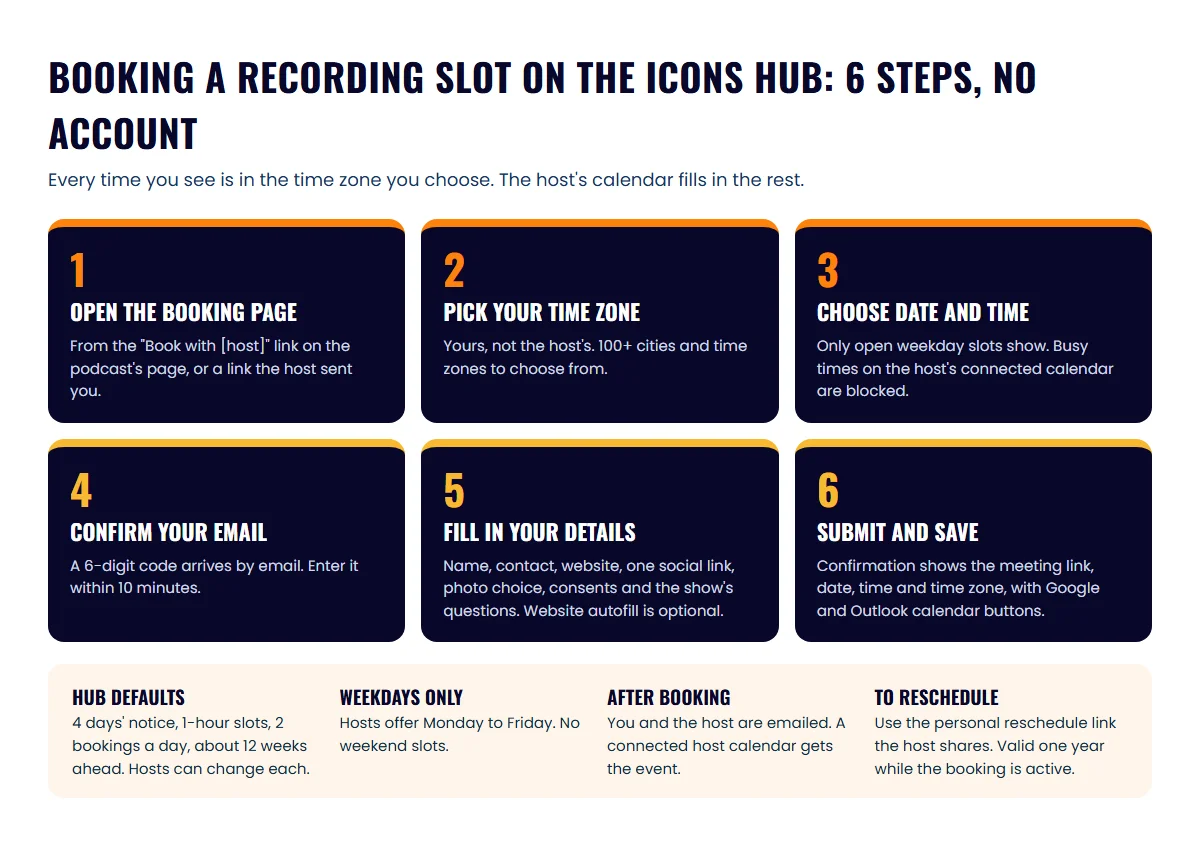
Booking a recording slot takes one sitting and ends with a confirmed date, a meeting link and calendar buttons. The whole process:
- Open the booking page from the podcast’s “Book with [host]” link or the link the host shared. If the show has more than one host taking bookings, pick the one you want to record with.
- Choose your time zone. The page lists well over a hundred cities and time zones. Pick yours, not the host’s. Every time you see from this point on is in your local time.
- Pick a date and a time. Only open slots appear, so you can’t double-book the host or land on a day they’ve blocked. Hosts offer weekdays only, Monday to Friday.
- Confirm your email. The Hub sends a 6-digit code to the address you enter. Type it in within 10 minutes.
- Fill in your guest details. Name, contact details, your website, at least one social link, a photo choice and the consents the show asks for. You also answer the show’s own questions, which the host uses to prepare the interview.
- Submit. The confirmation page shows the meeting link, the date, the time and the time zone, with “Add to Google Calendar” and “Add to Outlook Calendar” buttons.
Step 5 has a shortcut. Enter your website address and the page can suggest a bio, social links and answers to the show’s questions. You get one autofill per podcast per visit, and everything it suggests is editable. Read every line before you submit, because the host sees exactly what you leave in. Keep a bio of your own ready as a check; the podcast guest bio examples for agents will get you there in ten minutes.
For the photo, you have three options: attach one now, send one later, or let the host use a photo from your social media. Attach one now if you can. It’s one less thing the host has to chase.
Before you start, have these ready:
- A current headshot (you can also send it later)
- Your website address and at least one social profile link
- A short bio you’ve checked, in case the autofill misses
- Two or three sentences on what you’d talk about, for the show’s questions
- Your calendar open, so you don’t book over a closing
Which times can you book?
You can book any open weekday slot the host shows, in your own time zone, within that host’s booking rules. Every host sets their own rules, so the exact window differs from show to show. The table shows the Hub defaults, which each host can change.
| Setting | Hub default | Can the host change it? |
|---|---|---|
| Days offered | Monday to Friday | No, weekends are not offered |
| Minimum notice | 4 days | Yes |
| Slot length | 1 hour | Yes |
| Bookings a day | Up to 2 | Yes |
| How far ahead | About 12 weeks | Yes |
If the host has connected their Google or Outlook calendar, times when they’re already busy are blocked too. That’s why a slot you saw this morning can be gone by lunch. If the day you want isn’t there, book the nearest one and use the reschedule link later if a better slot opens.
Weekday-only matters if you planned to record on a Saturday between showings. Block a weekday morning instead. Most hosts record during working hours, and you’ll sound better when you’re not between appointments.
What happens after you submit the booking?
After you submit, the confirmation page shows your meeting link, date, time and time zone, and both you and the host get a confirmation email. If the host’s calendar is connected, the recording is added to their calendar automatically.
Use the calendar buttons straight away. Google Calendar shows events in your local time and, per Google’s own help page, appears in local time when you travel, so a recording booked from Denver still shows at the right hour if you’re in Phoenix that week. Either way, the meeting link travels with the event, so you’re not digging through email on the day.
Three things to do in the same sitting:
- Save the meeting link somewhere you’ll find it, in case the calendar invite goes missing.
- Set a reminder two days before to re-read the show’s recent episodes and your answers.
- Send the host your one-sheet if they asked for one. The podcast one-sheet template for agents covers what goes on it.
How do you reschedule a podcast recording?
Rescheduling uses a personal reschedule link that the host shares with you, which lets you or the host pick a new open slot. The link works while the booking is still active (Booked or Waiting to Reschedule) and stays valid for a year, so keep the email.
If you don’t have the link, email the host directly and ask for it. Give them two or three alternative weekday slots in the same message, in their time zone and yours, so it’s a one-reply fix. If you need to cancel outright, tell the host as early as you can; a slot released a week out can go to another guest.
How do you prepare once the slot is booked?
Preparation for a booked recording is the same as for any guest appearance: know the show, know your three talking points and know what you want listeners to do afterwards. Start with the questions hosts ask real estate agents and draft answers you can give in under a minute. It also helps to know the three questions every real estate host should ask, so you have an answer ready for each. Then decide your one call to action; a single, specific next step beats a list of every way to reach you.
If you’d rather have someone else handle the finding, pitching and scheduling across many shows, that’s what the done-for-you podcast guesting service is for, and the ICONS podcast network lists the real estate shows it works with. For a single show whose host takes bookings, though, the booking page is faster than any pitch. Open it, pick your slot, confirm your email and you’re on the calendar.
Frequently asked questions
Do I need an ICONS Hub account to book a recording?
No. A host's booking page works without an account; you confirm your email with a 6-digit code instead. You need an account only to bookmark shows, apply to podcasts or manage a guest profile.
Can I book a weekend recording?
No. Hosts on the Hub offer Monday to Friday only. Pick a weekday morning you can protect from showings.
Does the ICONS Hub record the interview?
No. The Hub handles the scheduling. The recording happens on the meeting link shown on your confirmation page, which the host provides.
What if the booking page says bookings are paused?
The host has paused bookings for a date range. Check back later, or send the host a short pitch by email and ask when they reopen.
Sources
- ICONS Hub: podcast directory — ICONS of Real Estate (accessed October 9, 2026)
- ICONS Hub: membership plans — ICONS of Real Estate (accessed October 9, 2026)
- Use Google Calendar in different time zones — Google Calendar Help (accessed October 9, 2026)
Podcast guesting for agents
Get booked on real estate podcasts
The ICONS Hub connects agents with real estate podcast hosts looking for expert guests.
Guest On The Network
Written by
Co-Founder and Podcast Guru, Icons of Real Estate
Tomás Fonseca co-founded Icons of Real Estate in 2021 and is its Podcast Guru. He has a background in marketing, with stints at companies like Nintendo and Ardor SEO, and is one of the hosts of the Icons of Real Estate Podcast.

How we research, write, fact-check and correct articles: our editorial standards.