On this page
- What goes on a podcast guest profile?
- What is the media kit on the ICONS Hub?
- How do you set up your guest profile, step by step?
- Which speaking topics and interview questions should an agent list?
- Which numbers and testimonials belong on a public page?
- Who sees your guest profile, and what can they do with it?
A real estate podcast guest profile on the ICONS Hub is a public speaker page that shows your photo, title, location, bio, speaking topics, suggested interview questions, stats, designations, testimonials, social links and podcast appearances, plus a media kit button that downloads the one-sheet PDF you upload. Hosts use it to judge fit before they say yes.
Think of the profile as the page you’d send a host instead of a long email. Hosts need guests every week and the audience is there: Edison Research’s Infinite Dial 2025 puts monthly podcast listening at 55% of Americans aged 12 and over. What follows is the member side of the Hub, the self-serve route in the agent’s podcast guesting playbook.
What goes on a podcast guest profile?
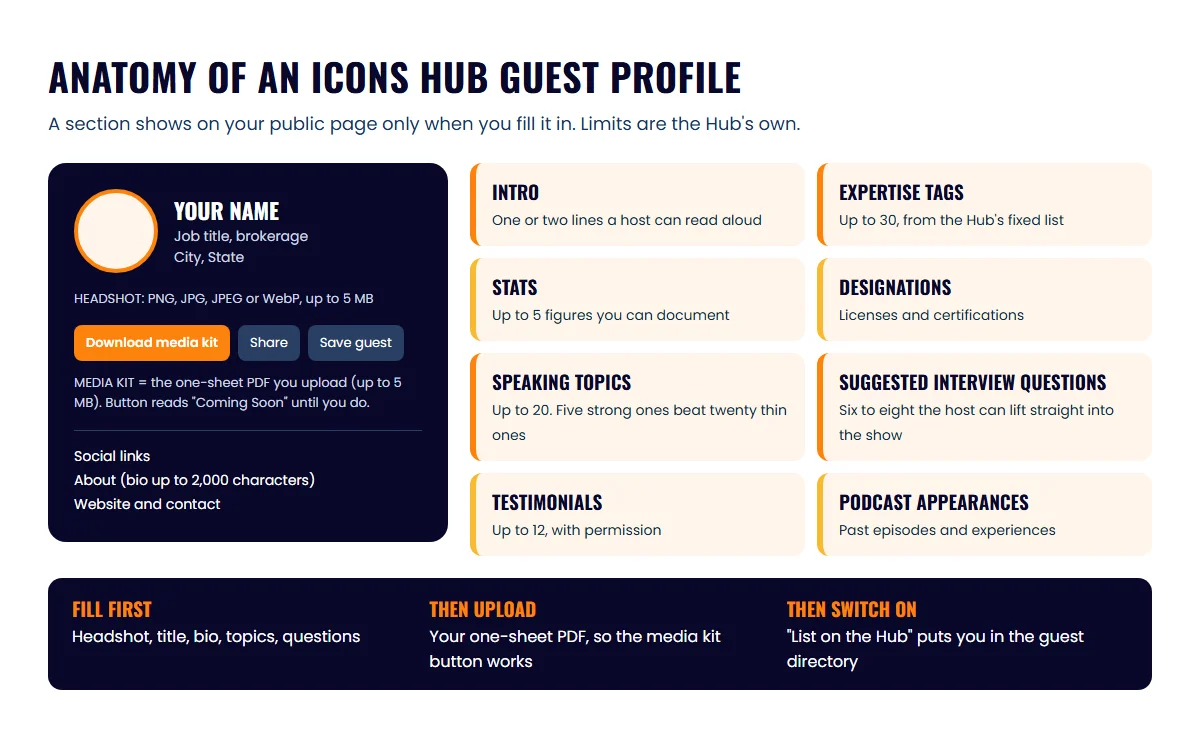
A guest profile has two layers: the basic details from the profile editor, and the showcase sections that make it read like a speaker page. The table lists every section, what to put there and the limit the Hub sets.
| Section | What to put there | Limit |
|---|---|---|
| Headshot | A current photo, shoulders up, plain background | PNG, JPG, JPEG or WebP, up to 5 MB |
| Name, job title, brokerage, location, website, contact | Exactly as they appear on your license and your listings | n/a |
| Biography | Who you serve, where, and what you’re known for | 2,000 characters |
| Intro | One or two lines a host could read aloud | n/a |
| Expertise tags | Chosen from the Hub’s fixed list | Up to 30 |
| Stats | Figures you can back up | Up to 5 |
| Speaking topics | The subjects you want to be interviewed on | Up to 20 |
| Suggested interview questions | Questions you’d like to be asked | n/a |
| Testimonials | Client or partner quotes you have permission to use | Up to 12 |
| Designations | Licenses and certifications | n/a |
| Experiences and links | Past appearances, social profiles | n/a |
| One-sheet (media kit) | Your one-page PDF | PDF, up to 5 MB |
A section appears on your public page only when you’ve filled it in, so an empty profile isn’t embarrassing; it’s just short. Fill the top rows first. Headshot, title, bio, topics and questions are what a host scans in the first thirty seconds.
What is the media kit on the ICONS Hub?
The media kit on your Hub profile is the one-sheet PDF you upload yourself; the “Download Media Kit” button hands that file to anyone who visits your page. Until you upload a one-sheet, the button reads “Coming Soon”, so uploading one is the biggest single upgrade you can make to the page.
One sentence to avoid a mix-up: the Hub media kit is your own uploaded one-sheet, and it is not the paid Guest Promotional Kit, which is a separate promotion package for guests who appear on the ICONS of Real Estate podcast. The Hub doesn’t design the PDF for you; you build it, or have it built, and upload it. What to put on a one-sheet, with a template and podcast guest bio examples for agents cover the writing.
Keep the PDF to one page and under the 5 MB limit. Export it at a modest resolution, since a host will open it on a phone between episodes, not print it.
How do you set up your guest profile, step by step?
Setting up a guest profile on the Hub is a sign-up wizard followed by an editing pass, and most agents can do it in one sitting if the bio and headshot are ready. The steps:
- Pick a plan and create your account. Free and paid plans exist; what each includes is on the plans page on the Hub. Paid plans check out through Stripe.
- Work through the sign-up wizard. It asks for personal details, professional details, experiences, location, social links, a photo and a one-sheet. You can skip the one-sheet and add it later.
- Finish the onboarding checklist. For guests this is mainly completing the profile. Applying to podcasts needs it done.
- Open the showcase editor and add your intro, expertise tags, stats, speaking topics, testimonials, designations, interview questions, experiences and links.
- Upload your headshot and one-sheet if you skipped them earlier.
- Switch “List on the Hub” on. Your page then appears in the guest directory. You control this and can take the page private again at any time.
If ICONS already created a profile for you, perhaps because you’ve appeared on a network show, don’t make a second one. Request a claim link from your guest page. It goes to the email on file and is valid for 24 hours. If that address is wrong, you can request a change, which the ICONS team reviews.
Which speaking topics and interview questions should an agent list?
List topics you can talk about for twenty minutes without notes, phrased the way a listener would search for them rather than the way a brochure would. “What first-time buyers get wrong about pre-approval” beats “Buyer representation”. Five strong topics are better than twenty thin ones, even though the Hub allows twenty.
Suggested interview questions do a job most guests underrate: they tell a busy host what the episode is, so the host doesn’t have to invent it. Write six to eight. Lead with the question whose answer makes you sound most useful, and include one the host wouldn’t think to ask. The podcast topic ideas for realtors and the questions hosts actually ask agents are good places to mine.
Which numbers and testimonials belong on a public page?
Put on your public page only numbers you can document and quotes you have written permission to use. Treat the speaker page the way your brokerage treats your website: your brokerage name where it’s required, no claims you can’t back up, and nothing that describes a neighborhood by who lives there. Read your brokerage’s advertising policy before you publish, and ask your broker if anything feels close to the line.
For the stats row, sales volume and years licensed are safe if accurate. Top-producer rankings need the source and the period, which a stats row has no room for; leave them for the one-sheet, where you can footnote. Testimonials should name the client only if they’ve agreed, and a first name plus a role (“seller, 2025”) is usually enough. If you don’t have client quotes yet, real estate testimonial software can collect them after each closing.
Before you set the page to public, run this check:
- Headshot is recent and shows your face clearly
- Name, title and brokerage match your license
- Bio says who you serve and where, in the first two sentences
- Every stat has a document behind it
- Every testimonial has permission
- Topics and questions read like a listener, not a brochure
- One-sheet PDF is uploaded and under 5 MB
Who sees your guest profile, and what can they do with it?
Once listed, your profile appears in the Hub’s public guest directory, which anyone can browse without an account. Visitors can search the directory, open your page, share it, download your media kit and, if they’re logged in, save you to a shortlist. Hosts on the network use the directory to find guests, and other members use it to see who else is guesting. If you’ve built the page but don’t know which shows to aim at, the free podcast match is the no-cost next step.
The directory loads 24 guests at a time, so a complete profile with a clear title and a real headshot matters more than you’d think; it’s what makes someone open your page instead of the next one. Then the page does the rest. When a host says yes, the next step is usually a booking link or a scheduled recording, covered in how to book a recording with an ICONS host.
If you’d rather have the profile optimized and the one-sheet built for you, the podcast guesting service includes both. For everyone else: one sitting, one headshot, one PDF, and your speaker page is live.
Frequently asked questions
Is my guest profile public as soon as I sign up?
No. Your page appears in the guest directory only after you switch List on the Hub on. You can switch it off again whenever you like.
What if I don't have a one-sheet yet?
Your profile still works. The media kit button simply reads Coming Soon until you upload a PDF, so add the one-sheet when it's ready.
What file types does the ICONS Hub accept?
A headshot as PNG, JPG, JPEG or WebP up to 5 MB, and a one-sheet as a PDF up to 5 MB.
ICONS already made a profile for me. Do I start a new one?
No. Request a claim link from your guest page; it goes to the email on file and is valid for 24 hours. If that email is wrong, request a change and the ICONS team reviews it.
Sources
- ICONS Hub: membership plans — ICONS of Real Estate (accessed October 9, 2026)
- The Infinite Dial 2025 — Edison Research (accessed October 9, 2026)
Podcast guesting for agents
Get booked on real estate podcasts
The ICONS Hub connects agents with real estate podcast hosts looking for expert guests.
Guest On The Network
Written by
Co-Founder and Podcast Guru, Icons of Real Estate
Tomás Fonseca co-founded Icons of Real Estate in 2021 and is its Podcast Guru. He has a background in marketing, with stints at companies like Nintendo and Ardor SEO, and is one of the hosts of the Icons of Real Estate Podcast.

How we research, write, fact-check and correct articles: our editorial standards.