On this page
- What do you need before you submit a podcast to Apple and Spotify?
- How do you submit your podcast to Apple Podcasts?
- How do you get your podcast on Spotify?
- How long does it take to show up on Apple Podcasts and Spotify?
- Which category should a real estate podcast choose?
- Why isn’t my podcast showing up on Apple or Spotify?
- Next step
To get your podcast on Apple Podcasts and Spotify, submit the RSS feed from your podcast host to each directory once. In Apple Podcasts Connect you choose “Add a show with an RSS feed”; in Spotify for Creators you choose “Find an existing show” and paste the code Spotify emails to your feed address. New episodes appear on their own.
The whole job takes about 20 minutes if the feed is ready, and an afternoon of back-and-forth if it isn’t. Most problems happen before you ever open Apple or Spotify: artwork the wrong size, a missing field, or a feed email that belongs to someone else. So check the feed first, then submit. No host yet? Start with the podcast hosting guide for real estate agents and come back once your feed exists.
What do you need before you submit a podcast to Apple and Spotify?
Before you submit a podcast to Apple Podcasts or Spotify, you need a public RSS feed with square cover art, the required show fields, an email address you control and at least one published episode. Each directory checks the same feed, so one clean feed passes both.
Here is the pre-flight list. Every item comes from Apple’s or Spotify’s own support pages, checked on October 9, 2026.
- Cover art is square, 1400 x 1400 to 3000 x 3000 pixels, PNG or JPG. Apple’s Show Cover specifications give that range for art delivered by RSS, prefer 3000 x 3000, and say the file can’t contain transparency or an alpha channel. Apple also warns that art showing Apple logos or hardware may be rejected. Spotify’s delivery specification asks for a 1:1 image at the highest resolution you have, in TIFF, PNG or JPEG. A 3000-pixel square PNG satisfies both.
- The required show fields are filled in. Apple’s validation page lists the tags it checks for: title, description, language, an explicit setting and a category. Spotify’s spec marks the show title and the author name as mandatory, and its error guidance names cover art, title, description and email as the fields most often missing.
- The feed email is one you read. Spotify sends its verification code to the email address inside your RSS feed. That address is visible to anyone who opens the feed, so use a work address.
- Every episode has a permanent ID and an enclosure. Apple requires a GUID that never changes and an enclosure tag with the file URL, length and type. Spotify requires a GUID and a publish date on every episode as well. Your host writes these for you; the point is never to edit them by hand later.
- Audio is MP3. Spotify recommends MP3 at 128 kbps or higher, the only format it passes through unchanged, or MP4 with AAC-LC. Apple’s validation checks that episode media files exist and load.
- One episode is published, even if it’s a 90-second trailer. Apple says your show “will not be available on Apple Podcasts until an episode is added and published.” Submit with a trailer a week or two before launch so review happens before launch day.
- The feed is public and the server answers HEAD and byte-range requests. Apple checks both. Your host handles this, but a password-protected feed will fail.
- Your broker has approved the name, art and description. Both directories treat these as the show’s identity, and changing them later means new approvals everywhere. The broker approval checklist for podcasts covers what to send.
Most hosts have a feed checker or a “validate” button. ICONS Podcast Hosting, for example, checks cover art against Apple’s rules, runs a feed health check that lists what to fix before you submit, and keeps a submission checklist for eight directories, including Apple Podcasts, Spotify and YouTube; you still submit on each directory’s own site. Whatever host you use, run its check, then also run the feed through Apple’s validation in Podcasts Connect. Apple calls that step strictly technical and adds that “passing validation doesn’t necessarily mean your podcast will be approved.”
The table below puts the two directories’ requirements side by side so you can check the feed once.
| Requirement | Apple Podcasts | Spotify |
|---|---|---|
| Cover art | Square, 1400 to 3000 px via RSS, 3000 preferred; PNG or JPG; no transparency | Square (1:1), highest resolution available; TIFF, PNG or JPEG |
| Required show text | Title, description, language, explicit tag, category | Title and author mandatory; description and cover art flagged if missing |
| Per episode | Enclosure (URL, length, type) and a GUID that never changes | GUID, publish date and an episode file (enclosure) |
| Audio | Media file must load; HEAD and byte-range requests enabled | MP3 at 128 kbps or more recommended; up to 12 hours per episode |
| Ownership check | Sign in with your Apple Account; Apple reviews the content | 8-digit code sent to the email in the feed |
| Review | Technical validation, then a content review; email when status changes | No review step described; the code confirms you own the feed |
How do you submit your podcast to Apple Podcasts?
You submit a podcast to Apple Podcasts in Apple Podcasts Connect by adding a show with an RSS feed, letting Apple validate the feed, completing the show pages and publishing it for review. Apple’s guide to submitting a show sets out the sequence:
- Sign in to Apple Podcasts Connect with the Apple Account you want to own the listing. That login controls the show from now on, so use yours rather than a producer’s.
- Click Add (+) and choose “Add a show with an RSS feed.”
- Paste your RSS feed URL and decide whether to restrict who in your account can see it. Apple validates the feed here; a warning means something must be fixed before you can continue.
- Check the Show Information page. Title, description, art and category are pulled from the feed, so fix them at your host rather than in Connect.
- Set content rights. You confirm you have permission for any third-party material, which includes intro music and guest clips.
- Add contact details so Apple can reach you about the show.
- Set availability: countries and regions, distribution settings, transcript preferences and the release timing.
- Save and publish. Your show is now in review.
Apple says shows must pass technical validation and a review against its content guidelines before they appear, and that it emails you when the status changes. Two statuses are the ones you want: “Ready for Release” (approved, waiting for your release date) and “Show Published,” which means the show is live as long as at least one episode is published. “Removed (Issue Found)” means fix the problem and resubmit.
How do you get your podcast on Spotify?
You get a podcast on Spotify by claiming the RSS feed in Spotify for Creators and pasting the 8-digit code Spotify emails to the address in that feed. Spotify’s claiming guide lists the steps:
- Go to creators.spotify.com and log in with any Spotify account. Use an account in your name, for the same reason as Apple.
- Select “Find an existing show,” then “Somewhere else.” If you already manage a show there, open the menu under your avatar and choose “Add a new show” first.
- Enter your podcast’s RSS feed URL.
- Open the email sent to your feed address, copy the 8-digit code and paste it into the form.
Step 4 is the one that trips up agents who hired help. The code goes to whichever email the host wrote into the feed. If that’s your producer’s or an old assistant’s address, they get the code. Spotify’s guidance says the feed email is used “to verify that you’re the owner of your podcast,” and that a change made at your host can take up to 4 hours for Spotify to recognize. So change the email at the host, wait, then claim.
Many hosts offer a one-click Spotify submission from their dashboard. That’s fine to use. Just make sure the Spotify for Creators login that ends up owning the show is yours.
How long does it take to show up on Apple Podcasts and Spotify?
Neither Apple nor Spotify publishes a fixed review time on the support pages we checked, so plan for days rather than hours and submit before launch day. Apple says it emails you when your show’s status changes, and you can watch the status in Podcasts Connect. The weeks around launch day are mapped in a 90-day podcast launch plan.
After approval, the rhythm is predictable. Apple’s troubleshooting page says to investigate if a new episode hasn’t appeared within 24 hours of publishing it to your feed. Spotify’s cover-art guidance says artwork changes typically take 24 hours to show. Treat “about a day” as normal lag for both. Don’t republish an episode to hurry it along; that creates duplicates.
The figure below shows the whole sequence, from host to both directories to the weekly publishing loop.
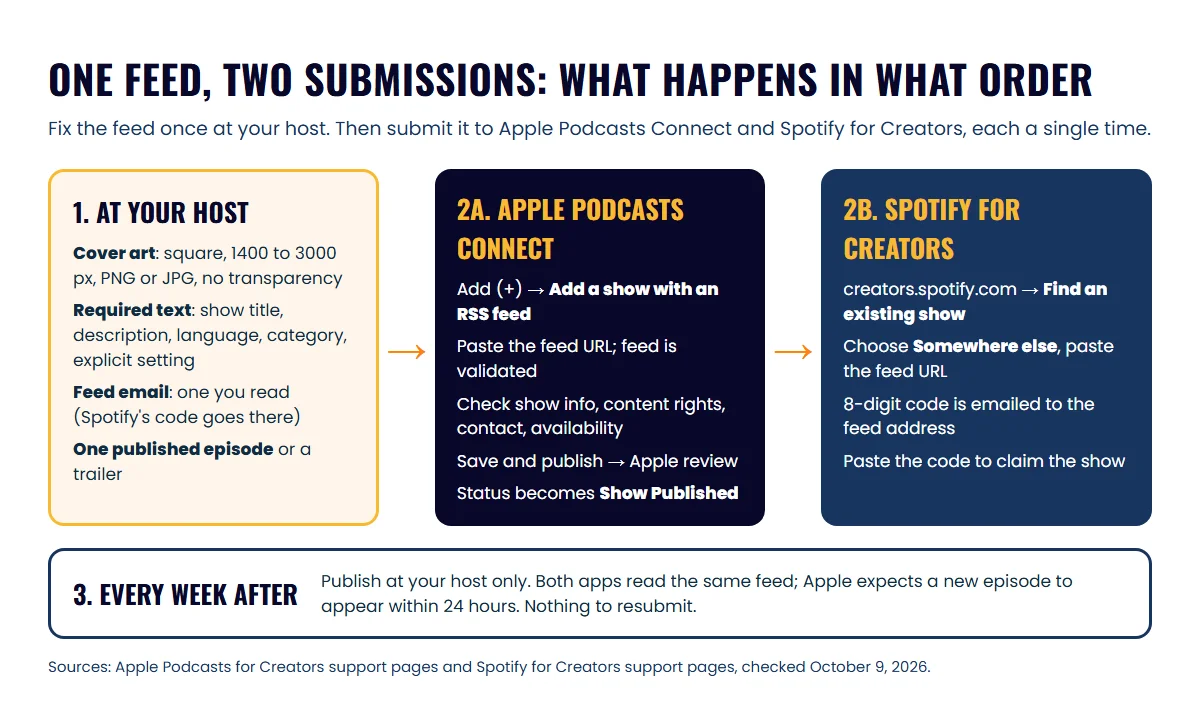
The table below is a practical calendar for a new show, counting back from launch day.
| When | What to do |
|---|---|
| Three weeks out | Art and name approved by your broker, feed built at the host, trailer recorded |
| Two weeks out | Trailer published; submit to Apple and claim on Spotify the same day |
| One week out | Confirm “Show Published” in Apple and a live Spotify page; add both links to your website and email signature |
| Launch day | Publish episode one at the host; nothing to resubmit |
For the rest of the launch tasks around those dates, use the podcast launch checklist for realtors.
Which category should a real estate podcast choose?
Choose Business as your primary category, add a subcategory that matches the show, and keep the same choice on both directories. Apple lets you pick up to two categories, primary and secondary, each with an optional subcategory, and says the primary one decides where the show appears in category pages, charts and recommendations.
Apple’s Business subcategories are Careers, Entrepreneurship, Investing, Management, Marketing and Non-Profit. Education offers Courses, How To, Language Learning and Self-Improvement. Spotify reads the same category tag from your feed, and its spec notes that the category matters for recommendations.
Match the category to the listener rather than to yourself:
| Show type | Primary category | Secondary | Why |
|---|---|---|---|
| Local market and lifestyle for buyers and sellers | Business | Education: How To | Listeners are consumers researching a move; How To fits question-led episodes |
| Investor-focused show | Business: Investing | Education | Investing is the closest subcategory to the content |
| Agent-to-agent or team recruiting show | Business: Careers | Business: Entrepreneurship | The audience is other agents choosing a brokerage or a path |
| Local business interviews | Business: Entrepreneurship | Society & Culture | Guests are owners; the secondary catches local-interest listeners |
Spotify’s spec also warns that consumer-facing text other than descriptions “should not exceed 20 characters to ensure a good fit in all Spotify clients,” with longer text cut off on small screens. Keep the show name short and put the town and brokerage in the description.
Why isn’t my podcast showing up on Apple or Spotify?
A podcast that doesn’t show up usually has an unpublished status, a future release date, a feed problem or a verification email that went to someone else. Work through the table below before contacting support.
| What you see | Likely cause | What to do |
|---|---|---|
| Apple validation warning on the feed URL | Missing required tag, bad XML declaration, or an unescaped ”&” in a category | Fix at your host; Apple’s validation page lists the exact messages |
| Apple shows “Draft” and nothing happens | You didn’t finish and publish the submission | Complete the show pages and click publish |
| Approved, but not in the app | No published episode, a release date in the future, or a missing country clearance | Publish an episode, then check the release date and availability settings |
| Spotify code never arrives | Feed email is someone else’s, or the host hasn’t written one into the feed | Change the feed email at the host, wait a few hours, resubmit |
| Spotify error about missing elements | Cover art, title, description or email absent from the feed | Add them at the host; Spotify tells you to contact your hosting platform if you can’t |
| New episode missing after a day | Feed didn’t update, or the episode is still scheduled at the host | Open the feed URL in a browser and confirm the episode is in it |
| Show appears under someone else’s name | A producer’s Apple Account or Spotify login was used | Ask them to transfer or add you; put future accounts in your name |
If the feed looks right and the show still doesn’t appear, Apple’s troubleshooting page and Spotify’s “missing elements” guidance are the two pages support will ask you to check first, so read them before you write in.
Next step
Open your feed URL in a browser right now and check four things: square art, a show description, your email and at least one episode. Then submit to Apple and claim on Spotify the same afternoon. Once both are live, give listeners somewhere to go: the YouTube or Spotify routine for a realtor podcast covers what to post each week, and the embed guide for agent websites puts the episode on your own site. Download numbers start arriving within days, and how podcast downloads are counted explains what they mean. Prefer to hand the setup off? The Launchpad package in Icons’ done-for-you podcast production includes cover art and RSS syndication setup.
Frequently asked questions
Do I have to resubmit every new episode?
No. Both directories re-read your RSS feed on their own. Publish at your host and the episode appears in the apps; Apple says to look into it only if a new episode hasn't shown up within 24 hours.
Can my producer submit the show for me?
Yes, as long as the Apple Account and the Spotify login belong to you and the producer works inside them. Whoever holds those logins controls the listing, and the Spotify code goes to whoever's email sits in the feed.
Can I change my cover art after the show is live?
Yes. Change it at your host and both directories pick it up from the feed; Spotify says artwork changes typically take 24 hours to appear. Keep the new art inside Apple's size and format rules, or the feed may fail validation.
What happens if Apple rejects my show?
Apple emails you when the status changes. Its review page says to follow the content guidelines and artwork requirements, correct the issue and resubmit in Apple Podcasts Connect.
Sources
- Submit a show — Apple Podcasts for Creators (accessed October 9, 2026)
- Validate your podcast RSS feed — Apple Podcasts for Creators (accessed October 9, 2026)
- Show Cover template and specifications — Apple Podcasts for Creators (accessed October 9, 2026)
- Podcast RSS feed requirements — Apple Podcasts for Creators (accessed October 9, 2026)
- Apple Podcasts categories — Apple Podcasts for Creators (accessed October 9, 2026)
- Review process — Apple Podcasts for Creators (accessed October 9, 2026)
- Statuses in Apple Podcasts Connect — Apple Podcasts for Creators (accessed October 9, 2026)
- Troubleshoot podcast availability — Apple Podcasts for Creators (accessed October 9, 2026)
- Claiming your podcast on Spotify for Creators — Spotify for Creators Support (accessed October 9, 2026)
- Adding your email address to your RSS feed — Spotify for Creators Support (accessed October 9, 2026)
- Missing elements in RSS feed — Spotify for Creators Support (accessed October 9, 2026)
- Uploading cover art — Spotify for Creators Support (accessed October 9, 2026)
- Podcast Delivery Specification v1.10 — Spotify for Providers (accessed October 9, 2026)
Done-for-you podcast production
Want a podcast that brings in referrals, not just downloads?
Icons of Real Estate plans, produces and publishes business-growing podcasts for agents. You record. We handle the rest.
Launch Your Podcast
Written by
Co-Founder and Podcast Guru, Icons of Real Estate
Tomás Fonseca co-founded Icons of Real Estate in 2021 and is its Podcast Guru. He has a background in marketing, with stints at companies like Nintendo and Ardor SEO, and is one of the hosts of the Icons of Real Estate Podcast.

How we research, write, fact-check and correct articles: our editorial standards.