On this page
- What do you need before you embed a podcast on your website?
- Where do you paste embed code on common agent and IDX platforms?
- How do you embed a podcast on a real estate website, step by step?
- What should a podcast episode page on a realtor website include?
- What do you do when your website blocks the podcast player?
- Do you need a separate website for your podcast?
- Next step
To embed a podcast on a real estate website, copy the episode’s embed code from your podcast host or YouTube, open a page in your agent or IDX website editor, and paste the code into its HTML, source code or custom HTML area. If the platform strips the player, use its built-in YouTube video block or link out instead.
The steps are the easy part. Most agent websites run on IDX platforms with their own editors, and each one hides the paste-code option somewhere different. Some quietly delete players on save. Why episode pages matter at all, and how the feed and host fit together, is covered in podcast hosting for real estate agents.
What do you need before you embed a podcast on your website?
Before you embed a podcast, you need three things: a published episode on a host or YouTube, its embed code, and edit access to a page on your website. Gather them first so you aren’t hunting mid-edit.
Embed code is a short block of HTML that tells your page to load a player from another site. Your podcast host generates one for each episode and usually one for the whole show. YouTube gives you one for every video: on a computer, click Share, then Embed, and copy the code, as YouTube’s embed help page describes.
The table below shows the kinds of code you’ll run into and where each one fits on an agent site.
| Code type | What it looks like | Best use on an agent site |
|---|---|---|
| Script embed | Starts with <script or a <div> plus a script | Your host’s default player; works on most open editors |
| iframe embed | Starts with <iframe | Fallback when a site strips scripts; also what YouTube gives you |
| Video URL | A plain YouTube or Vimeo link | Built-in video blocks that don’t accept pasted code |
| Full-show player | Any of the above, for the whole feed | A “Podcast” index page, not individual episode pages |
Use the single-episode player on episode pages. A full-show player always starts with the newest episode, so an older page about closing costs would end up playing last week’s interview.
Where do you paste embed code on common agent and IDX platforms?
Embed code goes in a different spot on each agent and IDX platform, and some platforms limit it by template or user role. The table below summarizes what each platform’s own help documentation says, checked on October 6, 2026.
| Platform | Where to paste it | What the official help notes |
|---|---|---|
| Real Geeks | Content Editor, then the Source Code button (<>) | Works anywhere the editor appears: home, content and area pages, blog posts, sidebar and footer boxes |
| BoldTrail (kvCORE) | Web & IDX, then Website Management, then Pages; use the Video block or Custom HTML block | Video block takes a YouTube or Vimeo URL; custom HTML may affect how the page adjusts to screen size |
| Sierra Interactive | Content, then Content Pages; video icon or HTML source editor icon | Video icon takes a YouTube URL; the HTML source editor takes pasted embed code |
| Luxury Presence | Add a Custom Content section to the page | Support varies by template; raw HTML only on select templates; desktop only, not the mobile app |
| WordPress-based agent sites | Custom HTML block (type /html in the editor) | Users without the unfiltered_html capability have <script> and <iframe> stripped on save |
Platforms change their editors often. If your screen doesn’t match, search your platform’s help center for “embed code” or “custom HTML” before you contact support.
Real Geeks
Real Geeks’ help page on adding code walks through it: open the page, click the Source Code button (<>) in the Content Editor, paste the embed code exactly where you want the player, click OK, then Save. The same page asks you to use code only from trusted platforms that allow website embedding.
BoldTrail (kvCORE)
BoldTrail builds custom pages in its Page Editor, under Web & IDX, then Website Management, then Pages. According to BoldTrail’s Page Editor guide, you drag in a Video block and add a YouTube or Vimeo URL. For an audio player, use the Custom HTML block, and preview the page on a phone, because the guide warns custom code can affect responsiveness.
Sierra Interactive
Sierra Interactive gives you two routes on a content page. Paste a YouTube URL through the video icon in the editor toolbar, or paste embed code through the HTML source editor icon, then click Update and Save. Sierra’s help center also recommends YouTube or Vimeo over uploading video files directly, which can slow the page.
Luxury Presence
On Luxury Presence, add a Custom Content section to embed third-party content on most templates. Luxury Presence’s help article says support varies by template, raw HTML is available only on select templates, and the option works on desktop, not the mobile app. If you don’t see the section, your template doesn’t support it, and support can help.
WordPress-based agent sites
Many agent sites run on WordPress with an IDX plugin. Add a Custom HTML block, paste the code and update the page. One catch from the WordPress Custom HTML documentation: if your login lacks the unfiltered_html capability, such as a Contributor account, WordPress strips <script> and <iframe> tags when you save.
Other platforms
Other agent website builders usually call this an embed block, HTML widget or custom code section. Look for it inside the page editor, not in site-wide settings. Site-wide header and footer code boxes are meant for tracking scripts, and a player pasted there would load on every page.
How do you embed a podcast on a real estate website, step by step?
Embedding a podcast on a real estate website takes about ten minutes per episode once the page is set up. Follow the same order every time so nothing gets skipped.
- Publish the episode first. Your host’s embed code and the YouTube video both need to be live, or the player will show an error.
- Copy the single-episode code. Use your host’s episode page, not the show-level player. On YouTube, use Share, then Embed.
- Create a new page or blog post on your site with a question-style title and a clean URL, such as
/podcast/cost-to-sell-a-house-in-[town]/. - Paste the code in the platform’s HTML, source code, embed or custom HTML spot, near the top of the page.
- Add the written content from the template in the next section: summary, takeaways, guest box, transcript and one call to action.
- Save, publish and test logged out. Open the live page in a private browser window and on your phone. Editors sometimes show a player that the public page doesn’t.
- Press play. Confirm the right episode starts, the video isn’t cropped on mobile, and the page still loads your IDX search bar.
- Link the page everywhere. Add it to your podcast index page, your show notes and the links you send to clients.
Step 8 is where the page earns its keep. Make it the default link in every text to a seller or buyer; the YouTube-or-Spotify publishing routine shows how that fits into a normal week.
What should a podcast episode page on a realtor website include?
A podcast episode page on a realtor website should include the player, a written answer to the episode’s main question, a guest box, an edited transcript and one next step. The written parts do the search work; the player is for people who already arrived.
The template below is ready to copy into your editor’s HTML view. Replace the bracketed parts. The <details> tag makes the transcript collapsible on most sites without extra plugins.
How should you format the transcript?
Format the transcript with a bold speaker name and a timestamp at each change of speaker, and break long answers into short paragraphs. Fix street names, school names and guest names that the automatic transcript got wrong, and cut filler words and false starts.
Read the transcript for Fair Housing problems before it goes live. An offhand remark in audio becomes searchable text on your domain. Run it against the Fair Housing review checklist for podcasts, and ask your broker how the brokerage name has to appear on the page.
Where does the episode page fit in your content week?
The episode page is the hub that every clip, post and email points back to, and it’s one of the channels in a local audience growth plan for agent podcasts. A repurposing checklist for each episode maps those pieces. Want to know which pages actually produce leads? Tag the links you share and log the source with a CRM lead-source setup for podcast leads. For the referral side, see using a podcast to keep referrals coming.
What do you do when your website blocks the podcast player?
When your website blocks the podcast player, try the host’s iframe code, then the platform’s built-in YouTube video block, then a linked thumbnail. Keep the written content on your page whichever player option ends up working.
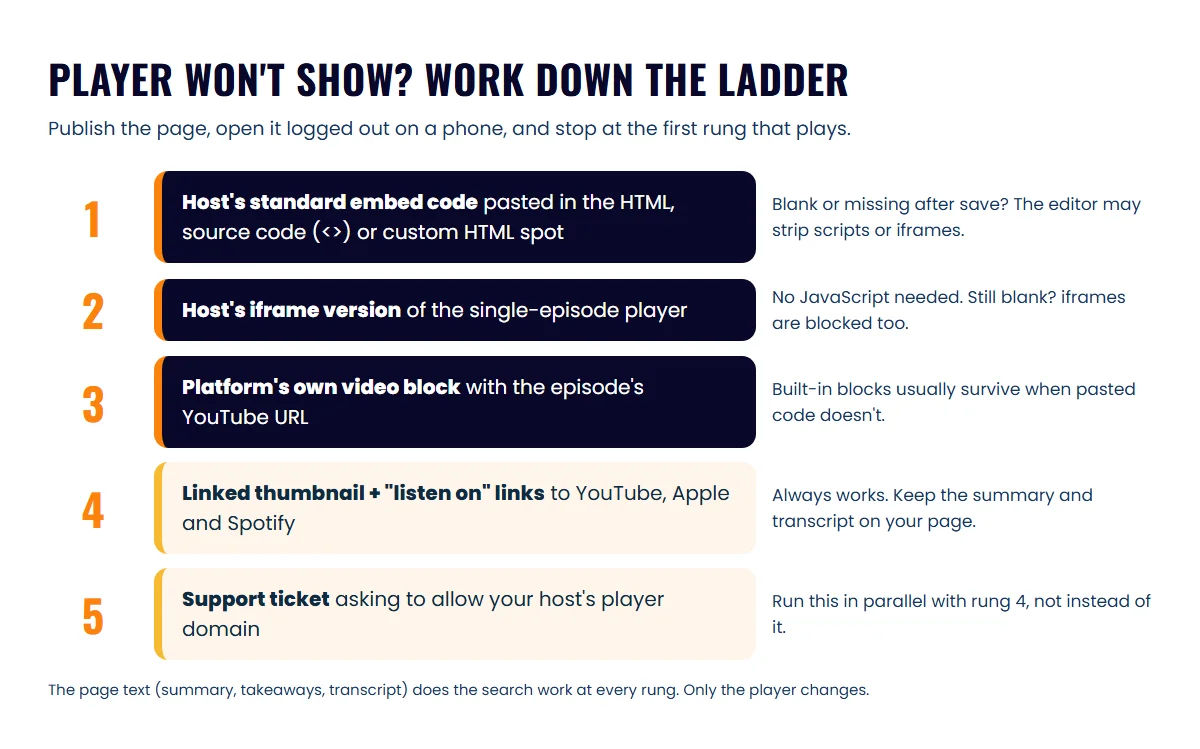
The table below matches the symptoms agents see most often to a likely cause and a fix.
| What you see | Likely cause | What to try |
|---|---|---|
| Player shows in the editor, blank on the live page | The editor removes scripts when saving | Use the host’s iframe code; Buzzsprout’s iFrame help calls this the fallback when standard codes clash with a site builder |
| Pasted code disappears entirely after saving | Your user role or template doesn’t allow raw HTML | On WordPress, ask the site admin to paste it; on template-based platforms, use a custom content or HTML section, or ask support |
| YouTube box says the video is unavailable | Embedding is turned off on that video | In YouTube Studio, open the video’s details, show more, and tick “Allow embedding” |
| Player overflows or squashes on phones | Fixed width and height in the pasted code | Use the platform’s video block, or set the width to 100% if the editor allows |
| Audio player is cut off at the bottom | iframe height doesn’t adjust to the player | Increase the height value; Buzzsprout notes its iframe height isn’t dynamic |
| Nothing works at all | The platform blocks outside players | Use a linked thumbnail plus “listen on” links, and open a support ticket |
A linked thumbnail is a screenshot of the episode’s video frame, saved as an image on your page and linked to the YouTube video. Below it, add plain text links to the episode on YouTube, Apple Podcasts and Spotify. Visitors leave your site to play it. That’s a small cost. The summary, transcript and call to action still sit on your domain and still do the work.
Support tickets need specifics. Name your podcast host, paste the embed code, and ask whether they can allow that host’s player domain on custom pages. A vague “my podcast won’t embed” request tends to bounce around.
Do you need a separate website for your podcast?
You don’t need a separate website for your podcast; put episode pages on your existing agent website. That keeps the search value, the leads and the IDX search on the domain you already promote and own. Episode pages also keep working long after a post fades, which is why podcast episodes outlast social media posts.
Many hosts include a built-in podcast website, and the hosting guide’s comparison table notes which ones list it. That site is a fine backup. It gives you a working link on day one, and it’s the natural “listen on” fallback when your own site blocks a player. But it sits on the host’s domain, so every page you build there adds search value to a site you’d leave behind if you switched hosts.
Two exceptions are worth considering:
- A team or brokerage show with several agents may justify its own domain, so the show isn’t tied to one agent who might leave.
- A site you can’t edit. If your brokerage-provided site allows no custom pages at all, the host’s website is better than nothing until you have a site of your own.
Next step
Build one episode page this week, using your most useful episode and the template above, and test it logged out on your phone. Once it works, save it as a draft to duplicate for every new episode. Prefer to hand it off? The Launchpad package in Icons’ done-for-you podcast production includes a podcast landing page on your website.
Frequently asked questions
Should I embed the YouTube video or the audio player?
If you film the show, embed the YouTube video at the top and the audio player under it. Visitors who want to watch can, and people who prefer to listen in the background still have a one-click option.
Can I put every episode on one podcast page instead?
Yes, as an index page with a full-show player, but link each episode to its own page. One long page can only rank for one topic, while separate episode pages can each answer a different local question.
Will an embedded player slow down my IDX site?
Each player loads extra files from another site, so keep each page to one video and one audio player. Avoid uploading video files straight to your site; host the video on YouTube and embed it.
Sources
- Add Custom Code to a Page on Your Real Geeks Website — Real Geeks Support (accessed October 6, 2026)
- [BoldTrail] Page Editor — Inside Real Estate Help Center (accessed October 6, 2026)
- Embed YouTube Videos on Content Pages via Embed Tool or HTML — Sierra Interactive Help Center (accessed October 6, 2026)
- Can I add custom HTML or embed code to my Presence website? — Luxury Presence Help (accessed October 6, 2026)
- Custom HTML block — WordPress Documentation (accessed October 6, 2026)
- Embed videos & playlists — YouTube Help (accessed October 6, 2026)
- iFrame Code Overview — Buzzsprout Help (accessed October 6, 2026)
Done-for-you podcast production
Want a podcast that brings in referrals, not just downloads?
Icons of Real Estate plans, produces and publishes business-growing podcasts for agents. You record. We handle the rest.
Launch Your Podcast
Written by
Co-Founder and Podcast Guru, Icons of Real Estate
Tomás Fonseca co-founded Icons of Real Estate in 2021 and is its Podcast Guru. He has a background in marketing, with stints at companies like Nintendo and Ardor SEO, and is one of the hosts of the Icons of Real Estate Podcast.

How we research, write, fact-check and correct articles: our editorial standards.