On this page
- Real Estate Agents: Why Learn How to Start a Podcast on Spotify?
- What You Need Before You Start (Fast Checklist)
- How to Start a Podcast on Spotify (Step-by-Step)
- How to Start a Podcast on Spotify for Free
- How Much to Start a Podcast on Spotify (Realistic Cost Ranges)
- How to Get Your Podcast RSS Feed From Spotify
- How to Get Podcast Video on Spotify
- How to See Podcast Views on Spotify (And What Spotify Actually Tracks)
- How to Get Podcast Transcripts on Spotify
- How to Get Your Podcast Featured on Spotify
- Realtor Growth Playbook (Make Spotify Your Referral Engine)
- Done-For-You Podcast Launch Options (For Busy Agents)
- Frequently Asked Questions
- Learn More and Get Started
Okay, real estate agents who want to use podcasting as a networking method – here’s how to start a podcast on Spotify.
This comprehensive guide walks you through everything you need to launch your real estate podcast on Spotify, including:
- Free setup options for video publishing
- Analytics tracking
- And proven growth strategies that turn listeners into leads.
Whether you want to learn how to start a podcast for free on Spotify or understand the investment required for a professional production, this guide provides the step-by-step framework you need to succeed.
Real estate agents who effectively leverage podcasting are positioning themselves as trusted authorities in their markets, and Spotify makes this more accessible than ever before.
Real Estate Agents: Why Learn How to Start a Podcast on Spotify?
Spotify is one of the top podcast publishers in the US through its free hosting service, “Spotify for Creators.”
It’s also just second only to YouTube with 26.0% weekly U.S. listeners, followed by Apple podcasts.
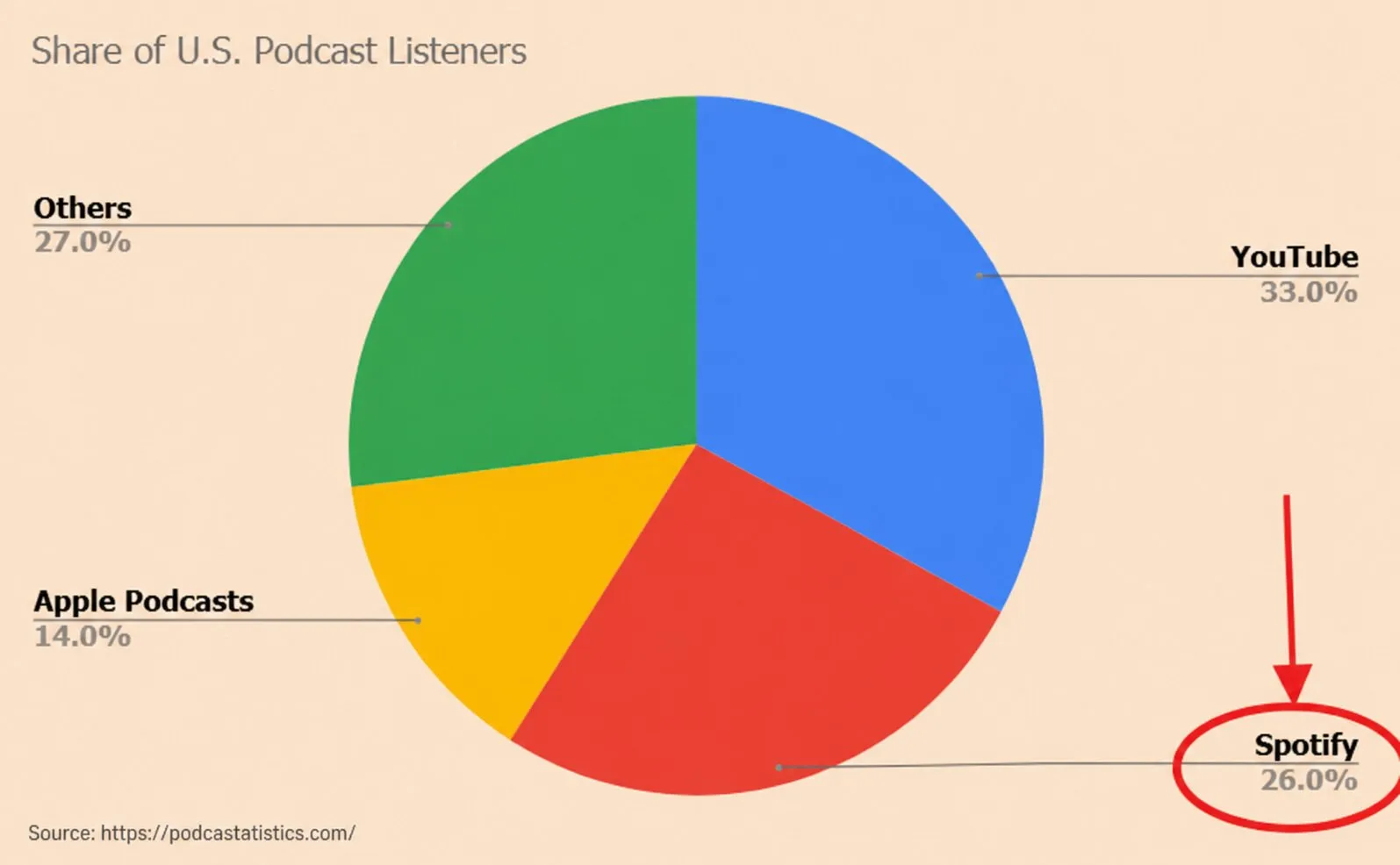
For real estate professionals, this means access to millions of potential listeners without significant upfront investment.
The platform’s discovery tools, follow functionality, and detailed analytics show you exactly who’s listening and how they’re engaging with your content.
Now, most realtors think podcasting is just another marketing channel.
But here’s what actually happens when you launch your podcast on Spotify.
Every episode becomes an opportunity.
You’re sharing your expertise, sure. But you’re doing it through actual conversations with guests and listeners who are already on the platform, already discovering new shows, already in the habit of following creators they connect with.
You’re not just talking into a microphone, hoping someone finds you on some obscure platform.
You’re on Spotify. Where people are already listening. Already discovering. Already engaging.
And those connections could turn into referrals. Partnerships. A network that actually supports your business. This has been the case for the real estate agents in our podcasting network.
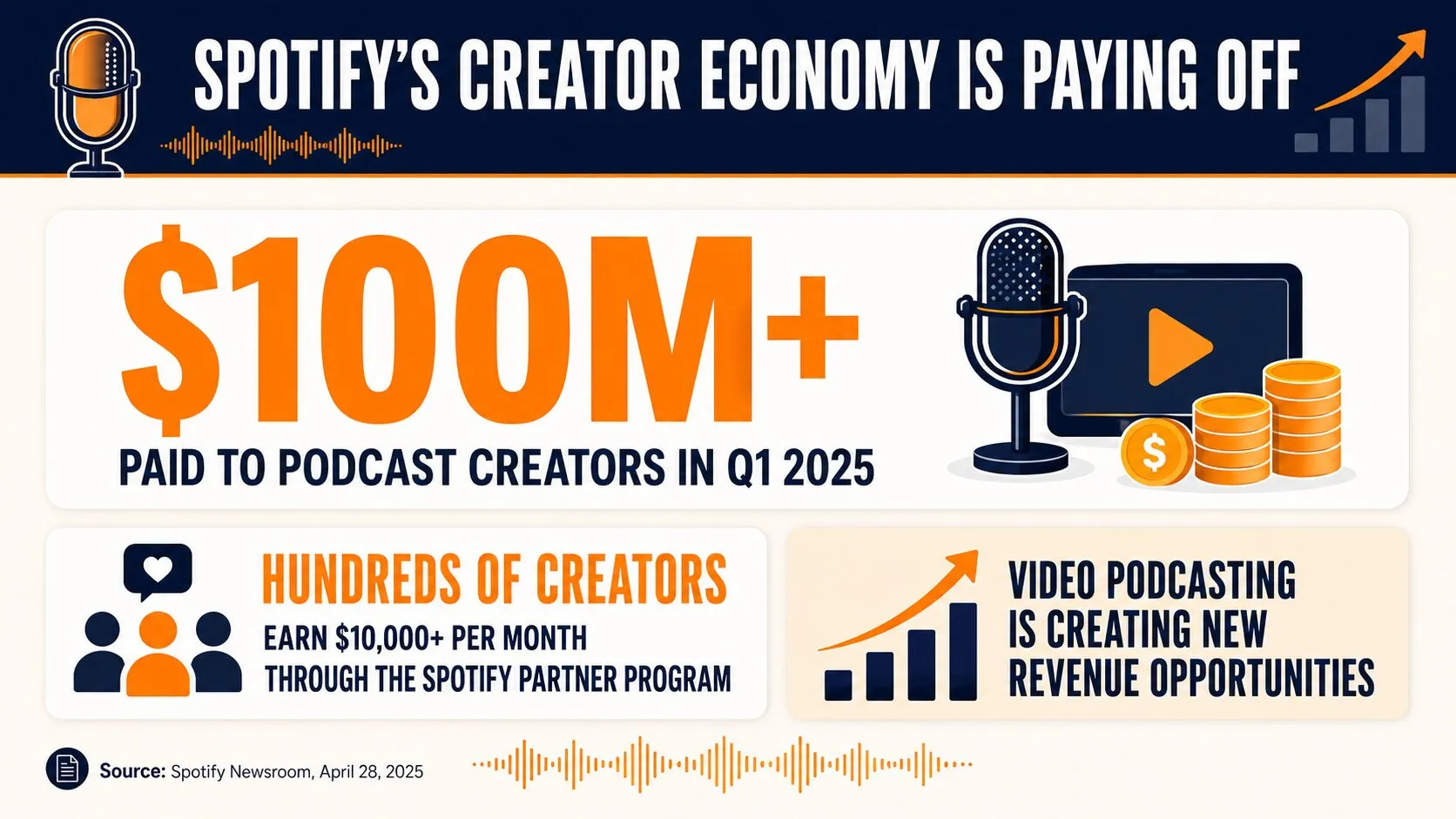
Spotify paid creators over $100 million in Q1 2025 alone. Hundreds of creators earn $10,000 or more monthly through the Partner Program.
While monetization may not be your primary goal as a real estate agent, these revenue opportunities demonstrate the platform’s commitment to your success and audience growth as a creator.
💡 Realtor Tip: Real estate podcasting is not just about putting content out there. It’s about getting on the right platforms. In the right format. Consistently. Whether you aim to publish on Spotify, Apple Podcasts, or YouTube, a structured approach ensures your episodes reach their full audience potential.
Want to turn your podcast into more than another content channel? Get the five-framework podcast playbook → Learn how to build stronger guest relationships, create reusable content, expand your visibility, and turn conversations into real estate opportunities.
What You Need Before You Start (Fast Checklist)
Before diving into Spotify for Creators, take time to establish your foundation. Framework 04: Launching starts with five decisions to make before you build anything: who the podcast is for, what it’s about, which format you’ll use, what you’ll call it, and how often you’ll publish. Use those decisions to guide the checklist below.
Here’s your essential pre-launch checklist:
1. Niche and Focus: Define your specific market angle.
For example:
- Luxury homes,
- First-time buyers
- Investment properties
- Local community focus
2. Show Name: Choose a memorable, searchable name that reflects your brand and expertise.
Here are sample names from our network:
- Oklahoma Real Estate Radio
- 239 Real Estate Roundtable
- The R.E.A.L. Moms Podcast
- Jacksonville and Beyond: Life and Real Estate
- Real Roots: Hawaii
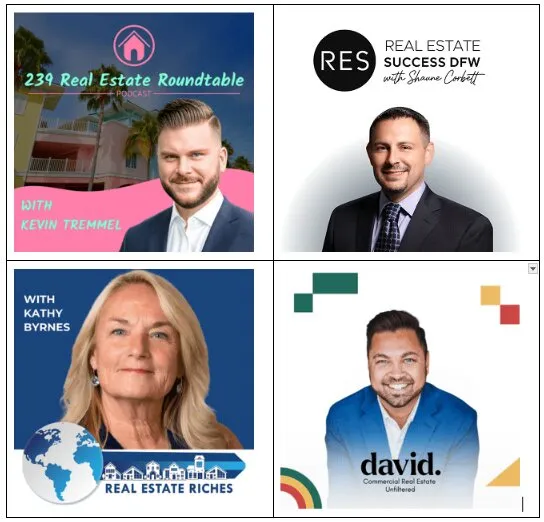
3. Cover Art: Square artwork (1400×1400 to 3000×3000 pixels) in JPEG or PNG format.
Here are some sample cover art from our Icons of Real Estate podcasting network. Most artwork includes vibrant colors, featuring the host, and the name of the podcast.
4. Intro/Outro: Professional audio branding that establishes your show’s identity.
Your intro is the first thing listeners hear; it should grab their attention and set clear expectations in just 15 to 30 seconds.
Intro elements:
| Element | Purpose |
|---|---|
| Captivating Hook | Bold statement, question, or teaser clip grabs attention. |
| Host/Show ID | States podcast name and introduces host for credibility. |
| Niche Value Prop | Explains show focus and target audience briefly. |
| Branded Music | Short clip sets the episode’s tone and mood. |
Outro Elements
| Element | Purpose |
|---|---|
| Episode Summary | Recaps key takeaways to reinforce value. |
| Call-to-Action | Directs listeners to subscribe, review, or visit site. |
| Genuine Gratitude | Thanks guest and audience to build community. |
| Final Wisdom | Guest shares last advice or contact info. |
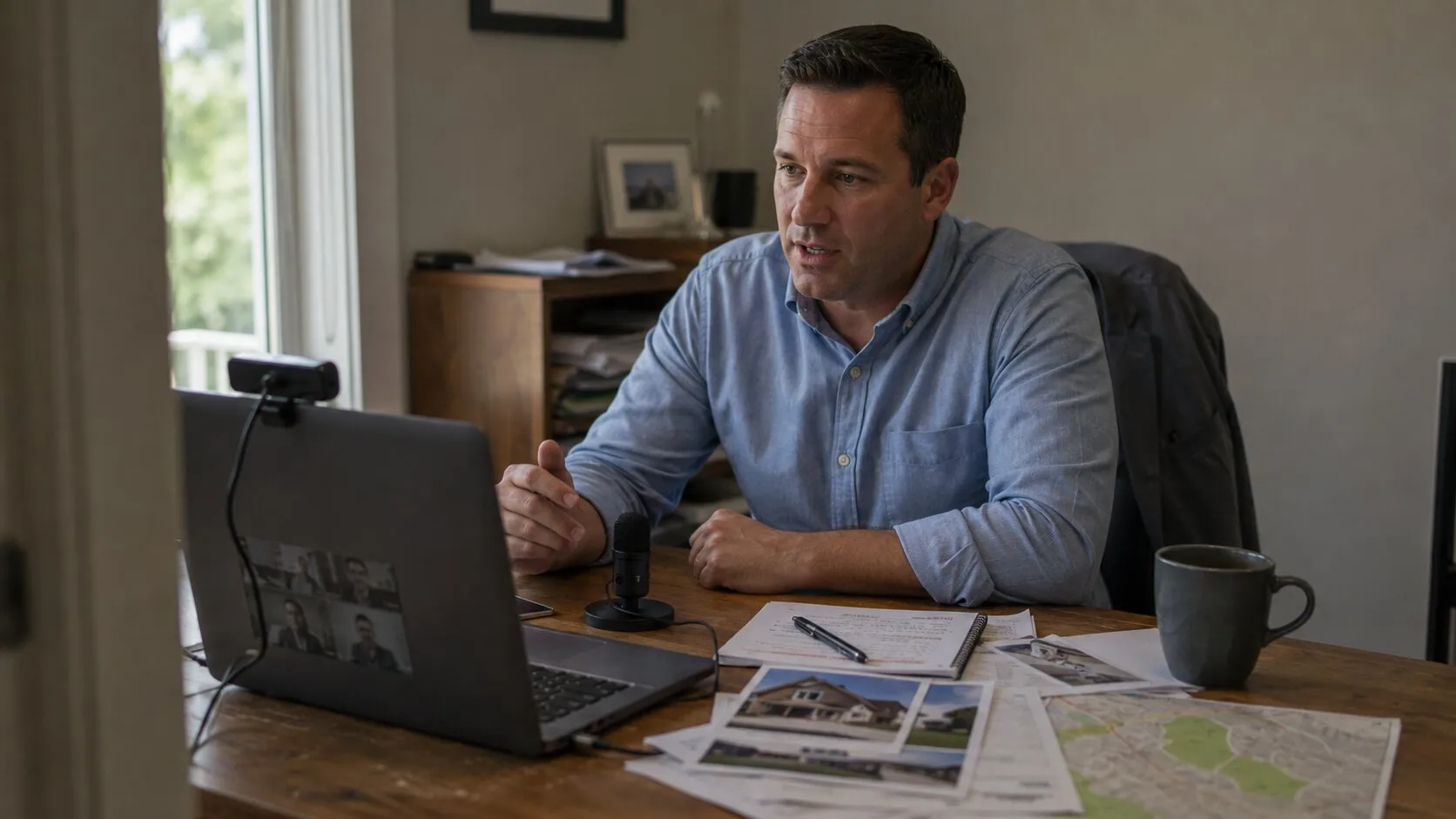
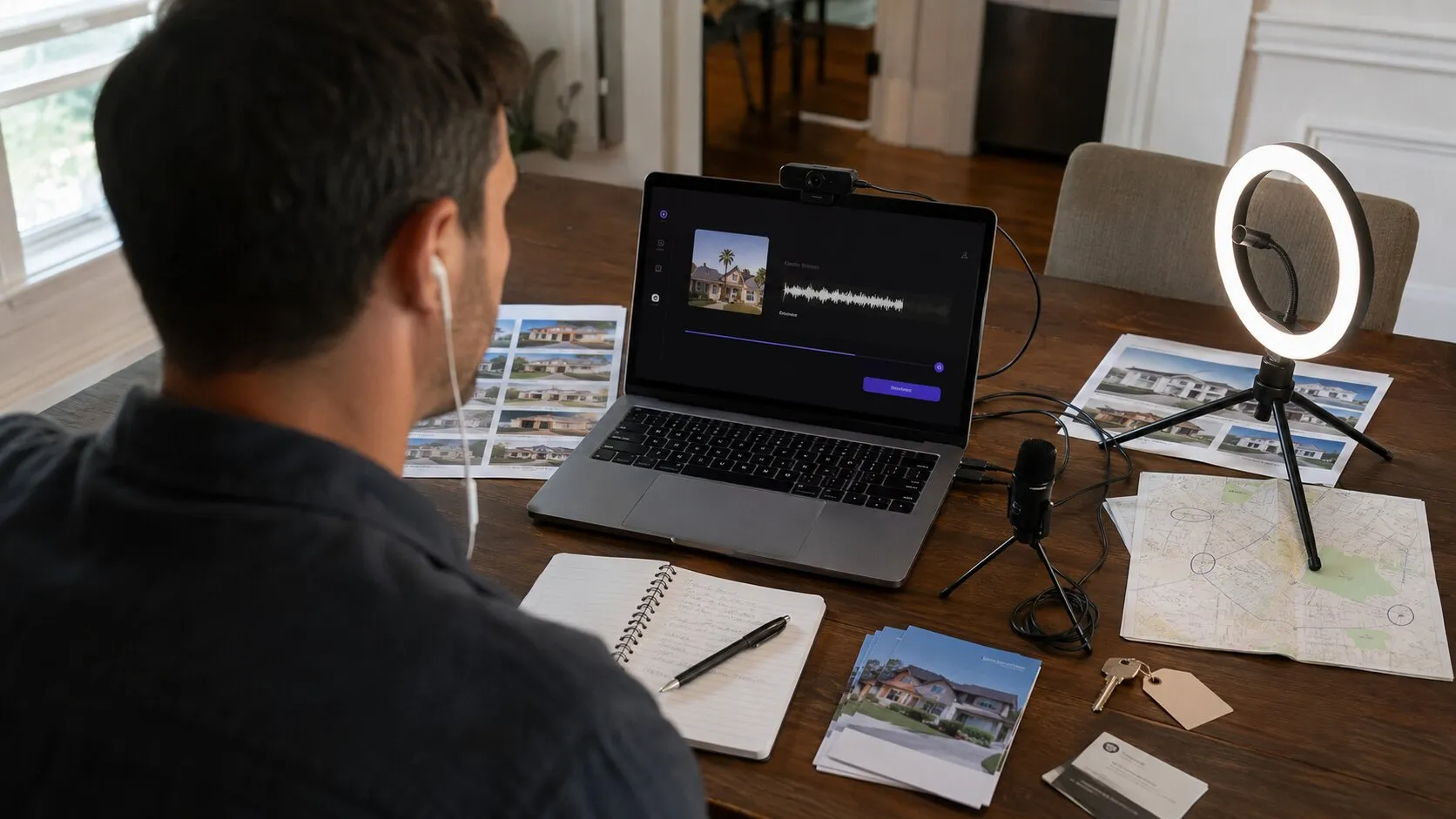
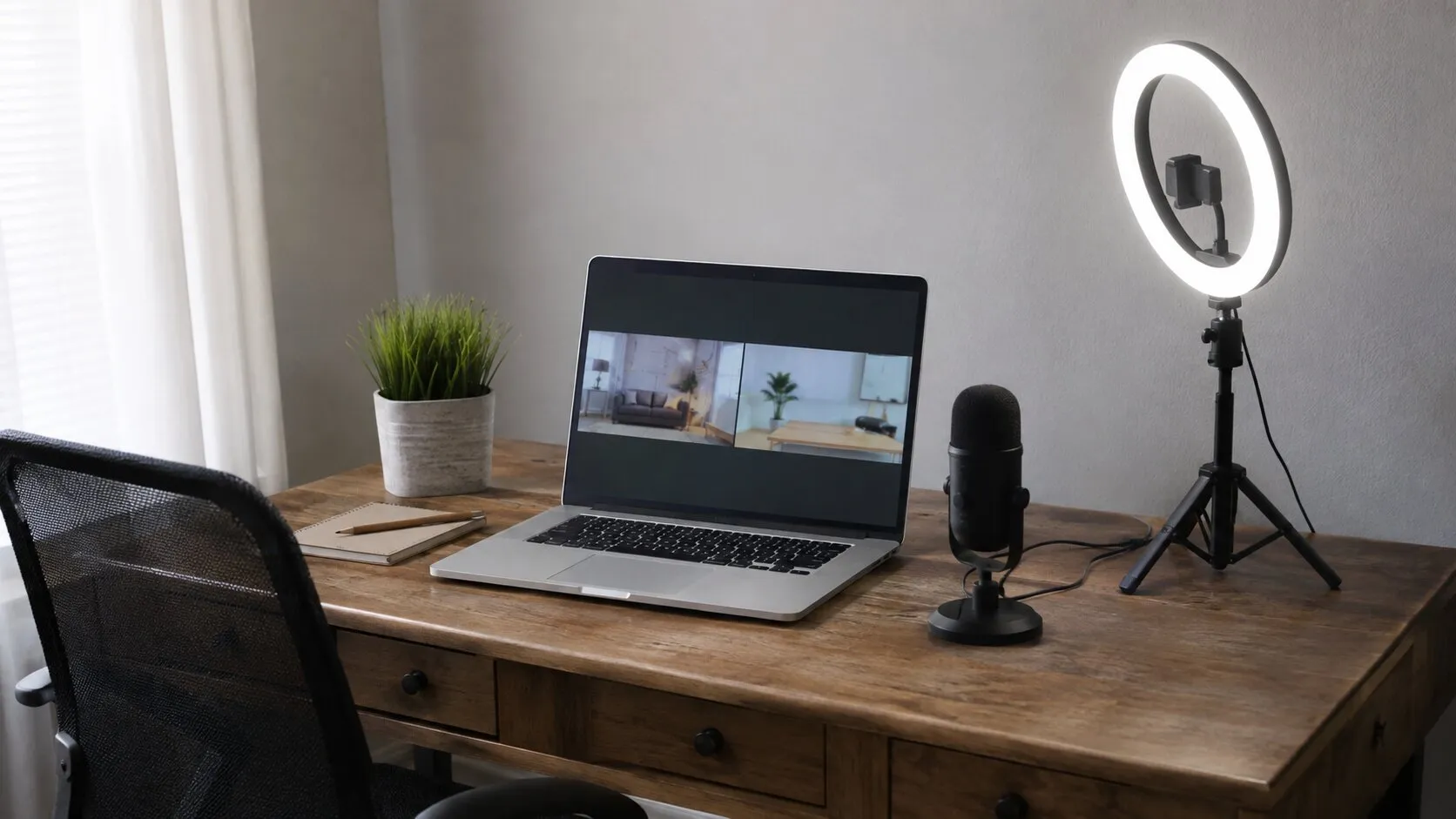
5. Recording Setup: Microphone, quiet space, and recording software (Zoom works great for interviews)
Something as simple as this works! The important thing is getting started – and improving your equipment as you gain more experience.
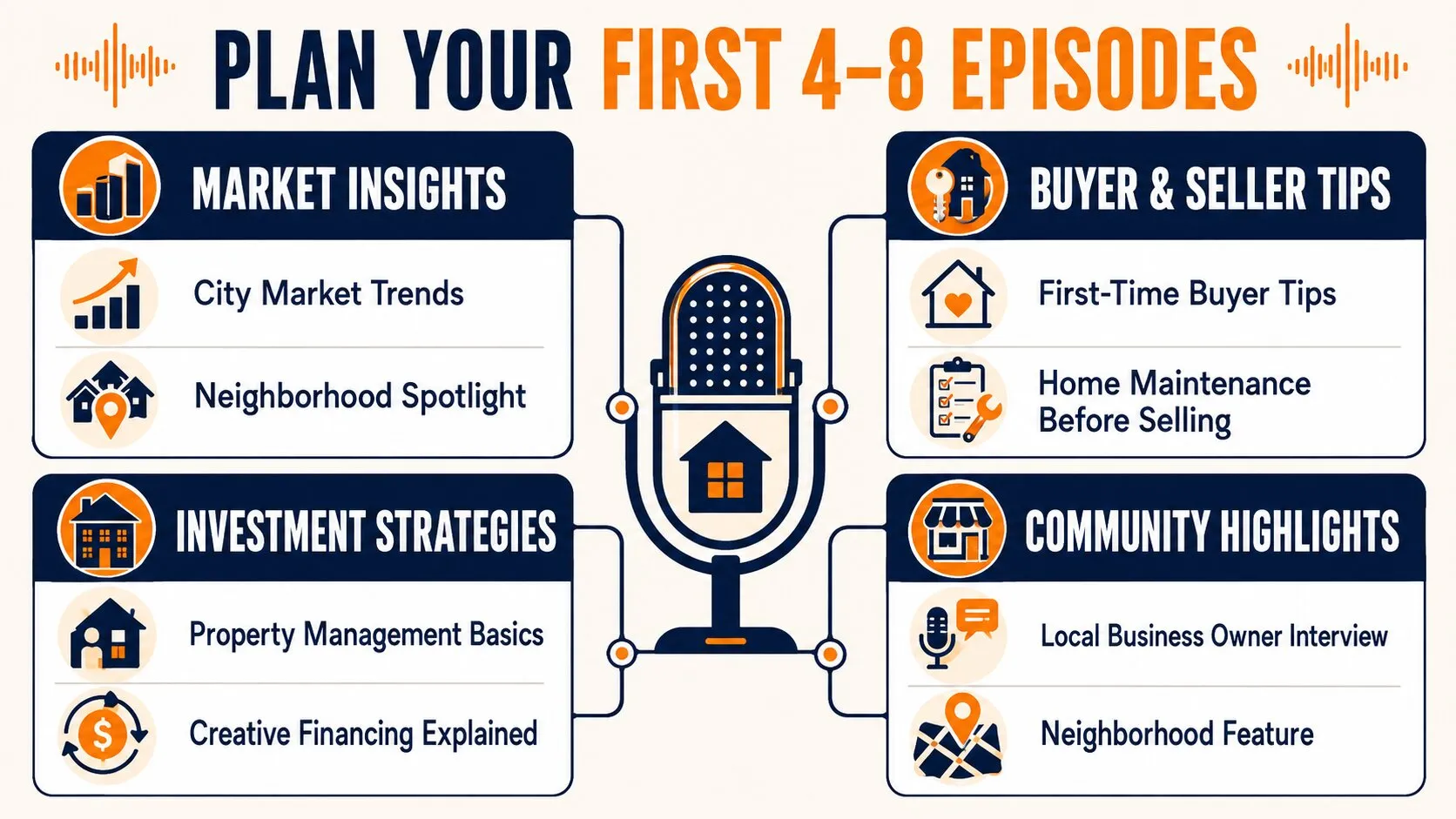
6. Episode Plan: Outline your first 4-8 episodes with topics and potential guests
Start by brainstorming themes based on your target audience’s needs. It should reflect your unique insights and local expertise.
- Market Insights: Trends in your specific city or neighborhood.
- Buyer/Seller Tips: Practical advice for first-time buyers or home maintenance.
- Investment Strategies: Deep dives into property management or creative financing.
- Community Highlights: Interviews with local business owners or neighborhood features.
7. Call-to-Action Framework: Know what you want listeners to do (subscribe, contact you, visit your website)
I actually break down how to create your own call to action at timestamp 21:04-21:12 in the video below. But that’s just one piece of it. I also talk about how to build your audience, enhance your brand, and grow your real estate business through our ultimate podcast framework.
💡 Realtor Tip: You don’t need complex equipment or a full production team to start a podcast. A phone, a laptop, stable internet, and something valuable to say are enough.
But recording is only the first step. Framework 05: Distribution shows you what happens after you hit publish: how to distribute your show across the major listening platforms and turn one recording into multiple pieces of content for social, email, and search. Use it to build a publishing system that gets more mileage from every episode you record.
Click Here to Get Framework 05: Distribution →
The fifth part of ICONS’ five-part Podcast Framework — discover how to distribute and repurpose every episode for greater reach.
How to Start a Podcast on Spotify (Step-by-Step)
Follow these steps to get your real estate podcast live on Spotify.
The process is straightforward whether you choose Spotify for Creators hosting or an external host with RSS distribution , which is basically just a link that automatically sends your episodes to Spotify (and other platforms) whenever you publish.
Step 1: Choose Your Hosting Path
You have two primary options: host directly with Spotify for Creators (free) or use an external podcast host and submit your RSS feed.
Hosting with Spotify gives you native access to all their creator tools, while external hosting (like Buzzsprout, Libsyn, or Transistor) provides more platform independence. For beginners, Spotify for Creators is the simplest path.
| Feature | Spotify for Creators (Direct Hosting) | External Podcast Host (Buzzsprout, Libsyn, Transistor, etc.) |
|---|---|---|
| Cost | Free | Paid (monthly subscription) |
| Ease of Setup | Extremely easy, beginner-friendly | Slight learning curve, more steps |
| Hosting Location | Spotify hosts your podcast directly | Host provides your RSS feed |
| Distribution | Spotify-focused | Full platform independence |
| Control & Ownership | More platform-dependent | Full ownership and portability |
| Analytics | Deep Spotify-only insights | Cross-platform analytics |
| Monetization Tools | Native Spotify monetization options | Varies by host, often more flexible |
| Growth Flexibility | Best for Spotify-first strategy | Best for long-term scaling |
| Platform Dependence | High | Low |
| Ideal For | Beginners, hobbyists, quick launches | Professionals, brands, long-term podcasters |
Step 2: Claim Your Show in Spotify for Creators
If you’re hosting with Buzzsprout, Voxnest, Podbean, or any platform that isn’t Spotify, you can claim your show on Spotify for Creators.
Head to creators.spotify.com and sign up with your Spotify account (or create one).
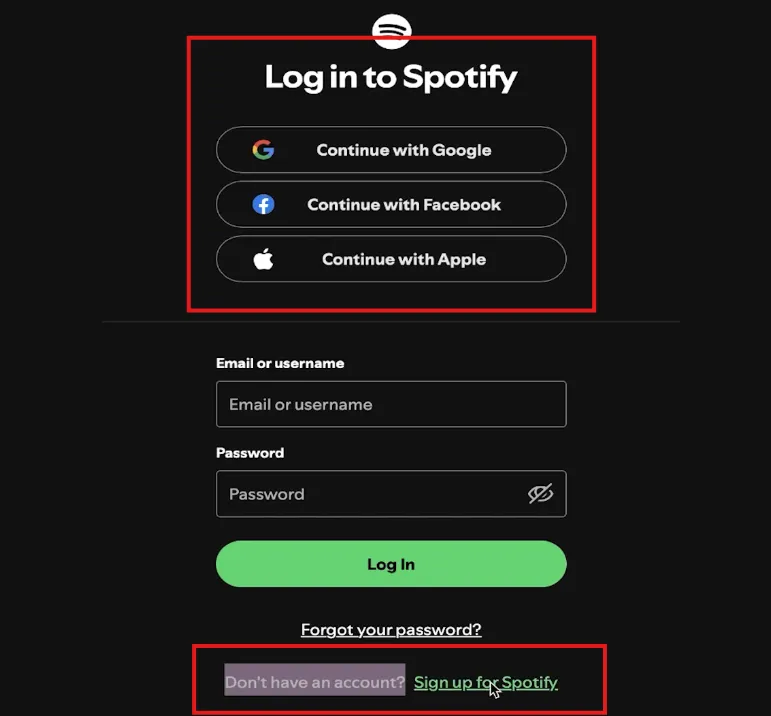
Accept the terms and select whether you’re starting fresh or claiming an existing show via RSS.
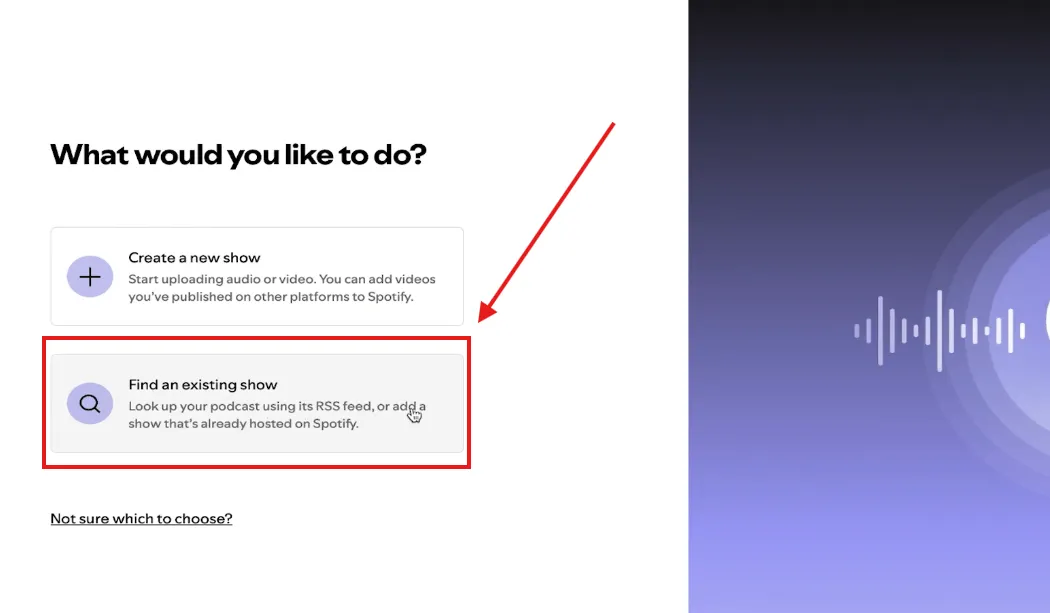
If claiming, you’ll verify ownership through a code sent to the email in your RSS feed. You can copy that code and send it to the submission form.
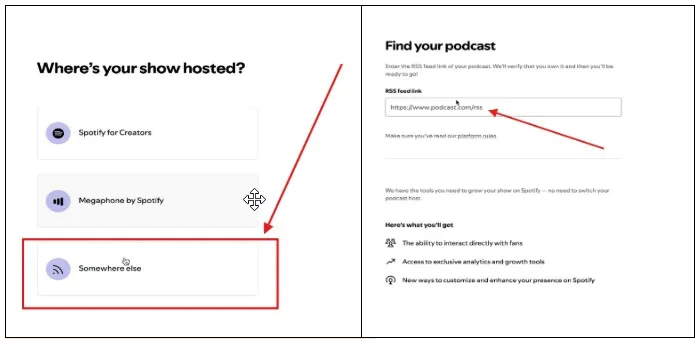
Step 3: Add Show Details
Now, if you’re creating a show from scratch, you can select “create a new show.”
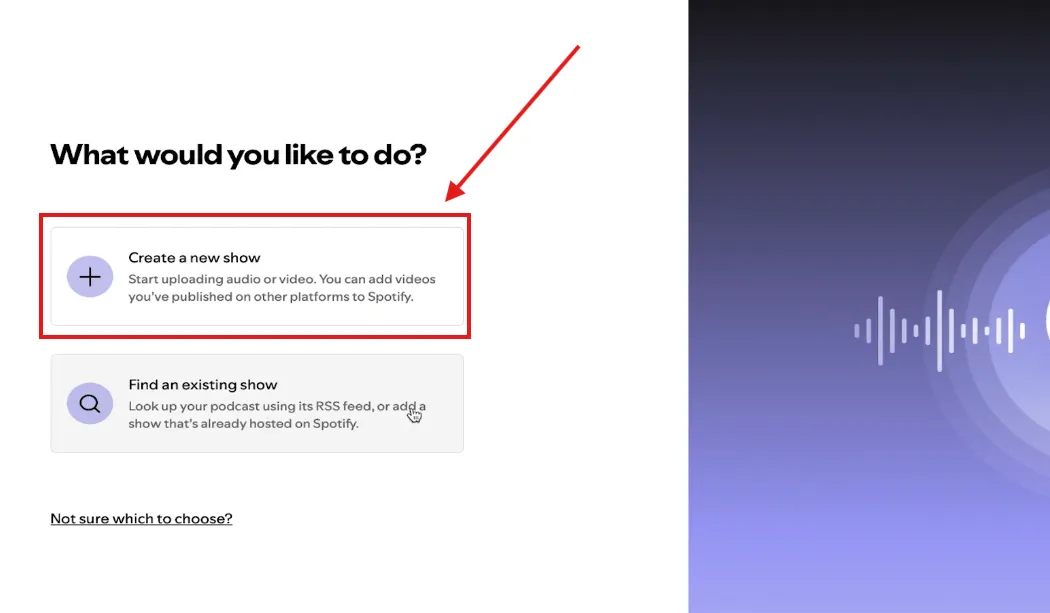
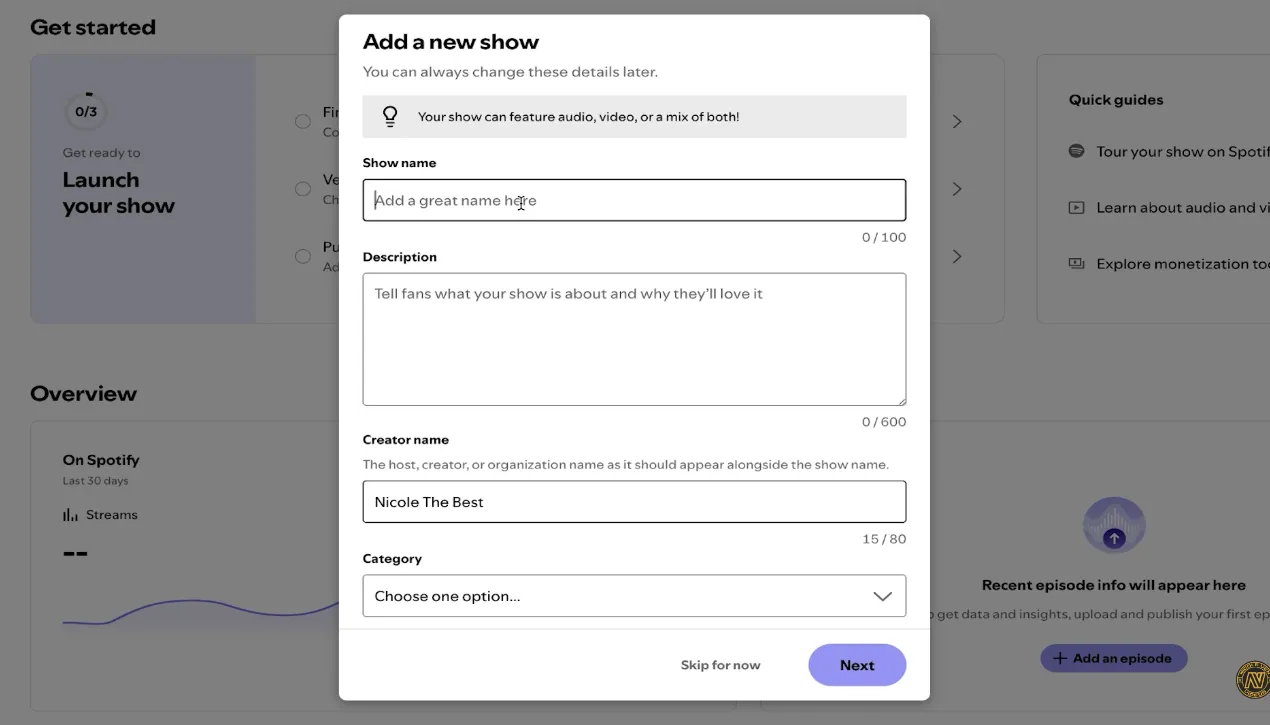
Then, complete your podcast profile with a:
- Compelling title
- Detailed description including relevant keywords (it should clearly communicate your value proposition to potential listeners.)
- Creator name
- Category: ‘Business’ as your primary category for real estate content
- Language setting
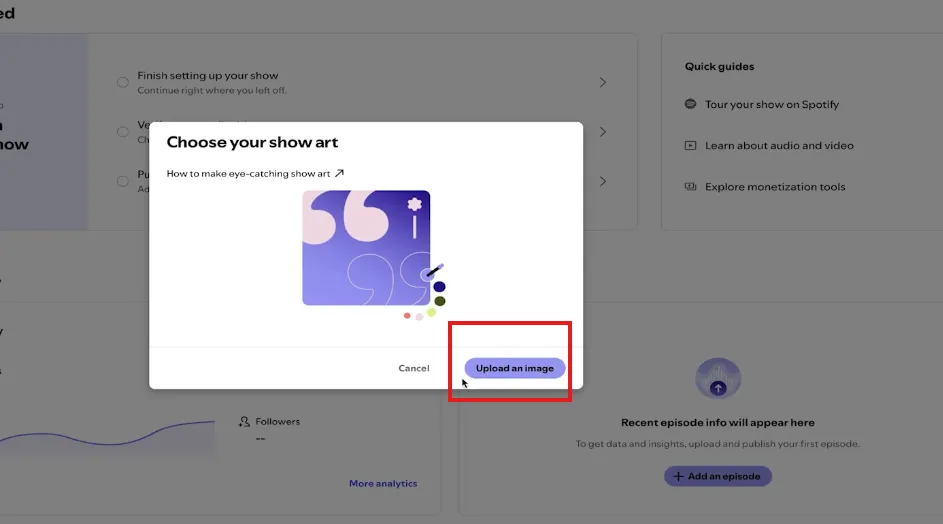
- Cover artwork
Step 4: Upload and Publish Your First Episode
Click ‘Publish an Episode’ from your dashboard. Here you can choose to upload an audio or a video file.
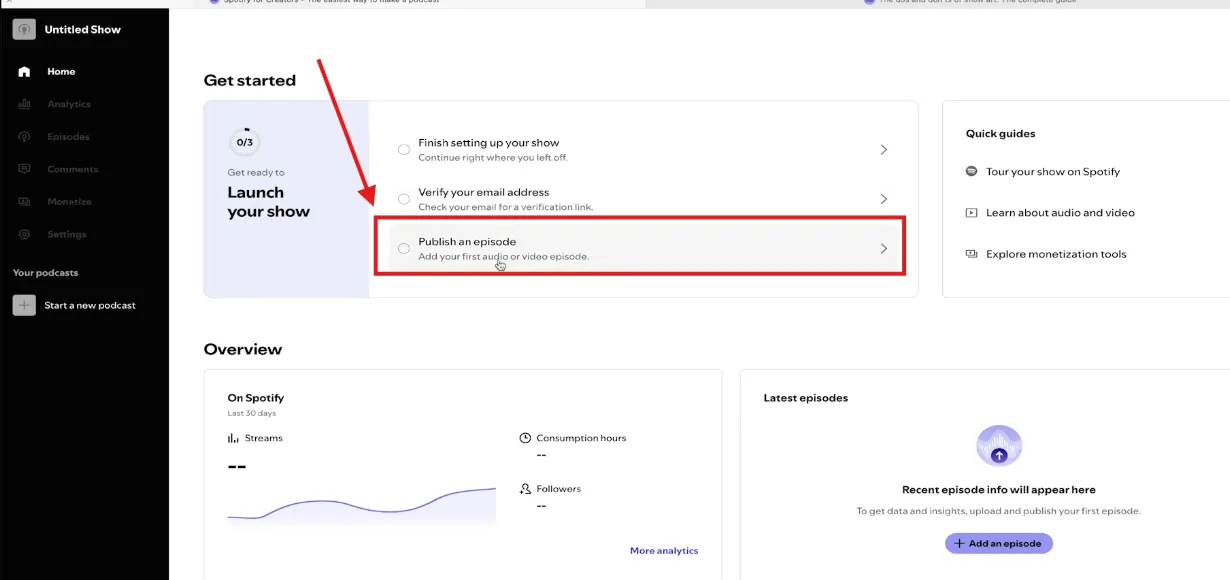
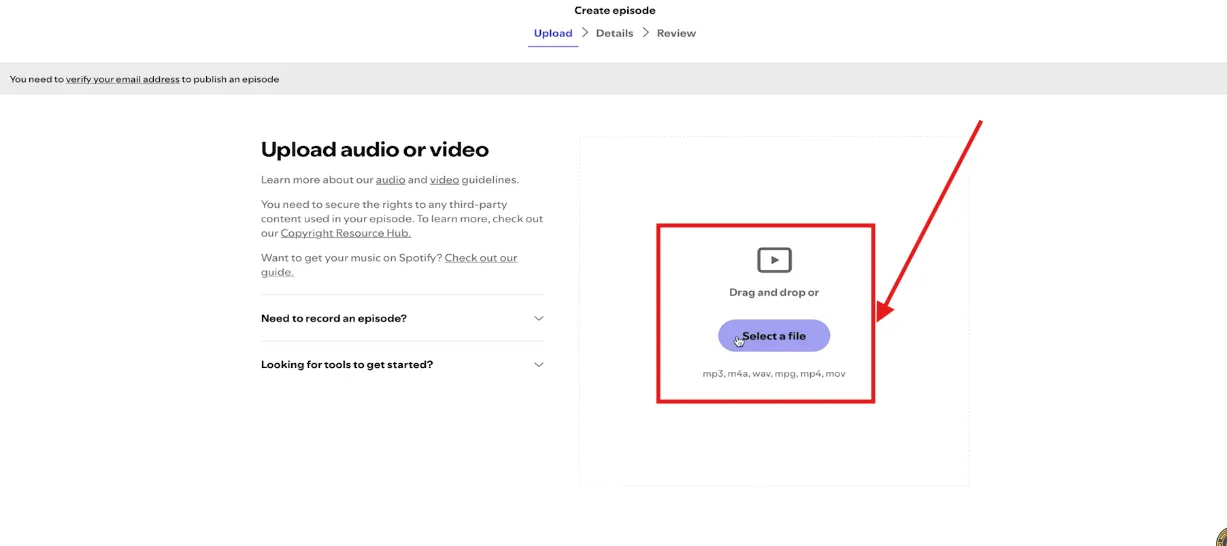
Add your title, description, and artwork. Then, set up your publish time and date. And that’s it.
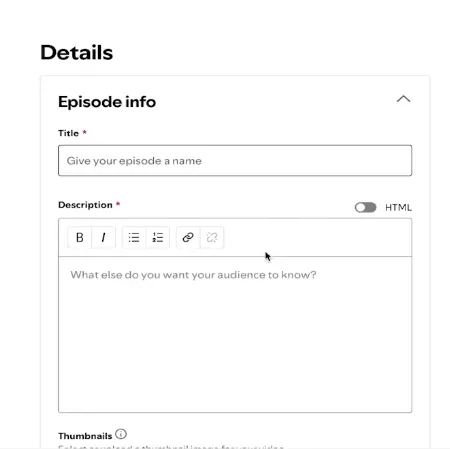
Pro tip: Framework 04: Launching recommends releasing at least three episodes on day one rather than launching with a single episode. That gives interested listeners more to explore immediately instead of making them wait for episode two.
Step 5: Verify Distribution
After publishing, your podcast will appear on Spotify within minutes if hosted directly. For RSS submissions, allow 24-48 hours for initial approval. Check your show’s Spotify page to confirm everything displays correctly. Enable RSS distribution in Settings → Availability to syndicate to other platforms automatically.
🎯 Want a Done-For-You Launch?
Skip the technical setup and focus on content creation. ICONS of Real Estate offers full podcast production services that handle everything from concept development to distribution. Learn about podcast production services →
How to Start a Podcast on Spotify for Free
Yes, you can start a podcast on Spotify for free, the Spotify for Creators platform itself costs nothing to use. However, understanding the full picture helps you budget appropriately. Here’s what’s genuinely free versus what typically costs money:
✅ FREE
- Spotify for Creators hosting
- Distribution to Spotify
- Analytics dashboard
- Automated transcripts
- Basic monetization tools
- Audacity editing software
- Your smartphone as a mic
💰 MAY COST MONEY
- Quality Microphone
- Professional Cover Art
- Audio Editing Services
- Video Equipment & Lighting
- Custom Intro / Outro Music
- Acoustic Treatment (foam panels, bass traps)
- Remote Recording Software
How Much to Start a Podcast on Spotify (Realistic Cost Ranges)
How much to start a podcast on Spotify depends entirely on your production ambitions. Industry data shows you can launch for under $100 or invest several thousand for professional quality
| Item | DIY Budget | Prosumer | Professional |
|---|---|---|---|
| Microphone | $0-$70 | $100-$200 | $300-$400 |
| Hosting | $0 (Spotify) | $5-$20/mo | $20-$100/mo |
| Cover Art | $0-$50 | $100-$200 | $300-$500 |
| Editing | DIY (free) | $75 – $500/episode (freelance) | $350-$1,500+ (full service production) |
| TOTAL STARTUP | $0-$120 | $250-$500 | $500-$2,500 |
Budget-friendly microphone recommendations include the Samson Q2U at approximately $70, which works as both USB and XLR, giving you flexibility to upgrade your setup later.
Free editing software like Audacity provides everything you need to produce professional-sounding episodes.
How to Get Your Podcast RSS Feed From Spotify
Your RSS feed is essential for distributing your podcast beyond Spotify to platforms like Apple Podcasts, Google Podcasts, and Amazon Music. If you host with Spotify for Creators, you can enable RSS distribution to share your content across the podcast ecosystem. To find and enable your RSS feed:
- Log in to creators.spotify.com
- Navigate to Settings
- Click “Availability”
- Scroll down to “RSS Distribution” and copy your unique feed URL
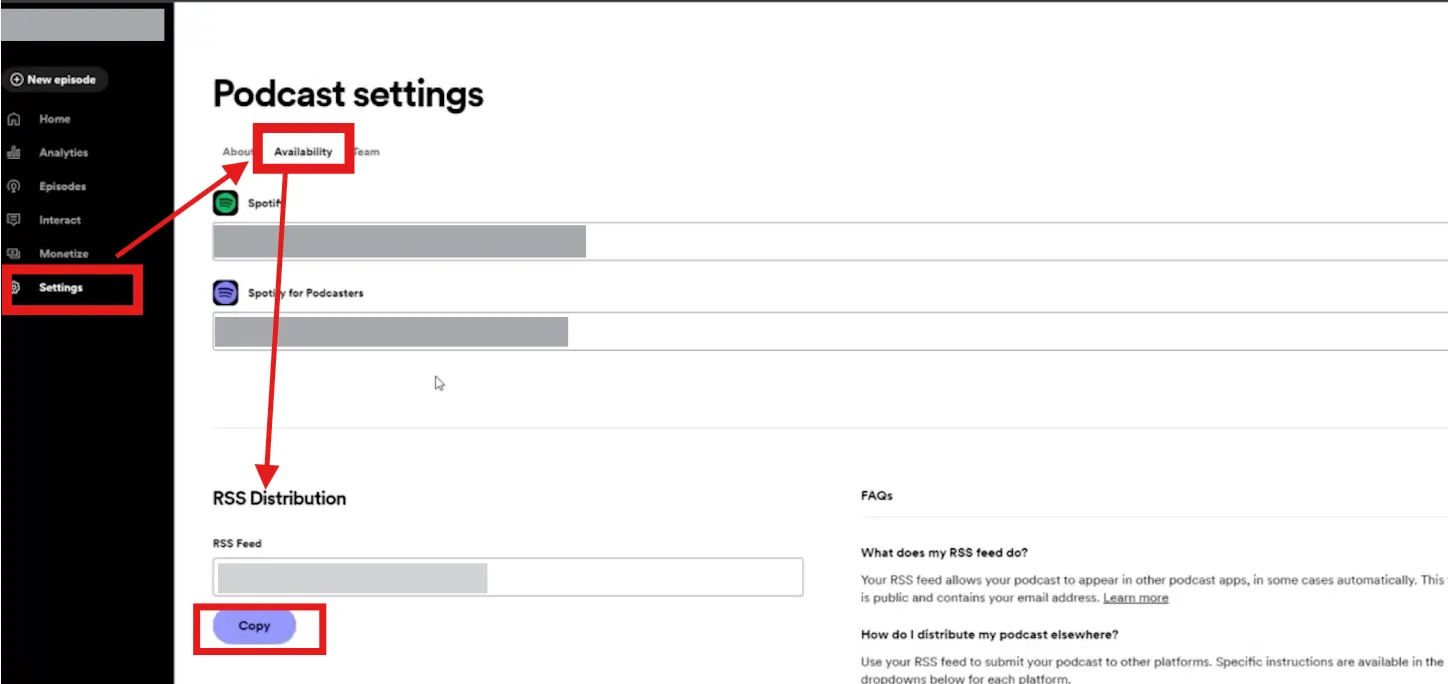
Once enabled, your RSS feed automatically updates whenever you publish new episodes, and other platforms will pull your content automatically (Spotify Support: Finding and Enabling Your RSS Feed).
How to Get Podcast Video on Spotify
Video podcasting on Spotify has exploded:
Ninety percent of marketers reported that video content helped them generate leads. In the real estate world, listings with video content get 403% more inquiries than those without.
This proves that video adds a personal connection that audio alone can’t match. To upload video episodes:
- Log in to Spotify for Creators
- Click ‘New Episode’ from your dashboard
- Upload your video file (MP4 or MOV format)
- Complete episode details and publish
Video Specifications (Recommended)
| Specification | Recommended |
|---|---|
| Format | MP4 (H.264 or H.265 codec) |
| Resolution | 1080p or higher |
| Aspect Ratio | 16:9 widescreen |
| Bitrate | 25 Mbit/s for 1080p |
| Frame Rate | 24, 25, 30, 50, or 60 FPS |
| Max File Size | Less than 10 GB (up to 60 GB supported) |
| Audio Codec | AAC-LC, 128 Kbps or higher |
Source: Spotify Support: Video Specs
How to See Podcast Views on Spotify (And What Spotify Actually Tracks)
In May 2025, Spotify introduced ‘plays’ as a new public-facing podcast metric, counted when someone listens to or watches an episode for at least 60 seconds. Your Spotify for Creators dashboard provides comprehensive analytics including:
| Metric | Description | Why It Matters |
|---|---|---|
| Plays | Near-immediate snapshot of content performance | Tracks hot market topics instantly |
| Consumption Hours | Total listening time across your content | Shows engaging property segments |
| Unique Listeners | Individual audience members reached | Measures total audience size |
| Follower Growth | Subscribers over time | Builds dedicated audience base |
| Demographics | Age, gender, and location breakdowns | Targets listeners by city/age |
| Discovery Analytics | How listeners find your episodes | Reveals search traffic sources |
Note that Spotify “plays” specifically measures engagement on the Spotify platform.
For total cross-platform performance, you’ll need to check analytics from each distribution platform or use your podcast host’s unified dashboard .
How to See Podcast Rankings, Charts, and Ratings on Spotify
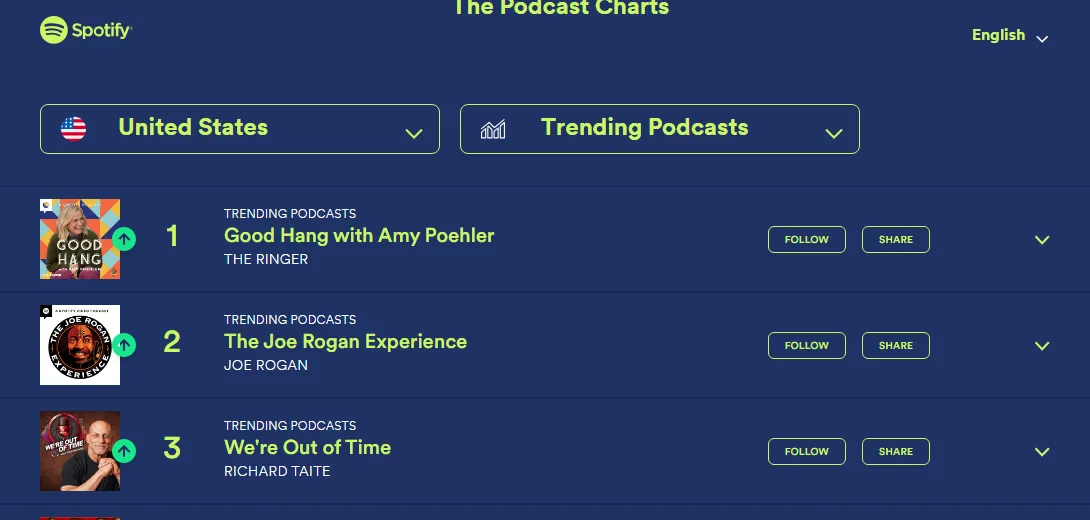
If you’re wondering how to see podcast charts on Spotify, you can access them directly in the app or through Spotify’s dedicated charts website at podcastcharts.byspotify.com
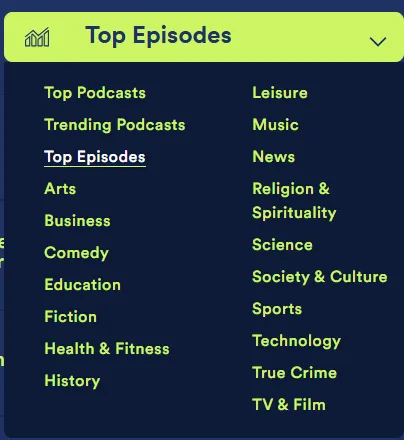
Charts include:
- Top Podcasts – These are the 200 most-listened-to shows in each country, ranked by how many unique people tune in weekly.
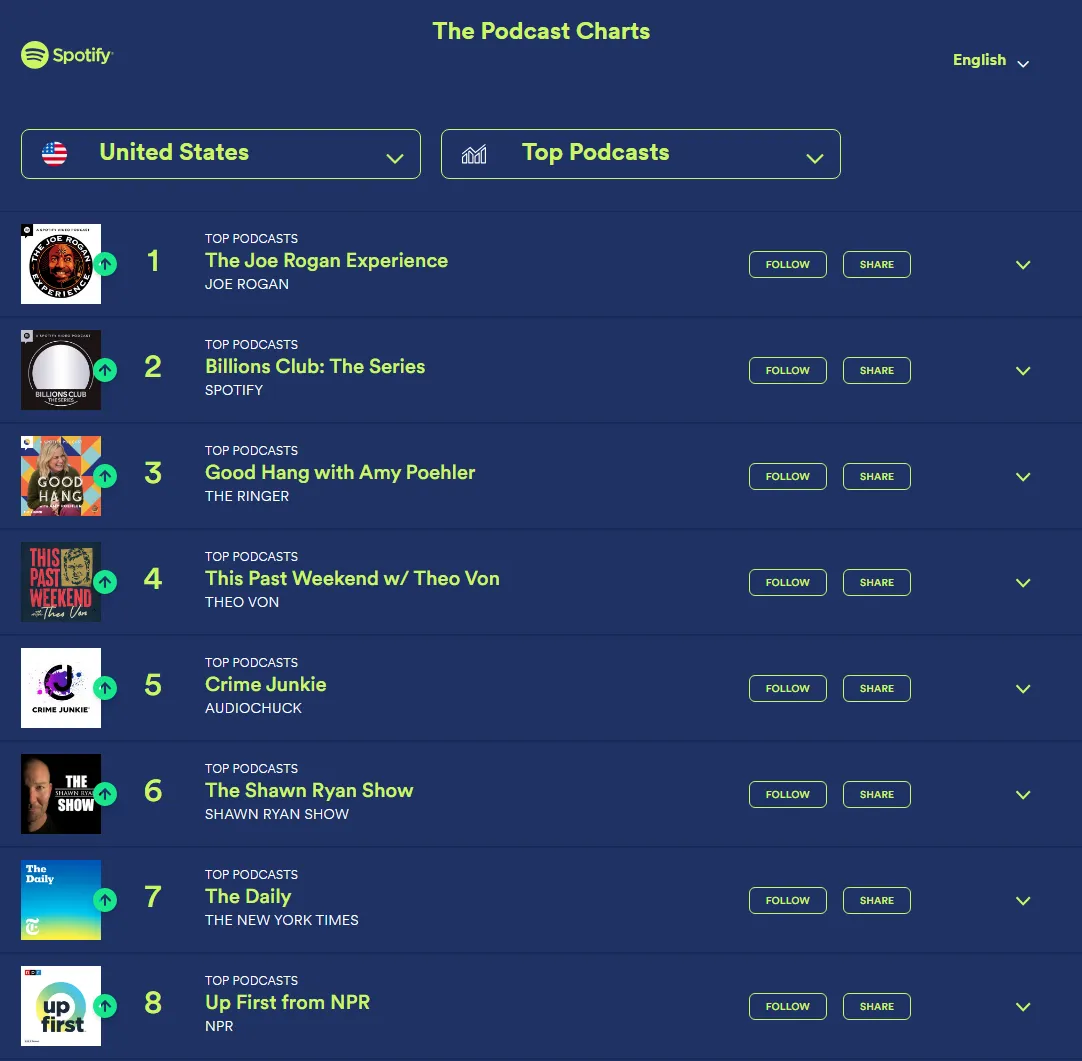
- Trending Podcasts – The 200 shows gaining the most momentum in each country.
- Category-specific rankings – The top 50 shows within specific categories
Charts update daily based on listening behavior and engagement.
From there, you can browse by country and category. Rankings are determined by recent unique listeners and follower counts
If you want to know how to see podcast ratings on Spotify, open the show’s public Spotify page to view its overall rating. However, creators cannot see individual ratings or identify who rated their show. Only aggregate information is available.
Encourage your audience to leave ratings to boost your visibility in search and recommendations.
How to Get Podcast Transcripts on Spotify
Spotify automatically generates transcripts for eligible podcasts, helping with discoverability and accessibility. Transcripts appear in the Now Playing view and episode page, scrolling in sync with audio so listeners can follow along.
To manage transcripts:
- Go to Settings in Spotify for Creators
- Find the Transcripts section under Audience Growth
- Toggle ‘Display transcripts on Spotify’ on or off
- Include your transcripts in your RSS feed to make them available to your other listening platforms. Simply toggle ‘Distribute transcripts across other platforms via RSS.’
How to Get Your Podcast Featured on Spotify
Unlike music, there’s no guaranteed ‘pitch’ system for podcasts to get featured on Spotify. However, you can optimize your chances through strategic actions:
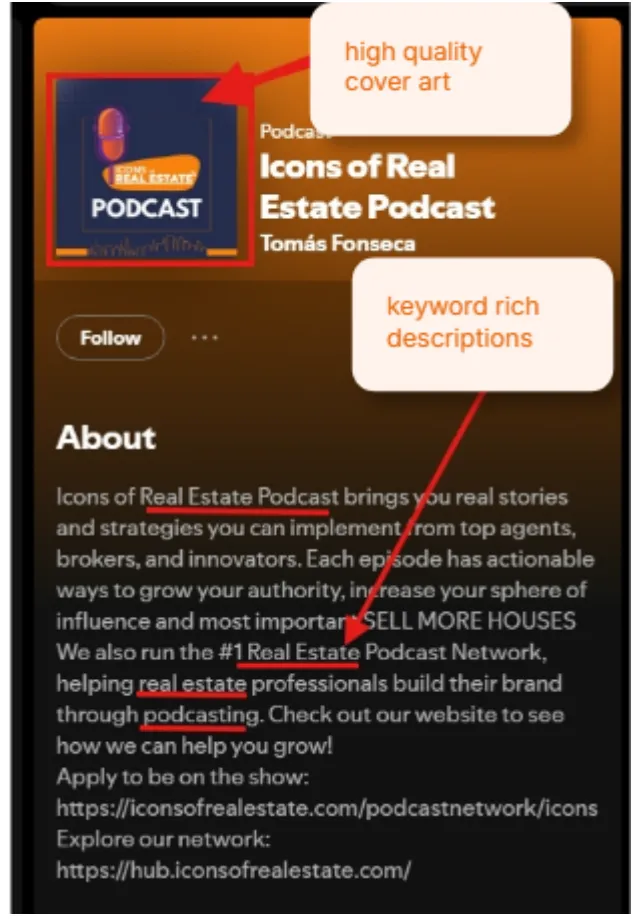
- Optimize Your Show Page: Complete all profile fields, use keyword-rich descriptions, and upload high-quality cover art
- Publish Consistently: Regular releases signal an active, quality show to Spotify’s algorithms. Pick a regular schedule, whether weekly or bi-weekly, as long as it’s something you can commit to.
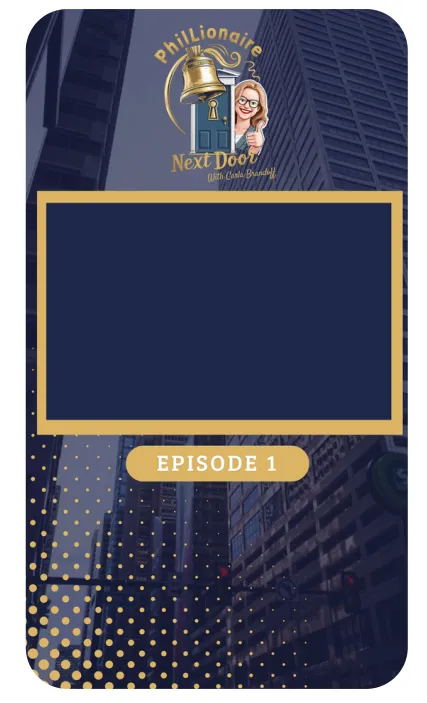
- Create and Share Clips: Short-form video clips boost discovery across the platform.
- Grab the “best moments” or soundbites from your full episodes.
- Turn it into multiple reels you can distribute across social media platforms
- Use reel frames to keep all snippets “branded.” Here’s an example from one of our networks.
- Engage Your Audience: Encourage follows, ratings, and comments to demonstrate engagement
- Build Press/Partner Relationships: External coverage and collaborations demonstrate broader relevance
- Add a “strong logline” in your show description, which is a concise, compelling one-sentence summary of your show’s premise
Realtor Growth Playbook (Make Spotify Your Referral Engine)
Real estate agents see a 20% to 50% conversion rate from leads that come from trusted referrals.
And I’m not just throwing numbers at you. This is something I saw after helping produce over 50+ podcasts across the nation using our ICONS real estate podcast framework.
So think about this for a second.
If you record one podcast per week with an expert guest, that’s 52 potential referral partners annually. Right?
And even if we’re being conservative here, even if only 40 of those become genuine relationships, and each one gives you just one referral over five years?
That’s substantial business growth built entirely through content creation.
So here’s exactly how you make this work for you.
| Why (Benefit) | Your Assignment: | |
|---|---|---|
| Strategic Guest Selection | Creates referral partnerships + expands audience | • Invite lenders, builders, inspectors, stagers, and local business owners depending on the needs of your audience. |
| Neighborhood Authority Mini-Series | Establishes local market expertise | • Create episodes on neighborhoods with local interviews + trends |
| Content Repurposing | Maximizes reach across marketing channels | • Transform episodes into reels, email content, and blog posts |
| CTA Framework | Converts listeners into leads | • End episodes with: “Subscribe, follow on social, DM for consultations, visit website.” |
| Nurture Campaign Integration | Maintains top-of-mind awareness | • Share episodes with past clients as valuable market updates |
Sample 4 – Episode Launch Plan:
Now, I know what you’re thinking.
That sounds like a lot to manage all at once, right?
But here’s the thing.
You don’t need to do everything perfectly from day one. You just need to start. And then you build momentum from there.
So here’s a sample of what your first month could look like:
- Episode 1: Introduction + your real estate journey and market expertise
- Episode 2: Interview with a top local lender about current market conditions
- Episode 3: Neighborhood spotlight featuring local business owners
- Episode 4: First-time homebuyer tips with a home inspector
Success Story: Shae Spitz generated 330 listings from her podcast efforts, demonstrating the massive business potential of strategic real estate podcasting. Read her full story →
🎤 Not ready to launch a show of your own? You can still use podcasting to put your expertise in front of new audiences.
Done-For-You Podcast Launch Options (For Busy Agents)
For real estate professionals who want the benefits of podcasting without the technical learning curve, done-for-you services offer a faster path to launch. ICONS of Real Estate provides comprehensive podcast production services that handle everything from concept development to recording, editing, and distribution (ICONS Podcast Production Services).
What’s included with professional production:
- Initial consultation and concept development aligned with your brand
- Branding and artwork
- Professional audio editing and enhancement
- Custom intro/outro production
- Distribution to Spotify, Apple Podcasts, and all major platforms
- Promotional strategy and social media content repurposing
Already have the expertise but don’t want to spend your time researching shows, cold-pitching hosts, and coordinating interviews?
Let the ICONS Podcast Guesting handle your guest-booking strategy including:
- Identifying relevant podcasts and guest opportunities
- Crafting customized pitches to podcast hosts
- Coordinating interviews and scheduling
- Helping you prepare for each appearance
→ Explore the ICONS Podcast Guesting
CASE STUDIES:
Ben Jimmerson went from concept to live podcast in just 3 weeks using the ICONS done-for-you approach (Read his success story).

Shaune Corbett secured 4 sponsorships through strategic podcast positioning (See how she did it).

Kathy interviewed a luxury agent and walked away with $100M funding opportunity (See her story here)
Frequently Asked Questions
Can I start a podcast on Spotify for free?
Yes, Spotify for Creators is completely free to use for hosting and distributing your podcast. You can create an account, upload episodes, and reach Spotify’s audience without any platform fees. The only potential costs are equipment and optional professional services (Spotify for Creators).
Do I need an RSS feed for Spotify?
It depends on your hosting choice. If you host directly with Spotify for Creators, no external RSS feed is needed, Spotify handles distribution internally. However, if you use an external podcast host, you’ll submit your RSS feed to Spotify to syndicate your content. You can also enable RSS distribution from Spotify for Creators to share content with other platforms
Can I upload video podcasts to Spotify?
Yes, Spotify fully supports video podcasts. Upload video files in MP4 or MOV format with 16:9 aspect ratio and 1080p or higher resolution. Video podcasting has grown significantly on the platform, with over 500k+ video podcasts and nearly 400 million users to watch them in 2026.
Where do I see Spotify podcast charts and rankings?
Access Spotify podcast charts at podcastcharts.byspotify.com or within the Spotify app by navigating to Search → Podcasts → Podcast Charts. Charts include Top Podcasts (top 200 by country), Trending Podcasts, and category-specific rankings. They update daily based on unique listeners and engagement
Learn More and Get Started
Starting a podcast on Spotify opens incredible opportunities for real estate professionals to build authority, generate referrals, and create lasting relationships with their community. Whether you choose the DIY path or a done-for-you solution, the key is taking action and staying consistent.
Continue Your Podcasting Journey:
- Download the Complete Podcast Frameworks – Your step-by-step guide to launching and growing a real estate podcast
- Explore the ICONS Podcast Network – Connect with the #1 real estate podcast community
- Browse the HUB Directory – Find real estate podcasts and professionals
- Launching Your Real Estate Podcast – Launch strategies and tips
- Podcast Production Services – Done-for-you podcast launch and management
Your next big break could be a podcast episode away. With Spotify’s powerful platform, the ICONS framework for guidance, and a commitment to providing value to your audience, you have everything needed to transform your real estate business through the power of podcasting.
Done-for-you podcast production
Want a podcast that brings in referrals, not just downloads?
Icons of Real Estate plans, produces and publishes business-growing podcasts for agents. You record. We handle the rest.
Launch Your Podcast
Written by
Co-Founder and Podcast Guru, Icons of Real Estate
Tomás Fonseca co-founded Icons of Real Estate in 2021 and is its Podcast Guru. He has a background in marketing, with stints at companies like Nintendo and Ardor SEO, and is one of the hosts of the Icons of Real Estate Podcast.
How we research, write, fact-check and correct articles: our editorial standards.