On this page
- How do the social media scheduling tools compare?
- What does a social media scheduler actually do for an agent?
- What does Buffer cost, and who is it for?
- What does Hootsuite cost, and who is it for?
- What does Later cost, and who is it for?
- Is Meta Business Suite enough for real estate agents?
- Where do the schedulers post, and who approves?
- How is ICONS Social different from a scheduler?
- What should real estate agents check before choosing a scheduler?
- Which scheduling tool should a real estate agent pick?
- How do you get more from any scheduler?
Social media scheduling tools for real estate agents split into two groups. Buffer, Hootsuite, Later and Meta Business Suite publish posts you write and make yourself. ICONS Social writes about 10 posts from an ICONS podcast episode you guested on, then posts them once you approve. Use a scheduler for everyday content and ICONS Social for your episode.
How do the social media scheduling tools compare?
The five tools range from free to $99 and up, as of October 2026, and only ICONS Social writes the posts from your episode. Prices and features below come from each company’s own pages, read on October 19, 2026. ICONS Social facts come from Icons of Real Estate.
| Tool | Entry price (Oct 2026) | Free option | Networks named | Approval step |
|---|---|---|---|---|
| Buffer | Essentials $5/mo per channel ($60/yr) | Free plan: up to 3 channels, 10 scheduled posts each | 12, including LinkedIn, Facebook, Instagram, YouTube, TikTok | Team plan, $10/mo per channel |
| Hootsuite | “Paid plans start at $99” for Standard | 14-day trial, no card | Instagram, Facebook Pages, X, TikTok, Threads, WhatsApp, LinkedIn, Pinterest, YouTube | Advanced plan and up |
| Later | Starter $18.75/mo billed yearly | 14-day trial | Instagram, Facebook, TikTok, Threads, YouTube, Pinterest, LinkedIn, Snapchat | Growth and Scale plans |
| Meta Business Suite | No price on Meta’s tool page | n/a | Facebook and Instagram (Messenger for messages) | Not named on the tool page |
| ICONS Social | Free | For ICONS show guests and ICONS DIY Podcast users | LinkedIn, Facebook, Instagram, YouTube, TikTok | Built in: you edit and approve every post |
Each scheduler also has a one-on-one comparison with ICONS Social:
- Buffer. Per-channel pricing and the Free plan are covered in Buffer vs ICONS Social.
- Hootsuite. Plans, seats and approvals are weighed in Hootsuite vs ICONS Social.
- Later. Social sets and post limits are covered in Later vs ICONS Social.
What does a social media scheduler actually do for an agent?
A social media scheduler lets you write or upload a post once, pick the accounts and the time, and have the tool publish it for you. You do the batch on Monday and stop opening five apps every day.
For a busy agent, the useful parts are:
- One calendar. Every post across LinkedIn, Facebook, Instagram, YouTube and TikTok in one view, so you can see the gaps.
- Batching. An hour a week to load up the next two weeks. Hootsuite says its bulk scheduler can “schedule up to 350 posts at once”, on its publishing page.
- Approvals. A teammate drafts, you sign off. Useful if you have an assistant, a team or a broker who wants to see posts first.
What a scheduler doesn’t solve is the blank page. Buffer, Hootsuite, Later and Meta Business Suite publish the posts you give them. If you have nothing to say this week, a scheduler just posts nothing on time. That’s why agents who guest on podcasts tend to post more: the episode hands them a stack of material. Our guide to repurposing a podcast guest appearance shows how to cut one episode into a month of posts by hand.
What does Buffer cost, and who is it for?
Buffer costs $5 a month per channel on Essentials and $10 a month per channel on Team, as of October 2026, according to its pricing page. The yearly prices shown are $60 and $120 per channel.
- Free: up to 3 channels, 10 scheduled posts per channel (“refill anytime”), 1 user.
- Essentials: unlimited scheduled posts per channel, 1 user. Buffer’s FAQ mentions a fair-use cap of 5,000 posts per channel on paid plans.
- Team: unlimited team members and “Content approval workflows”, described as “Manage who can draft and approve posts across your team.”
Buffer lists 12 networks: Instagram, Facebook, TikTok, LinkedIn, X, YouTube, Threads, Pinterest, Google Business Profile, Bluesky, Mastodon and Substack. Google Business Profile matters for agents, because many local searchers see your profile there before your website.
The pricing page says annual billing saves 20% and also says “save 2 months”, but the yearly figures shown equal twelve monthly payments. Check the checkout before you commit.
Best for: a solo agent who wants a cheap, simple scheduler for three or four accounts.
What does Hootsuite cost, and who is it for?
Hootsuite’s plans page says paid plans “start at $99 for a Standard plan, $199 for a Professional plan, and range up to $399 for an Advanced plan”, as of October 2026. The page shows prices per user per month based on annual billing, and Enterprise is priced on request.
- Standard: up to 10 social accounts from one calendar
- Professional: unlimited social accounts plus automation
- Advanced: adds “Review and approve content with your team.”
- Trial: 14 days, no credit card. Trial accounts have daily posting limits of 10 to 20 posts per organization, and no bulk scheduling.
Hootsuite’s FAQ and blog name Instagram, Facebook Pages, X, TikTok, Threads, WhatsApp, LinkedIn, Pinterest and YouTube for scheduling. Its publishing page also says it suggests posting times based on when your followers are active.
Best for: a team or brokerage with a marketing person who needs many accounts, approvals and reporting. For one agent, Standard is a lot of tool for the job.
What does Later cost, and who is it for?
Later costs $18.75 a month on Starter, $37.50 on Growth and $82.50 on Scale, billed yearly, as of October 2026, on its pricing page. Monthly-billing prices weren’t shown in the version we read.
| Later plan | Profiles | Users | Post limit | Approvals |
|---|---|---|---|---|
| Starter | 1 social set (8 profiles) | 1 | 30 posts per profile | No |
| Growth | 2 social sets (16 profiles) | 2 | 180 posts per profile | Internal and external |
| Scale | 6 social sets (48 profiles) | 4 | Unlimited | Yes |
Later supports Instagram, Facebook, TikTok, Threads, YouTube, Pinterest, LinkedIn and Snapchat. All three plans start with a 14-day free trial.
Best for: an agent whose marketing leans on Instagram and short video, who wants a visual calendar. Growth is the first plan with approvals, which suits an agent with an assistant.
Is Meta Business Suite enough for real estate agents?
Meta Business Suite is enough if Facebook and Instagram are your only channels. Meta’s Business Suite page says you can “create or schedule posts, stories and ads for your business”, from desktop or mobile.
The same page describes managing activity “on Facebook, Messenger and Instagram from one place”. It names no other networks for scheduling, and it shows no price. You’d still need another tool, or the native apps, for LinkedIn, YouTube and TikTok.
Best for: an agent who lives on Facebook and Instagram and wants scheduling plus messages in one place, without another login.
Where do the schedulers post, and who approves?
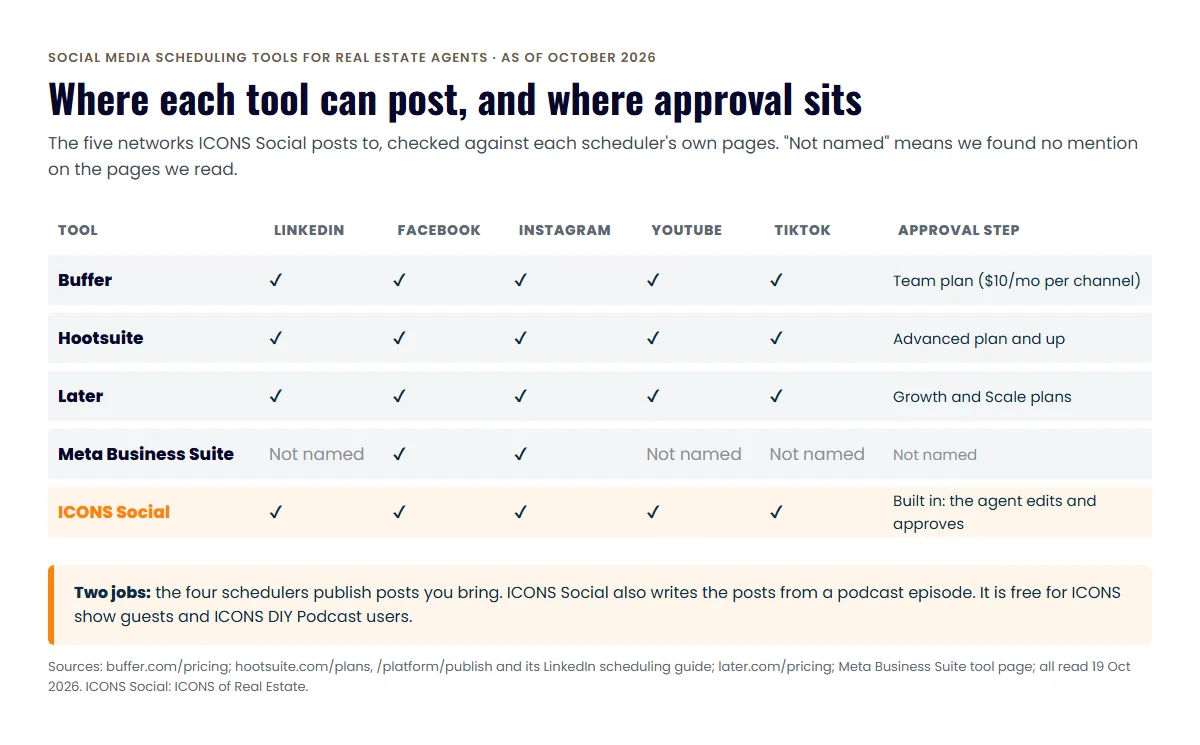
The four schedulers and ICONS Social all reach the big two, Facebook and Instagram, but they differ on the rest and on who signs off. The chart checks the five networks ICONS Social posts to.
How is ICONS Social different from a scheduler?
ICONS Social is a content writer and poster in one, not a general scheduler for everything you post. It starts from a podcast episode; for a guest, that’s the ICONS episode they were on. Once the episode is recorded and released, ICONS Social reads the transcript and writes a pack of about 10 posts using your own words from the episode.
- Write. Quote images, carousels and short video clips, built from what you actually said.
- Check. Fair-housing and disclosure checks, and consent checks before a guest’s face or voice is used.
- Approve. You log in, edit anything you want, and click approve.
- Post. It posts on schedule to your LinkedIn, Facebook, Instagram, YouTube and TikTok.
The point is a month of professional social content promoting you and the episode, without anyone at ICONS writing it by hand. The details are on the ICONS Social page.
ICONS Social is free. It’s for agents who guest on an ICONS show and for ICONS DIY Podcast users. For production clients, the ICONS team does everything for them.
The honest limit: ICONS Social isn’t a general scheduler. It posts the pack written from your episode, so listing posts, open-house reminders and market updates still need one of the tools above.
The checks don’t replace your broker. Advertising rules come from your brokerage, your state and your MLS, so ask your broker what every post needs.
What should real estate agents check before choosing a scheduler?
Real estate agents should check five things before paying for a scheduler: networks, approvals, post limits, seats and how billing works. Most regret comes from a limit found in week three, not from the price.
- Your networks are on the list. Write down every account you post to, including Google Business Profile, and match it against the tool’s own list. Meta Business Suite names Facebook and Instagram only.
- The approval step is on your plan. If an assistant, a team lead or your broker signs off on posts, check which tier adds approvals. On Buffer, Later and Hootsuite it isn’t the entry plan.
- The post limit fits a month. Buffer Free holds 10 scheduled posts per channel and Later Starter 30 per profile. Three posts a week per network fits Later Starter; on Buffer Free you’ll need to refill the queue mid-month, and a heavy listing month may not fit either.
- Seats match your people. Buffer Essentials and Later Starter are one user. Hootsuite prices per user.
- The billing matches the page. Buffer’s page gives two different savings figures for annual billing, and Later’s headline prices are billed yearly. Read the checkout total before you commit.
One more check sits outside any tool. Your brokerage decides what every post needs, such as the brokerage name, license details or disclosures. Ask your broker for that list once and keep it next to your content calendar.
Which scheduling tool should a real estate agent pick?
The right social media scheduling tool depends on how many accounts you run, who else touches your posts, and where your content comes from. Here’s how we’d decide.
- Solo agent, Facebook and Instagram only: Meta Business Suite, with nothing else to log into
- Solo agent on three to five networks: Buffer Essentials, priced per channel; start on Free to test it
- Agent with an assistant who drafts posts: Buffer Team or Later Growth, the first plans on each with approvals
- Team or brokerage marketing desk: Hootsuite, for many accounts, seats and reporting
- Agent who guests on an ICONS show, or runs a show with ICONS DIY Podcast: ICONS Social, free, for the episode content, plus any scheduler above for everything else.
How do you get more from any scheduler?
A social media scheduler pays off only when the posts start conversations. Three habits make the difference for agents.
- Batch from real material. One conversation, such as a podcast episode, a client Q&A or a market call, gives you a week of posts.
- Give every post one next step. A question to answer, a guide to request, a call to book. Our guide to real estate content lead generation covers how to turn posts into replies.
- Reply fast. Scheduling saves time on posting; spend it in the comments and messages.
If you want episode content without writing it, the route to ICONS Social is guesting on an ICONS show. You can apply to be a podcast guest on the ICONS network. If you run your own show with ICONS DIY Podcast, ICONS Social comes with it.
If you also need the clips and posts made, not just scheduled, compare the podcast repurposing tools for real estate agents.
Frequently asked questions
Is there a free social media scheduler for real estate agents?
Buffer has a Free plan for up to 3 channels with 10 scheduled posts per channel, as of October 2026. Meta's Business Suite page lists no price, so check inside your account. Hootsuite and Later offer 14-day free trials rather than free plans.
Can I schedule to my personal LinkedIn profile?
Check each tool's own help pages for the exact account types. Buffer and Later list LinkedIn among supported networks, and Hootsuite's LinkedIn page says you can post and schedule LinkedIn content, without saying whether that means profiles, Pages or both.
How do I get ICONS Social?
ICONS Social is free for agents who guest on an ICONS show and for ICONS DIY Podcast users. Guests get it by applying to be a guest on an ICONS show; DIY users get it with ICONS DIY Podcast. For production clients, the ICONS team does everything for them.
Do schedulers check my posts for fair housing or broker rules?
We found no mention of fair-housing checks on the Buffer, Hootsuite, Later or Meta pages we read. ICONS Social has fair-housing and disclosure checks built in. Either way, your broker sets the advertising rules you follow.
Sources
- Buffer pricing (accessed October 19, 2026)
- Hootsuite plans (accessed October 19, 2026)
- Hootsuite social media calendar and scheduler (accessed October 19, 2026)
- How to schedule LinkedIn posts — Hootsuite blog (accessed October 19, 2026)
- Later pricing (accessed October 19, 2026)
- Meta Business Suite — Meta for Business (accessed October 19, 2026)
Done-for-you podcast production
Want a podcast that brings in referrals, not just downloads?
Icons of Real Estate plans, produces and publishes business-growing podcasts for agents. You record. We handle the rest.
Launch Your Podcast
Written by
Co-Founder and Podcast Guru, Icons of Real Estate
Tomás Fonseca co-founded Icons of Real Estate in 2021 and is its Podcast Guru. He has a background in marketing, with stints at companies like Nintendo and Ardor SEO, and is one of the hosts of the Icons of Real Estate Podcast.

How we research, write, fact-check and correct articles: our editorial standards.