On this page
- How do podcast repurposing tools compare?
- What does each repurposing tool cost in 2026?
- How much is a full year on each repurposing tool?
- What do the free plans include?
- Which tools cut clips and which write posts?
- Which tools post to social media for you?
- What is ICONS Social, and who is it for?
- Which podcast repurposing tool should a real estate agent use?
- How should an agent set up a weekly repurposing routine?
- What should agents check before posting repurposed content?
- Next step
The best podcast repurposing tools for real estate agents depend on the job. Opus Clip, Riverside Magic Clips and Headliner cut clips. Castmagic and Descript also draft written posts. ICONS Social writes and posts a full pack for free, for ICONS show guests and ICONS DIY Podcast users. Most of the others have free plans with watermarks or caps.
How do podcast repurposing tools compare?
Podcast repurposing tools split into three jobs: cutting clips, writing posts and publishing them. The table shows what each tool’s own pages list for those jobs, read on October 19, 2026.
| Tool | Entry paid plan (Oct 2026) | Clips | Written posts | Posting to social |
|---|---|---|---|---|
| Opus Clip | Starter $15/mo | Yes, AI picks moments | AI descriptions and hashtags when scheduling | Starter posts to 3 platforms; Pro adds a scheduler |
| Castmagic | Hobby $19/mo billed annually | Yes, captioned vertical clips | Yes: LinkedIn, Instagram, X, carousels | “Publish or export”; no scheduling found |
| Descript | Hobbyist $16/mo annual, $24 monthly | Yes, clips and highlights | Yes, drafts posts and show notes | Exports to YouTube and podcast hosts; no social scheduling found |
| Riverside (Magic Clips) | Pro $24/mo annual, $29 monthly | Yes, free on every plan | Blog post and Instagram captions per recording; AI show notes on Pro | Pro publishes; Grow adds scheduling |
| Headliner | Basic $7.99/mo billed annually | Audiograms and 10+ clips | Show notes and social captions | Auto-posts on paid plans |
| ICONS Social | Free, for ICONS guests and ICONS DIY Podcast users | Short video clips | Quote images, carousels and posts in the guest’s own words | Posts on schedule after the agent approves |
Three of these tools have a detailed head-to-head with an ICONS product:
- Descript. Descript vs ICONS DIY Podcast covers editing, Studio Sound and media minutes.
- Riverside. Riverside vs ICONS Live covers recording, guests and download hours.
- Headliner. Headliner vs ICONS Design Studio weighs audiograms and auto-posting.
What does each repurposing tool cost in 2026?
Podcast repurposing tools cost between $0 and about $48 a month on the plans a solo agent would pick. All prices below are from each company’s own pricing page as of October 2026.
- Opus Clip. The OpusClip pricing page lists Free at $0, Starter at $15 a month and Pro at $29 a month, with Business priced on request. We found only monthly prices on the page.
- Castmagic. Hobby is $19 a month billed annually ($239 a year) with 30 transcribed hours. Starter is $48 a month billed annually and Team is $139. The Castmagic pricing page shows annual prices only.
- Descript. The Descript pricing page lists Free at $0 with 60 media minutes a month. Hobbyist is $16 a month on annual billing or $24 monthly, with 10 media hours. Creator is $24 or $35.
- Riverside. The Riverside pricing page lists Free at $0, Pro at $24 a month billed annually ($288 a year) or $29 monthly, and Grow at $34 or $39.
- Headliner. The Headliner pricing page lists Forever Free at $0, ad-supported. Basic is $7.99 a month billed annually or $9.99 monthly, and Pro is $19.99 or $25.99.
- ICONS Social. Free, for agents who guest on an ICONS show and for ICONS DIY Podcast users.
Prices change often. Check the live page before you buy, and compare the same billing period across tools.
How much is a full year on each repurposing tool?
A year on each entry paid plan costs between about $96 and $348 at October 2026 list prices. These are worked sums from the prices above, not quotes, before tax.
| Tool and plan | Listed price | Approximate year |
|---|---|---|
| ICONS Social | Free, for ICONS guests and ICONS DIY Podcast users | $0 |
| Headliner Basic, annual | $7.99 a month billed annually | about $96 |
| Opus Clip Starter | $15 a month | about $180 |
| Descript Hobbyist, annual | $16 a month billed annually | about $192 |
| Castmagic Hobby | $239 a year, billed annually | $239 |
| Riverside Pro, annual | $288 a year | $288 |
| Opus Clip Pro | $29 a month | about $348 |
Price alone misleads here. Opus Clip Starter and Headliner Basic are the cheapest ways to get posting built in, but neither writes LinkedIn-length posts. Castmagic writes the most, but you’d still pay for a scheduler on top. Add that second tool to the sum before you compare.
What do the free plans include?
Most podcast repurposing tools have a free plan, and each one carries a limit an agent will feel in the first week. These are the limits each company lists as of October 2026.
- Opus Clip Free: watermarked captions, media storage that expires after 3 days, and one brand template.
- Descript Free: 60 minutes of media a month, 100 one-time AI credits, 720p export and a watermark.
- Riverside Free: 2 hours of multi-track recording, up to 720p video and a Riverside watermark. The Magic Clips page calls the feature “completely free.”
- Headliner Forever Free: ad-supported, one unwatermarked audiogram a month and unlimited watermarked ones.
- Castmagic: we found no free plan or free trial on its pricing or home page.
A watermark on a client-facing clip looks like a shortcut. For an agent whose brand is the product, the first paid tier is usually worth it once you post weekly.
Which tools cut clips and which write posts?
Clip tools make short videos; writing tools turn the transcript into text posts. Most agents need both, because a feed of only clips or only text gets stale.
Clip-first tools
- Opus Clip says it turns long videos into short clips and picks the highlight moments for you. It claims captions with “over 97% accuracy” and reframes video to keep the speaker centered. Its pages describe podcasts as video; we found no mention of audio-only files.
- Riverside Magic Clips picks highlights automatically and lets you choose a focus speaker or topic. Riverside claims 99% accurate captions and offers 16:9, 1:1 and 9:16 formats, up to 4K. It works on recordings and uploads.
- Headliner started with audiograms, a waveform video made from audio. Its home page says it can make 10+ social-ready clips from a full-length video and transcribe in 100+ languages.
Writing-first tools
- Castmagic drafts LinkedIn posts, Instagram captions, tweets, carousels, newsletters, blog articles and quote cards from one recording. It also cuts captioned vertical clips and offers brand voice training with approved and banned terms.
- Descript is an editor first. It lists “Create clips” and highlights, and drafts social posts, show notes and descriptions with AI. Its help center lists direct export to YouTube and podcast hosts such as Buzzsprout and Captivate.
For a closer look at each tool against ICONS Social, see Opus Clip vs ICONS Social, Castmagic vs ICONS Social, Descript clips vs ICONS Social and Riverside Magic Clips vs ICONS Social.
Whichever you use, read every AI-written line against the transcript before it goes out. The words go out under your name and your license.
Which tools post to social media for you?
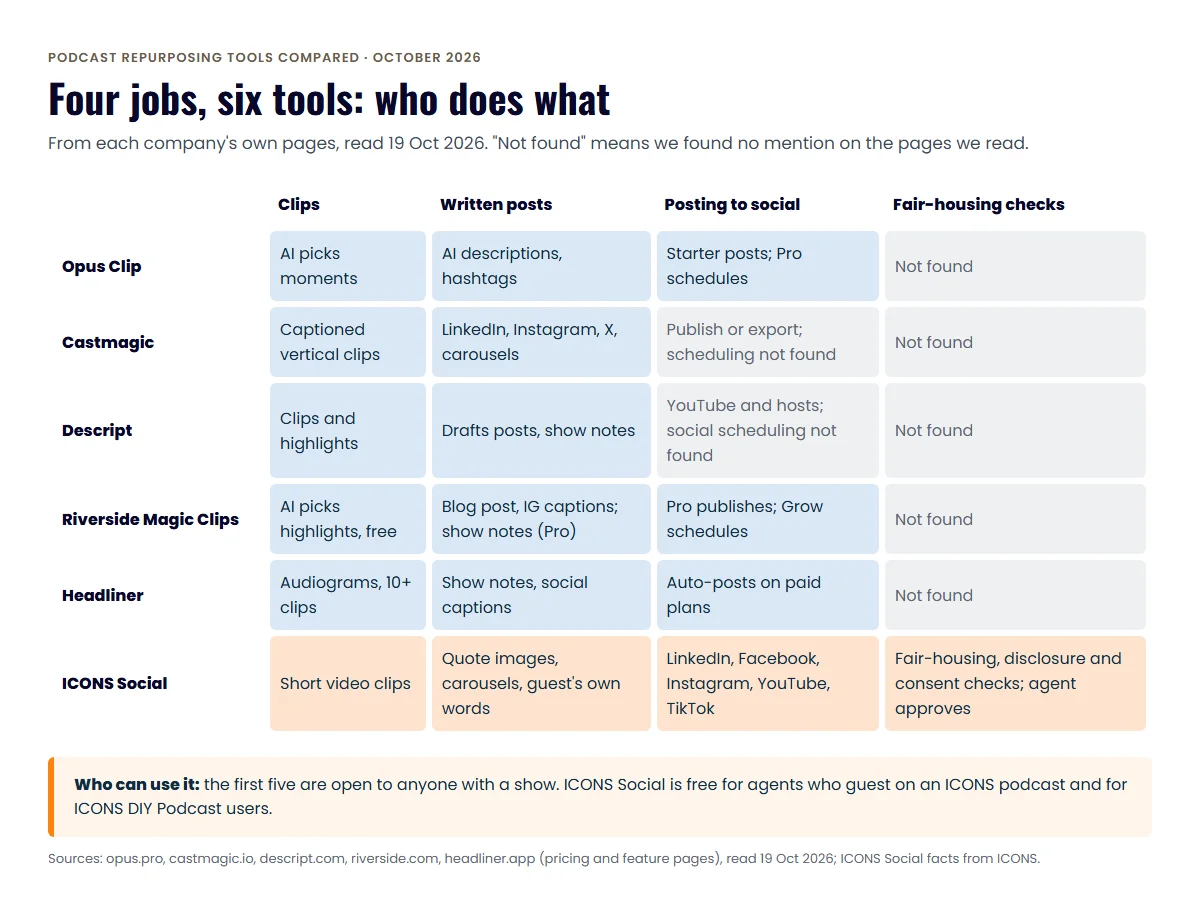
Opus Clip, Riverside and Headliner list built-in posting; Castmagic and Descript leave posting to you or another app. Posting is where most agents’ repurposing plans stall, so this column matters more than clip quality.
- Opus Clip. Starter posts to YouTube Shorts, TikTok and Instagram. Pro adds a scheduler and Facebook, LinkedIn, X, Pinterest, Threads and Bluesky.
- Riverside. Pro lists publishing to YouTube, Spotify, Apple, Instagram, LinkedIn and more. Grow adds social media scheduling.
- Headliner. Basic and Pro auto-post to “social media & YouTube.” The pricing page doesn’t name the platforms.
- Castmagic. The home page says “Publish or export, all from a single dashboard.” We found no mention of scheduling to social accounts.
- Descript. We found no mention of scheduling posts to social platforms on its home page, pricing page or export help page.
- ICONS Social. Posts on schedule to the agent’s LinkedIn, Facebook, Instagram, YouTube and TikTok once the agent approves the pack.
If your tool doesn’t schedule, you’ll need a separate scheduler. For what to post and when, see our guide to podcast clips for real estate agents.
What is ICONS Social, and who is it for?
ICONS Social writes an agent’s social media posts from their guest episode on an ICONS podcast, then posts them to the agent’s own accounts once the agent approves.
How it works, in four steps:
- The episode is recorded and released.
- ICONS Social reads the transcript and writes a pack of about 10 posts: quote images, carousels and short video clips, using the agent’s real words from the episode.
- The agent logs in, edits anything they want and clicks approve.
- ICONS Social posts them on schedule to the agent’s LinkedIn, Facebook, Instagram, YouTube and TikTok.
The point is a month of professional social content for every guest, promoting the agent and the episode, without anyone at ICONS writing it by hand.
Three checks are built in. ICONS Social runs fair-housing and disclosure checks on the posts. It checks consent before using a guest’s face or voice. And nothing posts until the agent approves it. On the tool pages we read, we found no mention of fair-housing or disclosure checks for the other five tools. These checks don’t replace your broker’s review; ask your broker what your posts need to include.
ICONS Social is free. Two groups can use it: agents who guest on an ICONS show, and agents who run their own show on ICONS DIY Podcast. For ICONS production clients, the ICONS team does everything for them.
Which podcast repurposing tool should a real estate agent use?
The right podcast repurposing tool depends on whether you host your own show or guest on someone else’s. Hosts need a tool they control; ICONS guests and ICONS DIY Podcast users get ICONS Social free.
- You host a video podcast and want clips posted with little effort: Opus Clip Pro or Riverside Grow. Both pick moments and schedule posts. Riverside also makes sense if you already record there.
- You want written posts as much as clips: Castmagic. It drafts LinkedIn posts, carousels and newsletters in a trained brand voice. Pair it with a scheduler.
- You edit your own episodes: Descript. Clips and draft posts sit in the same app you edit in.
- Your show is audio-only and on a tight budget: Headliner. Audiograms and auto-posting start at $7.99 a month billed annually.
- You’re a guest on an ICONS show: ICONS Social. The posts come from your episode, in your words, and you approve them before anything goes live.
- You run your show on ICONS DIY Podcast: ICONS Social is included free, so you may not need a separate repurposing tool.
Being a guest and hosting aren’t either-or. A host can still use Opus Clip or Castmagic for their own show and get ICONS Social for an ICONS guest spot. Our podcast guest appearance repurposing plan shows what to do with an appearance whichever tool makes the posts.
How should an agent set up a weekly repurposing routine?
A weekly repurposing routine works best as one short block of time per episode, with one person who owns it. Pick the tool after you know the routine, not before.
- Choose two channels. Most agents get more from two well-fed accounts than five quiet ones. Start where your past clients and referral partners already are.
- Set the pack size. Decide how many clips, quote cards and text posts each episode should produce. A small, steady pack beats a big one you abandon in week three.
- Pick moments with a goal. Choose clips that make a viewer want to call you, such as a pricing tip or a local market answer, not just the funniest line.
- Write or review the text. If your tool drafts posts, edit them into your own voice. If it doesn’t, write one caption per clip from the transcript.
- Approve in one sitting. Review the whole pack at once against the checklist below, then schedule it.
- Check what worked. After a month, keep the post types that brought replies or messages and drop the rest.
A tool can automate steps 3 and 4, and some handle step 5. The choice of channels, the goal and the approval stay with you. If the routine never happens, a guest pack that is written for you and waits only for your approval may be the more realistic option.
What should agents check before posting repurposed content?
Agents should check every repurposed post for accuracy, fair housing and their broker’s advertising rules before it goes live. AI tools speed up the writing, not the responsibility.
- The quote is real. Match every quote card to the transcript, word for word.
- Fair housing. Ask your broker how fair-housing rules apply to your posts.
- Disclosure. Add the brokerage name and any license details your broker requires.
- Consent. Have a guest’s OK before you post their face, voice or name.
- Captions. Fix names, street names and numbers the transcript got wrong.
- Link. Point every post back to the full episode.
For the full asset list from one episode, see our guide to repurposing a real estate podcast. The bigger video strategy, from setup to clip length, is in the real estate video podcast guide.
Next step
If you’d rather have your posts written from an episode than make them yourself, there are two ways in. Apply to be a guest on an ICONS podcast and tell us about your market, or ask for an ICONS DIY Podcast invitation to run your own show.
Frequently asked questions
Which podcast repurposing tool is free?
As of October 2026, Opus Clip, Descript, Riverside and Headliner list free plans, each with limits such as watermarks or capped minutes. Riverside calls Magic Clips completely free. We found no free plan on Castmagic's pricing page.
Can these tools post to Instagram and LinkedIn for me?
Some can. Opus Clip Pro, Riverside Grow and Headliner's paid plans list posting or scheduling to social platforms. ICONS Social posts to LinkedIn, Facebook, Instagram, YouTube and TikTok after the agent approves.
Do I need a video podcast to use these tools?
Opus Clip and Riverside Magic Clips describe working from video. Headliner makes audiograms from audio, and Castmagic and Descript work from audio or video. Check each tool's own pages for your file type before you pay.
How do I get ICONS Social?
ICONS Social is free for agents who guest on an ICONS show and for ICONS DIY Podcast users. Agents apply to be a guest on an ICONS podcast or start a show with ICONS DIY Podcast. For ICONS production clients, the ICONS team does everything for them.
Sources
- OpusClip pricing (accessed October 19, 2026)
- OpusClip home page (accessed October 19, 2026)
- Castmagic pricing (accessed October 19, 2026)
- Castmagic home page (accessed October 19, 2026)
- Descript pricing (accessed October 19, 2026)
- Descript home page (accessed October 19, 2026)
- Descript Help: publishing to other hosting providers (accessed October 19, 2026)
- Riverside pricing (accessed October 19, 2026)
- Riverside Magic Clips (accessed October 19, 2026)
- Headliner pricing (accessed October 19, 2026)
- Headliner home page (accessed October 19, 2026)
Done-for-you podcast production
Want a podcast that brings in referrals, not just downloads?
Icons of Real Estate plans, produces and publishes business-growing podcasts for agents. You record. We handle the rest.
Launch Your Podcast
Written by
Co-Founder and Podcast Guru, Icons of Real Estate
Tomás Fonseca co-founded Icons of Real Estate in 2021 and is its Podcast Guru. He has a background in marketing, with stints at companies like Nintendo and Ardor SEO, and is one of the hosts of the Icons of Real Estate Podcast.

How we research, write, fact-check and correct articles: our editorial standards.