On this page
- Opus Clip and ICONS Social side by side
- What does Opus Clip cost?
- What is ICONS Social, and who can use it?
- How do they compare on the content itself?
- Which one handles real estate compliance better?
- What should you check before you approve a post?
- Where Opus Clip does more
- Where ICONS Social does more
- Opus Clip or ICONS Social: which should you choose?
Opus Clip vs ICONS Social comes down to whose video it is. Opus Clip turns any video into short clips and schedules them on its $29-a-month Pro plan (October 2026). ICONS Social is free for ICONS show guests and ICONS DIY Podcast users: it writes posts from the episode and publishes them once you approve.
Opus Clip and ICONS Social side by side
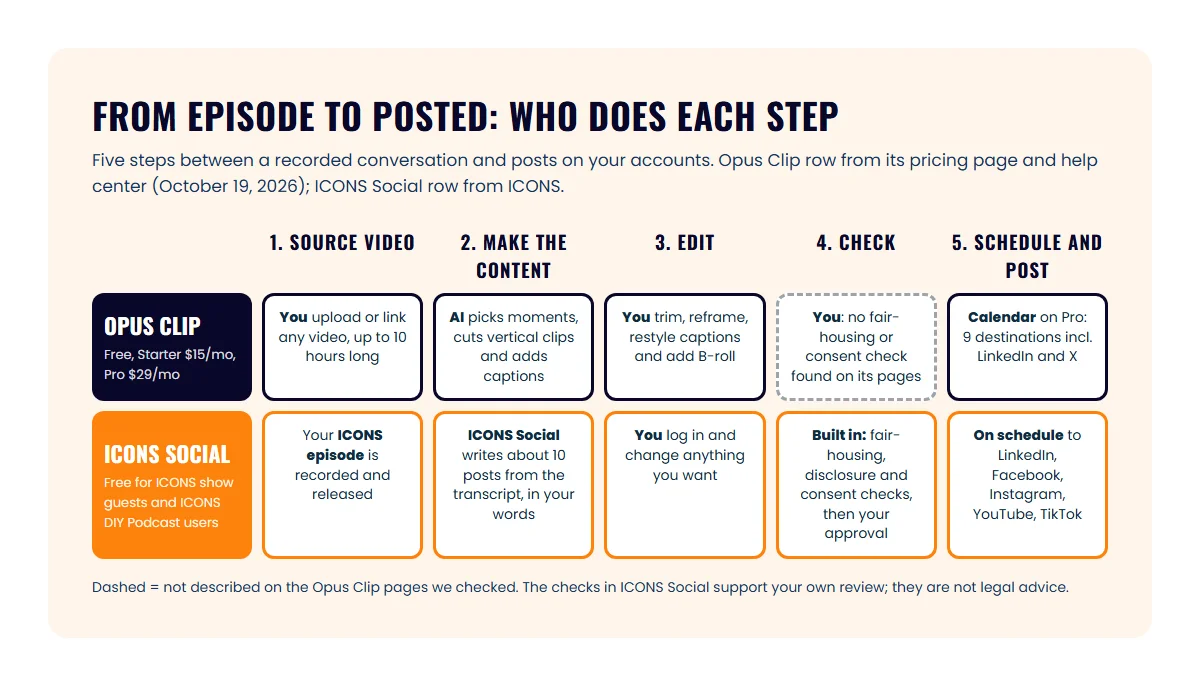
Opus Clip and ICONS Social both turn a long conversation into short social content, but they start from different places. The table below compares them; the Opus Clip column was read off its pricing page and help center on October 19, 2026.
| Opus Clip | ICONS Social | |
|---|---|---|
| Who it’s for | Anyone with a video | Agents who guest on an ICONS show, and ICONS DIY Podcast users |
| Price | Free; Starter $15/mo; Pro $29/mo; Business custom | Free |
| How you get it | Sign up on opus.pro | Be a guest on an ICONS show, or use ICONS DIY Podcast |
| Source video | Any upload or link, up to 10 hours | An ICONS podcast episode, once released |
| What it makes | Vertical clips with captions, reframing and B-roll | About 10 posts: quote images, carousels and short video clips |
| Whose words | Moments the AI picks from your video | Your real words from the episode transcript |
| Editing | Clip editor; caption styles and brand templates | Log in and change anything you want |
| Checks before posting | Default censored-words list on Pro; no fair-housing or consent checks found | Fair-housing and disclosure checks; consent checks before using a guest’s face or voice |
| Approval step | We found no mention of an approval step | You approve before anything posts |
| Where it posts | Starter: YouTube Shorts, TikTok, Instagram. Pro: those plus Facebook, LinkedIn, X, Pinterest, Threads, Bluesky | LinkedIn, Facebook, Instagram, YouTube and TikTok |
| Scheduling | Calendar on Pro and Business | Posts on a schedule after you approve |
What does Opus Clip cost?
Opus Clip’s paid plans are $15 a month for Starter and $29 a month for Pro, with a free plan and custom Business pricing, per its pricing page in October 2026. The plan you need depends mostly on whether you want it to post for you.
- Free: $0, no card needed. The help center lists 60 processing minutes a month. Animated captions carry a watermark, exports are kept for 3 days at up to 1080p, and there’s no social posting.
- Starter: $15 a month and 150 processing minutes a month. It removes the watermark and posts to YouTube Shorts, TikTok and Instagram, but has no scheduler.
- Pro: $29 a month and 300 processing minutes a month, or 3,600 a year. Pro adds the scheduler, Facebook, LinkedIn, X, Pinterest, Threads and Bluesky, up to 4 brand templates, AI video B-roll and seats for up to 4 users.
- Business: custom pricing, unlimited seats and a dedicated processing queue.
Two details matter for an agent’s budget. According to Opus Clip’s billing help page, Pro is the only plan offered on a monthly or yearly cycle, and that page doesn’t list prices, so check the pricing page before you commit. The help center also doesn’t say how many credits a minute of video uses, so a long interview may use more of your allowance than you expect.
What is ICONS Social, and who can use it?
ICONS Social is an ICONS tool that writes a guest’s social media posts from their ICONS podcast episode and posts them to the guest’s own accounts after the guest approves them. You end up with a month of professional social content promoting you and the episode.
From a released episode to scheduled posts, the only thing you do is approve. Step-by-step on the product page.
ICONS Social is free, but it isn’t open sign-up and you can’t point it at any video. Two groups use it: agents who guest on an ICONS show, and ICONS DIY Podcast users. For production clients, the ICONS team does everything for them. The ICONS Social page has the details.
How do they compare on the content itself?
Opus Clip gives you more control over clips, while ICONS Social gives you a finished, mixed pack. Opus Clip’s home page describes AI that finds highlight moments, a ReframeAnything model that keeps the speaker in frame, and captions it says are over 97% accurate.
For shaping a clip, the tools go deep:
- clip lengths from under a minute up to 10 to 15 minutes;
- caption templates, keyword highlights and, on Pro, custom fonts;
- AI image B-roll on Starter (3 clips a month) and AI video B-roll on Pro;
- AI-written descriptions and hashtags when you schedule, per its scheduling help page.
ICONS Social is narrower and more done-for-you. You get quote images and carousels as well as clips, and the wording comes from what you said on the episode. For an agent, that matters: a carousel built on your own answer about pricing a listing sounds like you, not like a caption generator.
Which one handles real estate compliance better?
ICONS Social is built with real estate rules in mind, and Opus Clip is a general creator tool. ICONS Social runs fair-housing and disclosure checks, checks consent before it uses a guest’s face or voice, and won’t post anything until you approve it.
On Opus Clip’s pages we checked, we found no mention of fair-housing checks, advertising disclosures, consent checks or an approval step. Its Pro plan does list a default censored-words list for captions, and Business adds a custom list. Opus Clip also describes a team workspace, so an assistant can work on clips with you.
Neither tool replaces your own judgment. Every post under your name is advertising, so your broker’s advertising rules still apply. The real estate podcast compliance guide covers what to check, and the fair housing checklist for podcasts lists the phrases to watch. This is general information, not legal advice; check with your broker.
What should you check before you approve a post?
Before you approve a post, check that it reads like you, follows your broker’s advertising rules and still makes sense to someone who never heard the episode. The table below lists what to look for in posts from either tool.
| Check | What to look for |
|---|---|
| Your name and brokerage | Shown the way your broker requires |
| Numbers you mentioned | A price or timeline from the episode is still true on the day it posts |
| Neighborhood wording | No line describes an area by who lives there |
| People on screen | Everyone who appears or speaks agreed to be in it |
| The caption | Makes sense to someone who never heard the episode |
| The call to action | Points somewhere you actually check, such as your DMs or a booking link |
| The cut | No sentence is cut off in a way that changes what you meant |
With Opus Clip, that review is entirely yours, and a team member can share it on Pro. With ICONS Social, the built-in checks run first, and your approval is still the final step before anything goes out under your name.
Where Opus Clip does more
Opus Clip does more as an open, self-serve tool. For an agent who films a lot of their own video, these advantages are real:
- Any video. Listing tours, market updates, webinars and your own podcast all work, up to 10 hours long, per its help center.
- Open sign-up. Anyone can start free today, with no card needed.
- More destinations. Pro lists nine, including X, Pinterest, Threads and Bluesky.
- More control. You choose the clips, lengths, captions, fonts and B-roll.
- Team seats. Pro lists up to 4 users, and Business unlimited.
Where ICONS Social does more
ICONS Social’s advantages sit in the parts of the job an agent tends to skip:
- The first draft is done. ICONS Social writes the pack; nobody at ICONS writes it by hand, and you don’t start from a blank page.
- More than clips. The pack mixes quote images, carousels and short videos.
- Your words. Every post comes from what you said on the episode.
- Checks built in. Fair-housing, disclosure and consent checks run before you approve.
- You stay in charge. Nothing posts until you click approve.
The posts promote both you and the ICONS episode. For more on what to do with a guest appearance, see how to repurpose a podcast guest appearance.
Opus Clip or ICONS Social: which should you choose?
Choose Opus Clip for video you film yourself, and ICONS Social for your ICONS episodes, since it costs nothing there. Plenty of agents can use both. Here’s how it plays out:
- Agent who films weekly videos or hosts a show: Opus Clip. Start free, move to Pro at $29 a month when you want it to schedule to LinkedIn and Facebook.
- Agent who guests on an ICONS show: use ICONS Social for that episode. The posts are written, checked and waiting for your approval.
- Agent who does both: use Opus Clip for your own content and ICONS Social for your guest episodes, so you aren’t cutting the same interview twice.
- Agent running a show in ICONS DIY Podcast: ICONS Social is free there too. If ICONS produces your show, the team handles all of it for you.
- Agent who wants posts but has no video yet: get a guest spot first. Apply through the ICONS podcast guest application.
If you’re choosing which moments to clip, podcast clips for real estate agents covers what gets DMs, and the real estate video podcast guide shows how one recording feeds every platform.
Weighing up more clip tools? Our podcast repurposing tools roundup puts five side by side. We also match ICONS Social against Castmagic’s post writer, Descript’s clips and Riverside Magic Clips.
Frequently asked questions
Is Opus Clip free?
Opus Clip has a free plan. As of October 2026 its help center lists 60 processing minutes a month on Free, and its pricing page shows a watermark on animated captions, 3-day storage and no social posting on that plan.
Can I use ICONS Social on my own videos?
ICONS Social works from ICONS podcast episodes: it reads the episode's transcript and writes your posts from it. It is free for agents who guest on an ICONS show and for ICONS DIY Podcast users. For a listing tour you filmed on your phone, use a clipping tool such as Opus Clip.
Does Opus Clip post to LinkedIn?
Yes, on Pro and Business. Opus Clip's pricing page lists posting and scheduling to LinkedIn, Facebook, Instagram, TikTok, YouTube Shorts, X, Pinterest, Threads and Bluesky on Pro. Starter lists posting to YouTube Shorts, TikTok and Instagram only, with no scheduler.
Do fair-housing checks mean I don't need my broker to review posts?
No. ICONS Social's fair-housing and disclosure checks help catch problems before you approve, but they are not legal advice. Your broker's advertising rules still apply to every post that goes out under your name.
Sources
- OpusClip pricing (accessed October 19, 2026)
- OpusClip home page (accessed October 19, 2026)
- OpusClip Help: billing and payment (plans and credits) (accessed October 19, 2026)
- OpusClip Help: schedule your clips (accessed October 19, 2026)
- OpusClip Help: video length supported (accessed October 19, 2026)
Done-for-you podcast production
Want a podcast that brings in referrals, not just downloads?
Icons of Real Estate plans, produces and publishes business-growing podcasts for agents. You record. We handle the rest.
Launch Your Podcast
Written by
Co-Founder and Podcast Guru, Icons of Real Estate
Tomás Fonseca co-founded Icons of Real Estate in 2021 and is its Podcast Guru. He has a background in marketing, with stints at companies like Nintendo and Ardor SEO, and is one of the hosts of the Icons of Real Estate Podcast.

How we research, write, fact-check and correct articles: our editorial standards.