On this page
- How do Descript clips and ICONS Social compare at a glance?
- How does Descript’s Create clips tool work?
- What do Descript clips cost?
- Where does Descript stop: publishing and scheduling?
- How does ICONS Social work for an agent?
- Where Descript does more
- Where ICONS Social does more
- Which should a real estate agent choose: Descript clips or ICONS Social?
Descript Clips vs ICONS Social comes down to who finishes the job. Descript cuts clips and drafts social posts in its editor; you export and post them. ICONS Social turns an episode into about 10 posts in your own words and publishes them after you approve. It is free for ICONS guests and ICONS DIY Podcast users.
How do Descript clips and ICONS Social compare at a glance?
Descript clips and ICONS Social overlap on making content from an episode but split on publishing. The table uses Descript’s own pages as they stood on October 19, 2026, and the ICONS Social description.
| Descript (clips and social posts) | ICONS Social | |
|---|---|---|
| Who can use it | Anyone who signs up | Agents who guest on an ICONS show; ICONS DIY Podcast users |
| Price | Free plan with limited clips; paid from $16 per person a month billed annually | Free |
| Finding the moments | Create clips: 1 to 20 clips, 10 seconds to 5 minutes | Reads the transcript and uses your real words |
| What you get | Video clips, captions you style, AI-drafted post text | About 10 posts: quote images, carousels, short video clips |
| Checks before posting | None described | Fair-housing, disclosure and consent checks |
| Approval | You review your own work | You edit, then click approve |
| Publishing | Export files; direct export to YouTube (not Shorts) | Posts to LinkedIn, Facebook, Instagram, YouTube and TikTok |
| Scheduling | We found no mention of social scheduling | Posts on schedule |
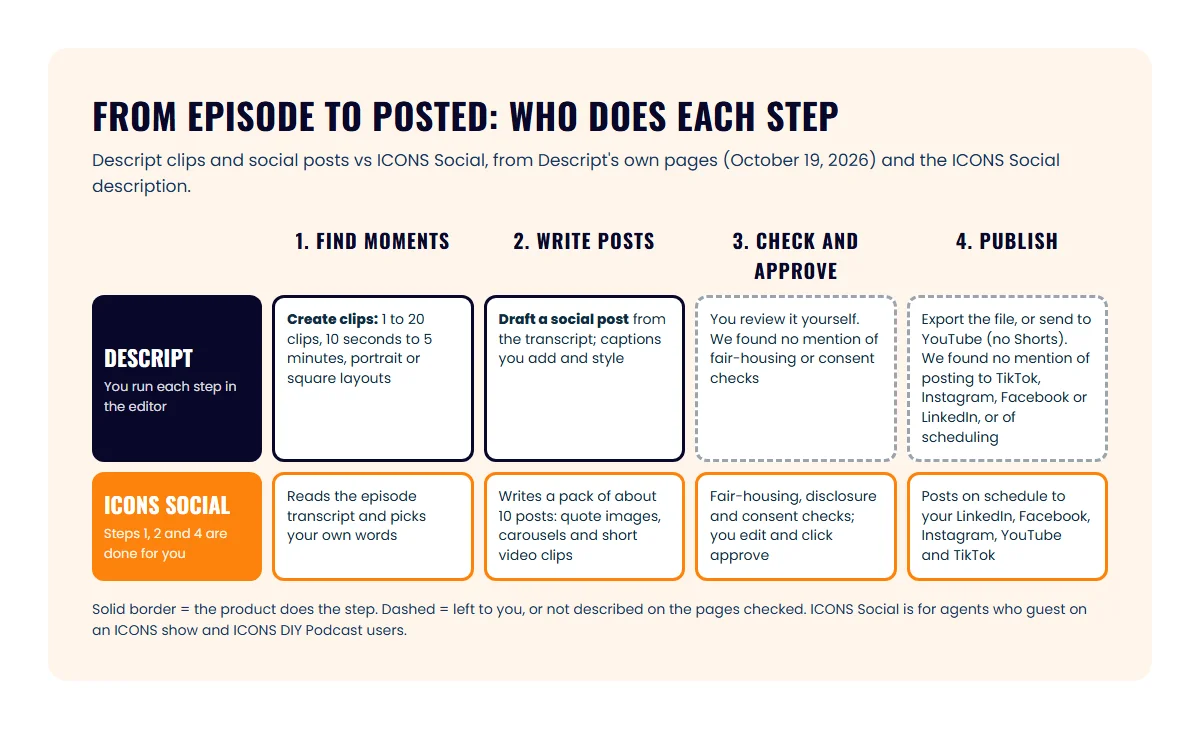
If your question is about Descript as an editor (text-based editing, Studio Sound, recording in Rooms), the full breakdown is in Descript vs ICONS DIY Podcast. This page sticks to clips, posts and publishing.
How does Descript’s Create clips tool work?
Descript’s Create clips tool scans a composition and pulls out short, self-contained cuts for social media, highlight reels or teasers. You open it from the AI Tools panel, under Repurpose, per the Descript help article on creating clips.
You control the brief:
- Number of clips: 1 to 20
- Length: 10 seconds to 5 minutes
- Layout: optional portrait (9:16) or square (1:1) presets, or a custom layout pack
- Topic: an optional topic or goal to steer which moments it picks
Each clip lands in its own folder as a separate composition you can edit. Descript’s clips page adds captions “in a couple clicks,” aspect-ratio changes for each platform, and layouts you can set to your brand. The help article warns that recordings under 1 minute may not give any clips.
For the words around the clip, Descript’s Publish AI tools include “Draft a social post,” which turns your transcript into a post. The same panel drafts titles, show notes, a YouTube description and a blog post.
What do Descript clips cost?
Descript’s clip and social post tools are limited on the free plan and included from Hobbyist up, as of October 2026. On October 19, 2026, the Descript pricing page listed:
- Free: $0, with clips and social posts marked “Limited,” 1 media hour a month and 720p export
- Hobbyist: $16 per person a month billed annually ($24 monthly), 10 media hours, 1080p, no watermark
- Creator: $24 billed annually ($35 monthly), 30 media hours, 4K export
- Business: $50 billed annually ($65 monthly), 40 media hours
Paid plans list AI that “picks your most viral-worthy moments & makes clips that pop” and writes “social media text posts, video descriptions, podcast summaries with timestamps, and more.”
Where does Descript stop: publishing and scheduling?
On the pages we checked, Descript stops at the export for most social platforms. Its export and publishing overview lists a shareable web link, local files, YouTube and podcast hosting services.
YouTube is the one social network with a direct route. The Descript YouTube export article lets you set the title, description, privacy, category and tags, on every plan. It also says YouTube Shorts and brand or shared-access channels aren’t supported, and it doesn’t mention scheduling.
On the pages we checked, we found no mention of publishing straight to TikTok, Instagram, Facebook or LinkedIn, and no tool for scheduling social posts. So with Descript, you download each clip, then post it yourself or through a separate scheduler.
How does ICONS Social work for an agent?
You read the drafts, change what you like, and approve; posting happens on its own after that (how it works).
Three checks are built in. ICONS Social runs fair-housing and disclosure checks, checks consent before using a guest’s face or voice, and waits for your approval. The point is simple: every guest gets professional content promoting themselves and the episode, without anyone at ICONS writing it by hand.
Who can use ICONS Social matters here. It is free for agents who guest on an ICONS show and for ICONS DIY Podcast users. For ICONS production clients, the ICONS team does all of this for them. It isn’t open to anyone with a video, the way Descript is.
Where Descript does more
Descript does more for an agent who wants hands-on control over every clip, or who has no ICONS episode at all. Its real advantages:
- Open to anyone. Sign up and clip any recording, from your own show to a webinar.
- Fine control. Pick the number, length, layout and topic of clips, then edit each one in a full video editor.
- Up to 20 clips from one composition, versus a fixed pack
- Brandable layouts and captions, styled your way
- More written formats. Show notes, titles, YouTube descriptions and blog drafts from the same transcript.
- Direct YouTube upload with title, tags and privacy set in Descript.
Where ICONS Social does more
ICONS Social does more for a guest who wants the episode promoted without becoming a video editor. Its advantages:
- Done for you. The posts are written and the clips cut before you log in.
- Posting included. It publishes to five networks on a schedule; we found no social scheduling on Descript’s pages; it exports files and uploads to YouTube.
- Built-in checks. Fair-housing, disclosure and consent checks run before anything goes out. These checks don’t replace your broker’s review of your advertising.
- Your own words. Posts come from what you said on the episode, which keeps the voice yours.
- Free for ICONS guests and ICONS DIY Podcast users.
Which should a real estate agent choose: Descript clips or ICONS Social?
Choose Descript clips for your own content and ICONS Social for your ICONS guest episodes. The two don’t compete for the same recording, so you can use both.
- You host your own show and edit it yourself: Descript, since Create clips sits inside the editor you already use. Add a scheduler for posting. Or run the show in ICONS DIY Podcast and get ICONS Social with it.
- You were a guest on an ICONS show: ICONS Social. The pack is built from your episode, so approve it and let it post.
- You want to be a guest: apply to be a podcast guest on an ICONS show. ICONS Social comes with the episode.
- You don’t want to touch any of it: ICONS production clients have the ICONS team do it for them.
For what to do with a guest spot beyond social posts, see how to repurpose a podcast guest appearance. For picking which moments to clip, read podcast clips for realtors, and the pillar on real estate video podcasts covers the whole video side.
Still shopping? The repurposing tools roundup covers Opus Clip, Castmagic, Riverside and Headliner too, and three of them have their own head-to-head: Opus Clip, Castmagic’s post writer and Riverside Magic Clips.
Frequently asked questions
Can Descript post clips to Instagram or TikTok for me?
We found no mention of it. As of October 2026, Descript's export overview lists a web link, local export, YouTube and podcast hosts. You export the clip file and upload it to Instagram or TikTok yourself.
Is ICONS Social free?
Yes. ICONS Social is free for agents who guest on an ICONS show and for ICONS DIY Podcast users. For production clients, the ICONS team does the work for them.
Does ICONS Social post anything without my OK?
No. You log in, edit any post you want and click approve. ICONS Social posts the pack on schedule only after that approval step.
Are Descript's clip tools on the free plan?
Descript's pricing page lists clips and social post writing as limited on the Free plan, as of October 2026. Hobbyist, Creator and Business include them in full.
Sources
- Descript pricing (accessed October 19, 2026)
- Descript clips (accessed October 19, 2026)
- Descript Help: create clips from your content (accessed October 19, 2026)
- Descript Help: Publish AI tools (accessed October 19, 2026)
- Descript Help: export and publishing overview (accessed October 19, 2026)
- Descript Help: export to YouTube (accessed October 19, 2026)
Done-for-you podcast production
Want a podcast that brings in referrals, not just downloads?
Icons of Real Estate plans, produces and publishes business-growing podcasts for agents. You record. We handle the rest.
Launch Your Podcast
Written by
Co-Founder and Podcast Guru, Icons of Real Estate
Tomás Fonseca co-founded Icons of Real Estate in 2021 and is its Podcast Guru. He has a background in marketing, with stints at companies like Nintendo and Ardor SEO, and is one of the hosts of the Icons of Real Estate Podcast.

How we research, write, fact-check and correct articles: our editorial standards.