On this page
- Castmagic and ICONS Social side by side
- What does Castmagic cost?
- Is ICONS Social really free?
- How do they turn an episode into posts?
- Who posts the content?
- What checks do they run on real estate content?
- Where Castmagic does more
- Where ICONS Social does more
- Castmagic or ICONS Social: which should you choose?
Castmagic vs ICONS Social comes down to whose recording it is and who does the posting. Castmagic costs from $19 a month billed annually (October 2026) and turns any recording you own into posts, clips and articles that you publish yourself. ICONS Social is free for ICONS show guests and ICONS DIY Podcast users and posts approved content for you.
Castmagic and ICONS Social side by side
Castmagic and ICONS Social both read a transcript and draft social content from it, but they differ on price, who can use them and who publishes. The Castmagic column was read off Castmagic’s pricing page and home page on October 19, 2026; the ICONS Social column reflects the ICONS Social page.
| Castmagic | ICONS Social | |
|---|---|---|
| Price | Hobby $19/mo, Starter $48/mo, Team $139/mo billed annually (monthly billing costs more); Business & Scale from $699/mo | Free |
| Who can use it | Anyone who signs up | Agents who guest on an ICONS show, and ICONS DIY Podcast users |
| What it reads | Uploaded files, or links from YouTube, Spotify, Apple Podcasts, TikTok, Google Drive, Zoom and RSS feeds | The episode’s transcript |
| What it writes | Transcripts, show notes, LinkedIn posts, X threads, Instagram captions, reel scripts, carousels, clips, blogs, newsletters | About 10 posts: quote images, carousels and short video clips |
| Whose words | Brand voice settings and custom prompts shape the drafts | The agent’s real words from the episode |
| Posting | “Publish or export” from one dashboard; we found no mention of scheduling to social accounts | Posts on schedule to LinkedIn, Facebook, Instagram, YouTube and TikTok after approval |
| Approval | Comments, tasks and internal approval flows for teams | The agent logs in, edits and clicks approve |
| Real estate checks | We found no mention of fair-housing checks | Fair-housing and disclosure checks; consent checks before using a guest’s face or voice |
| Languages | 60+ for transcription | n/a |
What does Castmagic cost?
Castmagic’s cheapest plan, Hobby, costs $19 a month billed annually ($239 a year), as of October 2026; the page says annual billing saves 30%. Castmagic’s plans page lists three self-serve plans and one custom tier, and says annual billing saves 30%.
- Hobby: $19 a month billed annually, or $29 monthly. The plan includes 30 transcribed hours (listed as a “library total”), 3 seats and 50GB of storage, with no API access.
- Starter: $48 a month billed annually ($579 a year), or $69 monthly. Starter raises the limits to 100 hours, 5 seats and 250GB, and adds API access.
- Team: $139 a month billed annually ($1,669 a year), or $199 monthly. Team includes 400 hours and 5 seats, with extra seats at an added cost, plus priority support and an onboarding call.
- Business & Scale: from $699 a month, with custom volume, seats and storage.
Every plan lists unlimited AI content regeneration, unlimited clipping and audiograms, and the same integrations. Castmagic says you can buy more hours at any time and change plans when you like. We found no free plan on the pricing page; each plan has a “Try Castmagic” button.
Is ICONS Social really free?
ICONS Social is free for the two groups it serves: agents who guest on an ICONS show, and ICONS DIY Podcast users. There is no plan to pick. For ICONS production clients, the ICONS team does everything for them.
That is the honest limit of the comparison. Castmagic is open to anyone with a recording. ICONS Social is not a tool you sign up for on its own. You get it by being on an ICONS episode as a guest, or by running your own show in ICONS DIY Podcast.
How do they turn an episode into posts?
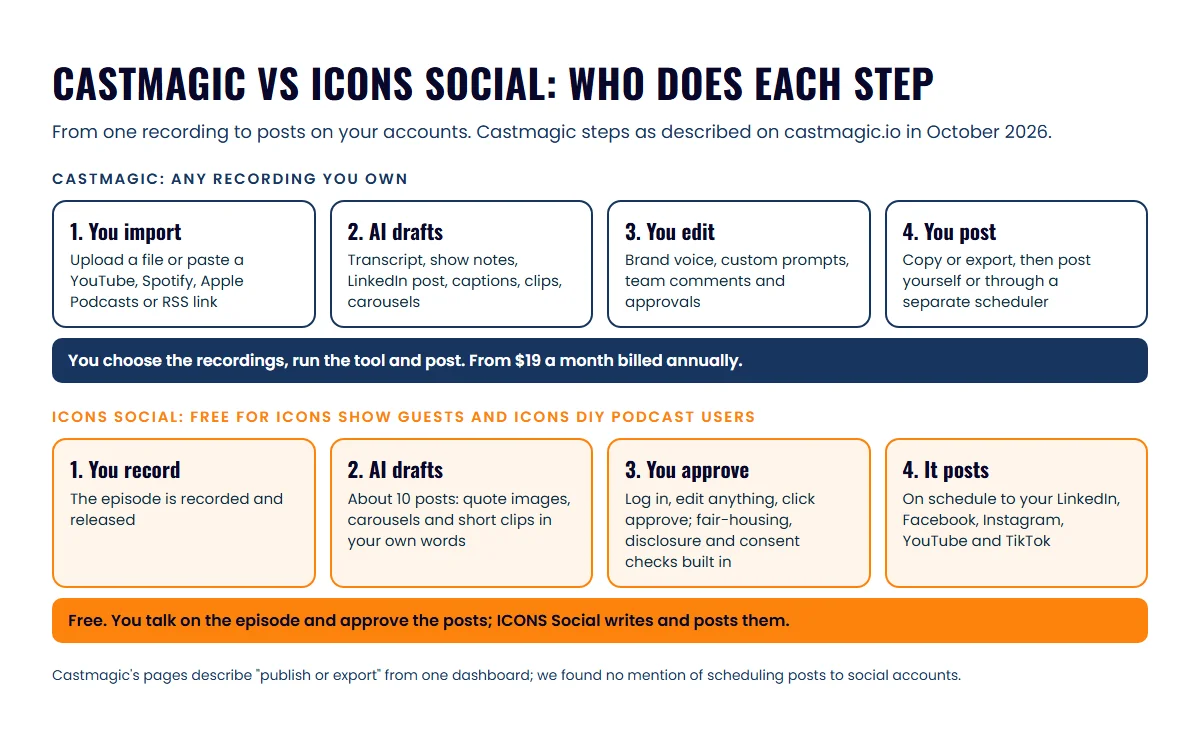
Castmagic and ICONS Social both start from a transcript, but Castmagic gives you a menu of formats while ICONS Social gives you a finished set of posts. The difference shows up in how much you have to decide.
Castmagic’s features page lists more than a hundred tools. From one recording you can draft:
- a transcript, show notes and a YouTube description with chapters;
- a LinkedIn post, an X thread, an Instagram caption and a reel script;
- captioned vertical clips, carousels and audiograms;
- a blog article or a newsletter edition.
Recurring prompts can run your usual set automatically each time a recording comes in. Brand voice settings and custom prompts shape the tone. Castmagic’s real estate page also pitches listing work: a phone walkthrough video becomes a listing description, just-listed posts, reel clips and an email blast.
ICONS Social does one job. After the episode is released, it reads the transcript and writes a pack of about 10 posts: quote images, carousels and short video clips. Every post uses the agent’s real words from the episode. The aim is a month of professional social content that promotes the agent and the episode, without anyone writing it by hand.
Who posts the content?
We found no posting or scheduling feature on Castmagic’s pages, while ICONS Social posts for you once you approve. Castmagic’s home page describes its LinkedIn post as “ready to paste” and says you can “publish or export” from a single dashboard. We found no mention on its pages of connecting your social accounts or scheduling posts. Expect to copy the drafts into each network, or into a scheduler you already pay for.
ICONS Social covers that last step. The agent logs in, edits anything they want and clicks approve. The posts then go out on schedule to the agent’s own LinkedIn, Facebook, Instagram, YouTube and TikTok.
For a busy agent, that last step is often where repurposing stalls. Drafts sit in a folder because nobody has an hour to post them. The guide to repurposing a podcast guest appearance covers what to do with an episode by hand if you’d rather run it yourself.
What checks do they run on real estate content?
ICONS Social has fair-housing and disclosure checks, consent checks before using a guest’s face or voice, and an approval step for the agent. Castmagic’s team features include comments, tasks and internal approval flows. On the pages we checked, we found no mention of fair-housing or consent checks.
Treat any tool’s checks as a safety net, not a sign-off. You’re still responsible for what goes out under your name, and your broker’s advertising rules apply. This is general information, not legal advice. The fair housing checklist for real estate podcasts lists the wording to watch, and your broker has the final word.
Where Castmagic does more
Castmagic does more as a general content tool for any recording you own. For an agent who records a lot outside a podcast, these are real advantages:
- Any source. Upload a file or paste a YouTube, Spotify, Apple Podcasts, TikTok or Google Drive link, or point it at your show’s RSS feed.
- More formats. Blogs, newsletters, YouTube descriptions, X threads and listing copy go beyond social posts.
- Listing marketing. The real estate page describes a full listing launch from one walkthrough video.
- Your back catalog. A content strategist feature answers what to publish next from your whole library of recordings.
- Languages. Castmagic transcribes in more than 60 languages, which helps in a bilingual market.
- Open sign-up. Anyone can start today without being on a particular show.
Where ICONS Social does more
ICONS Social’s advantages sit at both ends of the job: what the posts say and getting them posted. When the episode is an ICONS one, that’s the part you’d otherwise do by hand:
- Free. Guests and ICONS DIY Podcast users pay nothing for it.
- Your own words. The posts quote what you actually said in the episode.
- Posting on schedule. Approved posts go to LinkedIn, Facebook, Instagram, YouTube and TikTok.
- Built-in checks. Drafts get fair-housing and disclosure checks, and consent checks before a guest’s face or voice is used.
- A month of content. One episode becomes about 10 posts, with no prompts to write.
Castmagic or ICONS Social: which should you choose?
Choose Castmagic for content from your own recordings, and get ICONS Social by guesting on an ICONS show or running your show in ICONS DIY Podcast. Here’s how it plays out for three kinds of agent:
- Agent booked as a guest on an ICONS show: use ICONS Social for that episode. It’s free and does the posting. You don’t need Castmagic for it.
- Agent running a show in ICONS DIY Podcast: ICONS Social covers your episodes. Add Castmagic only if you also want blogs, newsletters or listing copy from other recordings.
- Agent with their own show elsewhere, or lots of listing videos: Castmagic is the tool you can use today. Budget for a scheduler or the time to post, since we found no posting feature on its pages.
If clips are the main thing you want from an episode, which podcast clips get DMs for agents covers what to cut. The wider picture of video and repurposing is in the real estate video podcast guide.
The simplest way to get ICONS Social is to be a guest. Apply to be a guest on an ICONS show, and the posts from your episode are written for you to approve.
For the wider field, read podcast repurposing tools compared. Prefer a clip-first tool? See Opus Clip vs ICONS Social, Descript clips vs ICONS Social or Riverside Magic Clips vs ICONS Social.
Frequently asked questions
Does Castmagic have a free plan?
We found no free plan on Castmagic's pricing page in October 2026. Every plan shows a Try Castmagic button, and the cheapest listed plan is Hobby at $19 a month billed annually; monthly billing costs more.
Can Castmagic post to Instagram or LinkedIn for me?
Castmagic's pages, checked in October 2026, describe a LinkedIn post that is ready to paste and say you can publish or export from one dashboard. We found no mention of connecting social accounts or scheduling posts, so plan on a separate scheduler.
How do I get ICONS Social?
ICONS Social is free for two groups: agents who guest on an ICONS show, and ICONS DIY Podcast users. Apply to be a guest, or ask for an ICONS DIY Podcast invitation. For production clients, the ICONS team does everything for them.
Does ICONS Social give legal advice on fair housing?
No. ICONS Social runs fair-housing and disclosure checks on its drafts, and you approve every post before it goes out. Your broker's advertising rules still apply, so check with your broker on anything you are unsure about.
Sources
- Castmagic pricing (accessed October 19, 2026)
- Castmagic home page (accessed October 19, 2026)
- Castmagic features (accessed October 19, 2026)
- Castmagic for real estate agents (accessed October 19, 2026)
Done-for-you podcast production
Want a podcast that brings in referrals, not just downloads?
Icons of Real Estate plans, produces and publishes business-growing podcasts for agents. You record. We handle the rest.
Launch Your Podcast
Written by
Co-Founder and Podcast Guru, Icons of Real Estate
Tomás Fonseca co-founded Icons of Real Estate in 2021 and is its Podcast Guru. He has a background in marketing, with stints at companies like Nintendo and Ardor SEO, and is one of the hosts of the Icons of Real Estate Podcast.

How we research, write, fact-check and correct articles: our editorial standards.