On this page
- Riverside Magic Clips and ICONS Social side by side
- What does Riverside Magic Clips do?
- Can Riverside schedule and post the clips?
- How does ICONS Social work for an agent?
- How much do Riverside Magic Clips and ICONS Social cost?
- Where Riverside Magic Clips does more
- Where ICONS Social does more
- Riverside Magic Clips or ICONS Social: which should you choose?
Riverside Magic Clips vs ICONS Social is a choice between a clip tool and a posting service. Riverside Magic Clips cuts AI highlights from any recording, and you polish and schedule them yourself (scheduling starts on Grow, October 2026). ICONS Social is free and turns an ICONS episode into posts you approve.
Riverside Magic Clips and ICONS Social side by side
Riverside Magic Clips and ICONS Social both start from a recorded conversation, but they differ on who can use them and how much of the posting you do. The Riverside column below comes from its pricing page and help center as of October 19, 2026. The ICONS column describes ICONS Social.
| Riverside Magic Clips | ICONS Social | |
|---|---|---|
| Price | Free plan includes Magic Clips; Pro $24/mo, Grow $34/mo billed annually ($29, $39 monthly) | Free |
| Who can use it | Anyone who signs up | Agents who guest on an ICONS show, and ICONS DIY Podcast users |
| What it makes | Short clips, plus a blog post and Instagram captions per recording | About 10 posts per episode: quote images, carousels and short video clips |
| Words used | AI-picked highlights; AI-written descriptions you can edit | The agent’s real words from the episode |
| How many clips | About 2 per 5 minutes, 30 to 90 seconds each; extra sets on paid plans | About 10 posts per episode |
| Scheduling | Content planner on Grow and higher | Posts on schedule after approval |
| Platforms | YouTube, LinkedIn, TikTok, Instagram, X, Facebook | LinkedIn, Facebook, Instagram, YouTube, TikTok |
| Review step | Share an edit for comments (Pro and higher) | The agent edits and approves before anything posts |
| Real estate checks | We found no mention of fair-housing or consent checks | Fair-housing, disclosure and consent checks |
If your question is about recording quality, guest limits or Riverside’s editor rather than clips and posts, read Riverside vs ICONS Live for real estate recording instead.
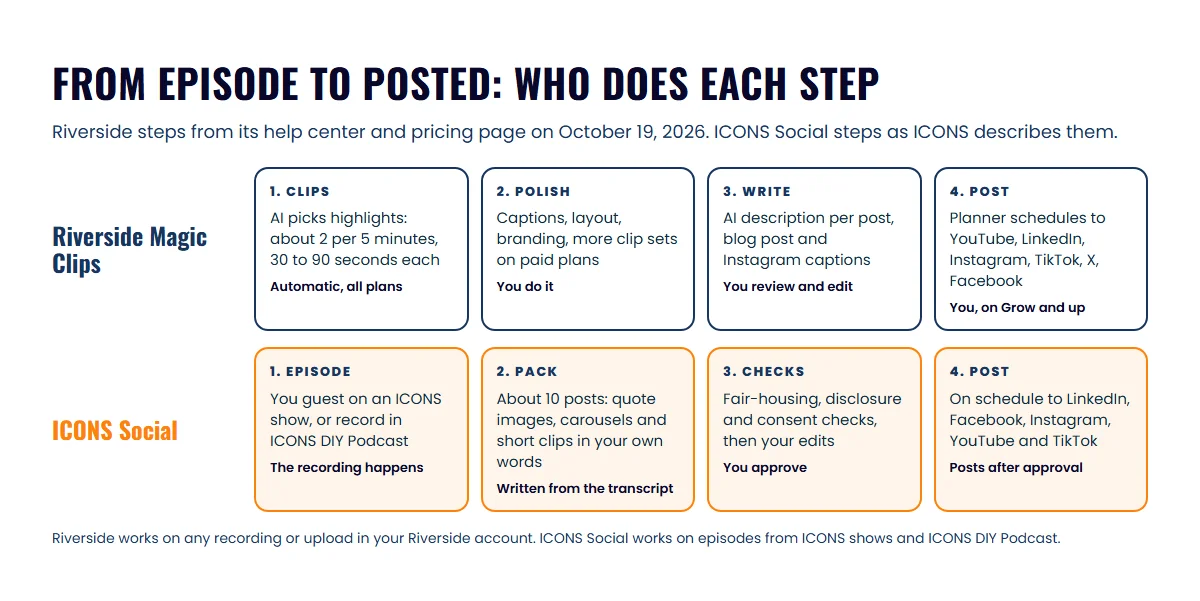
What does Riverside Magic Clips do?
Riverside Magic Clips is an AI feature that picks highlights from a recording or an uploaded file and turns them into short clips with animated captions. Riverside’s help center says it typically finds 2 clips for every 5 minutes of conversation, each 30 to 90 seconds long, for content over 3 minutes with a transcript.
What you get, as of October 2026:
- One automatic set per recording, on every plan, including free.
- Extra sets on paid plans: up to 3 sets in total on Pro, Grow and Webinar, and up to 5 on Business. For these you set the length, the speaker to focus on and keywords.
- A score from 70 to 99 on each clip, showing how strong Riverside rates it against the rest of the batch.
- Formatting: the Magic Clips page lists 16:9, 1:1 and 9:16 presets and adjustable captions. You can save your layout, branding and length as a preset.
- Written posts: Riverside also generates a blog post and Instagram captions for each recording, in English only.
Riverside’s help center itself calls Magic Clips “experimental” and says results may vary. In practice that means you watch every clip before it goes anywhere. An AI picks moments that sound lively, which isn’t always the moment a seller would care about.
Can Riverside schedule and post the clips?
Riverside can post clips for you, but scheduling sits on the higher plans. Its content planner schedules posts to YouTube, LinkedIn, TikTok, Instagram, X and Facebook, and the multi-platform scheduling guide lists Grow, Webinar and Business.
How it works:
- Open a Magic Clip or edit and click Share, which asks you to export the video first.
- Connect your accounts. Every connected account is selected by default, and you can exclude any of them.
- Tailor the caption per platform. On LinkedIn you can type a description or generate one with AI.
- Pick a date and time, or publish now.
Riverside’s pricing page puts “Social media scheduling” on Grow, $34 a month billed annually or $39 monthly. Its AI Co-Creator can also write captions and descriptions and lets you set a tone of voice. That’s a lot of capability for one subscription. The catch for a busy agent is that every step above is yours to do.
How does ICONS Social work for an agent?
ICONS Social turns an ICONS podcast episode into a month of social posts for the agent who was on it, and posts them once the agent approves. You get the pack already written, so your job shrinks to editing and approving.
After release, the pack is drafted, you sign off, and it is published for you. How ICONS Social works has the detail.
Each guest gets a month of professional content promoting themselves and the episode, and nobody at ICONS writes it by hand. ICONS DIY Podcast users get ICONS Social for their own shows. For production clients, the ICONS team does all of it for them.
How much do Riverside Magic Clips and ICONS Social cost?
Riverside Magic Clips costs nothing to try, because the free plan includes one automatic set of clips per recording. ICONS Social is free for the agents who can use it. The real cost difference shows up once you want posting handled.
Here is what each Riverside plan adds on the clips-and-posts side, from the pricing page and help center as of October 2026:
| Riverside plan | Price (annual / monthly) | Clips and posts |
|---|---|---|
| Free | $0 | One automatic Magic Clips set per recording; blog post and Instagram captions; Riverside watermark |
| Pro | $24 / $29 a month | Up to 3 clip sets per recording with your own settings; no watermark; share an edit for comments |
| Grow | $34 / $39 a month | Everything in Pro, plus social media scheduling in the content planner |
| Webinar | $79 / $99 a month | Up to 3 clip sets per recording; social media scheduling |
| Business | Custom | Up to 5 clip sets per recording |
So an agent who wants Riverside to post on a schedule is looking at Grow, $408 a year billed annually. For agents who record their own content every week, that’s fair value. For an agent whose main source of content is guest appearances, it’s paying for a studio to handle a job ICONS Social already does after an ICONS episode.
Where Riverside Magic Clips does more
Riverside Magic Clips does more as an open, self-serve tool. These are real advantages:
- Anyone can use it. Sign up and run Magic Clips on any recording or upload, with no show or invitation needed.
- It works on all your content. Solo market updates, listing videos and webinars all qualify, as well as podcast episodes.
- More control. You choose clip length, speaker focus, keywords, layout, branding and caption style.
- X is included. Riverside schedules to X as well as the five platforms ICONS Social covers.
- One place for everything. Recording, editing, clips, a planner and analytics sit in the same account.
If you run your own show and like doing the editing, Riverside is hard to beat for the price.
Where ICONS Social does more
ICONS Social’s advantages are about what reaches your feed and how much of your time it takes. For an agent who would rather approve than produce, that matters more than clip settings:
- Your words, not a summary. Every post is built from what you actually said on the episode.
- Checks built for real estate. Each pack goes through fair-housing and disclosure checks. On Riverside’s pages we found no mention of fair-housing checks.
- Consent checks. ICONS Social checks consent before it uses a guest’s face or voice. We found no mention of a likeness consent check on Riverside’s pages.
- Approval before posting. Nothing posts until you approve it. Riverside’s review link collects comments on an edit, which is a different job.
- Free. There’s no plan to move up to for scheduling.
Those checks describe what the tool does; they are not legal advice. Your broker’s advertising rules still apply to every post, and the real estate podcast compliance guide covers the questions to ask.
Riverside Magic Clips or ICONS Social: which should you choose?
Choose Riverside Magic Clips for content you record and post yourself, and ICONS Social when the episode is on an ICONS show or in ICONS DIY Podcast. Most agents won’t pick one over the other; they’ll use each where it fits.
- You record your own videos and like hands-on control: Riverside. Start on the free plan’s Magic Clips, and move to Grow if you want its planner to post for you.
- You want a month of posts without writing them: be a guest on an ICONS show and use ICONS Social. Apply to be a podcast guest to get on one.
- You run your own show and want the posting handled: host it in ICONS DIY Podcast, which includes ICONS Social.
- You already pay for Riverside Grow: keep it for your own content, and treat ICONS Social as the extra pack you get each time you guest on an ICONS show.
For more on which moments make clips that get replies, see podcast clips for real estate agents, and for the bigger picture of video in an agent’s marketing, the real estate video podcast guide.
If Riverside isn’t your recorder, the roundup of podcast repurposing tools may suit you better, along with our takes on Opus Clip, Castmagic’s post writer and Descript’s clip tools.
Frequently asked questions
Is Riverside Magic Clips free?
Yes, on the free plan too. As of October 2026 Riverside's pricing page lists Magic Clips on every plan, and its help center says each recording gets one automatic set. Extra sets with your own length, speaker and keyword settings start on Pro, $24 a month billed annually.
Can Riverside post my clips for me?
Yes, once you set the post up. Riverside's content planner schedules posts to YouTube, LinkedIn, TikTok, Instagram, X and Facebook on the Grow, Webinar and Business plans. You pick the clip, write or generate the caption and choose the time.
Can I use ICONS Social with a Riverside recording?
ICONS Social is for agents who guest on an ICONS show and for ICONS DIY Podcast users. If you record your own show in Riverside outside ICONS, Magic Clips and its planner are the tools to use for it.
Does ICONS Social replace my broker's compliance review?
No. ICONS Social runs fair-housing and disclosure checks on each post, but those checks don't stand in for your broker's advertising rules. Ask your broker what has to appear on a social post before you approve the pack.
Sources
- Riverside Magic Clips (accessed October 19, 2026)
- Riverside pricing (accessed October 19, 2026)
- Riverside Help Center: About Magic Clips (accessed October 19, 2026)
- Riverside Help Center: About Posts (accessed October 19, 2026)
- Riverside Help Center: Schedule a social post to multiple platforms (accessed October 19, 2026)
- Riverside Help Center: Share and publish your content (accessed October 19, 2026)
- Riverside Help Center: Schedule a social post to LinkedIn (accessed October 19, 2026)
- Riverside Help Center: Share an edit for review and comments (accessed October 19, 2026)
- Riverside Help Center: AI Co-Creator overview (accessed October 19, 2026)
Done-for-you podcast production
Want a podcast that brings in referrals, not just downloads?
Icons of Real Estate plans, produces and publishes business-growing podcasts for agents. You record. We handle the rest.
Launch Your Podcast
Written by
Co-Founder and Podcast Guru, Icons of Real Estate
Tomás Fonseca co-founded Icons of Real Estate in 2021 and is its Podcast Guru. He has a background in marketing, with stints at companies like Nintendo and Ardor SEO, and is one of the hosts of the Icons of Real Estate Podcast.

How we research, write, fact-check and correct articles: our editorial standards.