On this page
- Buffer and ICONS Social side by side
- What does Buffer cost for a real estate agent?
- What is ICONS Social?
- How do Buffer and ICONS Social handle approval?
- Which one checks for fair-housing and consent issues?
- Where Buffer does more
- Where ICONS Social does more
- Buffer or ICONS Social: which should you choose?
Buffer vs ICONS Social is a choice between a general scheduler and a done-for-you post pack. Buffer schedules anything you write to 12 social networks, free for 3 channels and paid per channel after that (October 2026). ICONS Social is free and writes about 10 posts from your ICONS episode, then posts them once you approve.
Buffer and ICONS Social side by side
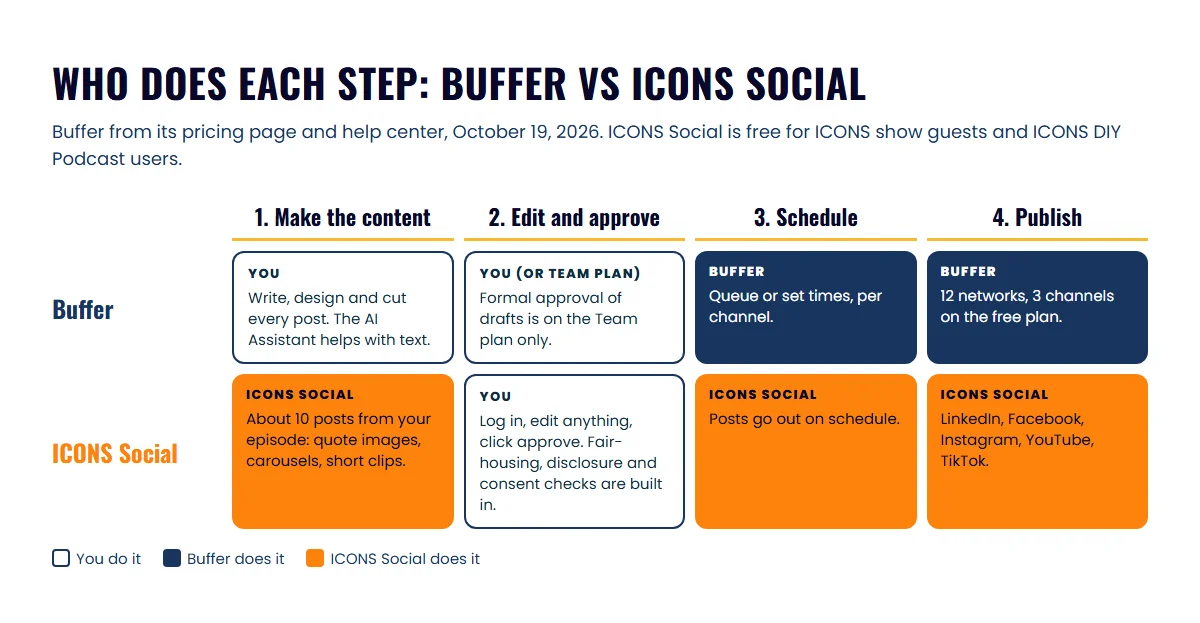
Buffer and ICONS Social both approve, schedule and publish posts, but only ICONS Social writes them from your episode. The Buffer column was read off its pricing page, home page and help center on October 19, 2026. The ICONS Social column reflects the ICONS Social page.
| Buffer | ICONS Social | |
|---|---|---|
| What it does | Schedules and publishes posts you create | Writes posts from your episode, then publishes them |
| Who can use it | Anyone who signs up | Agents who guest on an ICONS show, and ICONS DIY Podcast users |
| Price | Free; Essentials $5 and Team $10 per channel a month, shown as $60 and $120 billed yearly | Free |
| Where the content comes from | You, with help from its AI Assistant | Your own words from the episode transcript |
| Post types | Whatever you upload or write | About 10 posts: quote images, carousels and short video clips |
| Networks | Bluesky, Facebook, Google Business Profile, Instagram, LinkedIn, Mastodon, Pinterest, Substack, Threads, TikTok, X, YouTube | LinkedIn, Facebook, Instagram, YouTube, TikTok |
| Approval step | Team plan only | Built in: you edit and approve before anything posts |
| Compliance checks | We found no mention of fair-housing or disclosure checks | Fair-housing and disclosure checks; consent checks before using a guest’s face or voice |
| Analytics | 30-day history on Free; advanced analytics on paid plans | Reports on how your posts perform |
What does Buffer cost for a real estate agent?
Buffer costs nothing for up to 3 channels, and paid plans are priced per channel (October 2026 prices). The figures below come from the Buffer pricing page, checked on October 19, 2026.
- Free: $0 with no time limit. Up to 3 channels, 10 scheduled posts per channel at a time (“refill anytime”), 1 user, the AI Assistant and a 30-day analytics history. No approval workflows.
- Essentials: $5 a month for 1 channel, shown as $60 billed yearly. Unlimited scheduled posts per channel, advanced analytics, a hashtag manager and first-comment scheduling. Still 1 user.
- Team: $10 a month for 1 channel, shown as $120 billed yearly. Everything in Essentials plus unlimited team members, access levels and content approval workflows.
A few details matter for budgeting. Buffer bills per channel, so each connected account adds to the bill, and its FAQ says it uses volume discounts as you add channels. The page says annual billing saves 20% and “save 2 months”, but the yearly figures equal twelve monthly payments; check the price at checkout. Paid plans include a 14-day free trial, and “unlimited” posts are capped at 5,000 per channel under fair use.
What is ICONS Social?
ICONS Social is a free ICONS tool that writes and posts social media content for agents who guest on an ICONS podcast and for ICONS DIY Podcast users. After the episode is recorded and released, it reads the transcript and writes a pack of about 10 posts: quote images, carousels and short video clips. Every post uses the agent’s real words from the episode.
Once your episode is out, it drafts the posts, waits for your OK, then schedules them. See how ICONS Social works.
The point is that every guest gets a month of professional social content promoting themselves and the ICONS episode, without anyone at ICONS writing it by hand. Guests get it by appearing on an ICONS show, and DIY users get it with their ICONS DIY Podcast workspace. For ICONS production clients, the ICONS team does all of this for them. The full details are on the ICONS Social page.
How do Buffer and ICONS Social handle approval?
Buffer and ICONS Social both let you check posts before they go out, but Buffer reserves the formal approval step for its Team plan. Buffer’s help center says “approving drafts is only available on our Team plan.”
On Buffer Team, a member with the Needs Approval role writes a draft and requests approval. The draft moves to an Approvals tab, where the account owner or a Full Access user can edit it, approve it, send it back or delete it. Once approved, it goes into the next open queue slot or the time already set, per Buffer’s guide to approving drafts. That setup works well for an agent with an assistant or a marketing coordinator.
ICONS Social puts approval in front of the agent every time. Nothing posts to your accounts until you have logged in, edited what you want and approved the pack. For a solo agent on Buffer Essentials or Free, there is no separate approval step, because you are the only user and you schedule your own posts.
Which one checks for fair-housing and consent issues?
ICONS Social has fair-housing and disclosure checks built in, plus consent checks before using a guest’s face or voice. We found no mention of fair-housing or disclosure checks on the Buffer pages we read in October 2026.
That matters because a post pulled from a long conversation can lose its context. A line about a neighborhood or a client story reads differently on its own in a feed. Treat any automated check as a second pair of eyes, not a sign-off. Your broker’s advertising rules still apply to every post, whichever tool sends it. This is general information, not legal advice. For the questions to ask before an episode goes out, see the fair housing checklist for real estate podcasts.
Where Buffer does more
Buffer does more as an everyday scheduler for all the content you make, not just one episode. For most agents these are real advantages:
- Any content, any time. Listing posts, market updates, open-house reminders and client wins all go through the same queue.
- More networks. Buffer lists 12, including Google Business Profile, Threads, Pinterest and X. ICONS Social posts to 5.
- A free plan anyone can start today. No guest booking needed.
- An AI Assistant for text. Buffer’s AI Assistant page says it can turn one post into versions for each network and “summarize long content into short posts”. We found no mention of it cutting video clips or designing images.
- Analytics and engagement. Paid plans add advanced analytics, and Buffer’s home page describes replying to comments from one dashboard.
- A link-in-bio page. Buffer’s Start Page gives you a simple page for your social profiles.
Where ICONS Social does more
ICONS Social does the writing and the design, which is the slow part for most agents. Its advantages all come from starting with the episode:
- Content you didn’t have to make. About 10 finished posts, including short video clips, from one conversation.
- Your own words. Posts quote what you said on the show, so they sound like you rather than a template.
- Two kinds of promotion at once. The posts promote you and the ICONS episode, which gives your audience a reason to listen.
- Free, with approval built in. You edit and approve every pack, with no plan to buy.
- Real estate checks. Fair-housing and disclosure checks, and consent checks before using a guest’s face or voice.
The catch is plain: ICONS Social runs on an episode, either your ICONS guest appearance or your own show in ICONS DIY Podcast. Without one, it has nothing to write from. To work an appearance by hand, see the guide to repurposing a podcast guest appearance. For which moments to cut, see podcast clips for real estate agents.
Buffer or ICONS Social: which should you choose?
Choose Buffer for the content you make yourself every week, and get ICONS Social free by being a guest on an ICONS show. They solve different problems, so many agents could reasonably use both.
- You already create content and need it posted on time: Buffer. Start on the free plan, and move to Essentials when you need more than 3 channels.
- You have an assistant who drafts your posts: Buffer Team, so you approve before anything goes live.
- You struggle to make content at all: be a guest. One ICONS episode gives you a month of posts through ICONS Social without writing them yourself.
- You’re already a guest on an ICONS show, or run your show in ICONS DIY Podcast: use ICONS Social for the episode posts, and Buffer for everything else.
Posting is only half the job. Content brings business when it starts conversations, which the guide to real estate content lead generation covers step by step. If you want the episode that ICONS Social builds on, apply to be a podcast guest.
Looking at other schedulers? Social media scheduling tools for real estate agents compares Buffer, Hootsuite, Later and Meta Business Suite, and we cover Hootsuite for teams and Later for Instagram one-on-one.
Frequently asked questions
Is Buffer free?
Buffer has a free plan. As of October 2026 its pricing page lists up to 3 channels, 10 scheduled posts per channel at a time, 1 user and the AI Assistant. Approval workflows are not on the free plan.
Can I use ICONS Social without being on an ICONS show?
Yes, if you run your own show in ICONS DIY Podcast. ICONS Social is free for agents who guest on an ICONS show and for ICONS DIY Podcast users. For ICONS production clients, the ICONS team handles the social side for them.
Does Buffer turn a podcast episode into clips?
We found no mention of cutting video clips from an episode on Buffer's pages checked in October 2026. Its AI Assistant page describes writing, repurposing and summarizing text into posts. You bring the clips and images yourself.
Can I use Buffer and ICONS Social together?
Nothing stops you running both. ICONS Social covers the month of posts from your guest episode, and Buffer covers everything else you post. Keep an eye on your calendar so the two don't stack posts on the same day.
Sources
- Buffer pricing (accessed October 19, 2026)
- Buffer home page (accessed October 19, 2026)
- Buffer AI Assistant (accessed October 19, 2026)
- Buffer Help Center: managing and approving draft posts (accessed October 19, 2026)
Done-for-you podcast production
Want a podcast that brings in referrals, not just downloads?
Icons of Real Estate plans, produces and publishes business-growing podcasts for agents. You record. We handle the rest.
Launch Your Podcast
Written by
Co-Founder and Podcast Guru, Icons of Real Estate
Tomás Fonseca co-founded Icons of Real Estate in 2021 and is its Podcast Guru. He has a background in marketing, with stints at companies like Nintendo and Ardor SEO, and is one of the hosts of the Icons of Real Estate Podcast.

How we research, write, fact-check and correct articles: our editorial standards.