On this page
- Where do real estate agents use QR codes?
- What should a real estate QR code link to?
- Static or dynamic QR codes: which do agents need?
- How big should a QR code be on a sign or flyer?
- How do you track scans from a static QR code?
- What MLS and brokerage rules apply to QR codes?
- How do you make a QR code for a real estate sign?
QR codes for real estate work best as a shortcut from print to one page you control. Point each one at your listing page, an open-house sign-in form, a booking link, a video tour or a podcast episode where prospects hear you first. Print each code at least 2 cm wide, dark on light, and test it on several phones.
You can make one now with the free Icons QR code generator. It builds a static code from any URL or text right in your browser, lets you set the size, colors, quiet zone and error-correction level, and downloads PNG or SVG. Keep it open in another tab while you read.
Where do real estate agents use QR codes?
Real estate agents use QR codes anywhere a printed piece needs a next step: yard sign riders, flyers, open-house sign-in, business cards, listing presentations and postcards. The rule is the same everywhere. One code, one job, one page.
The table shows each placement, what the code should open and the mistake that wastes it.
| Placement | Link the QR code to | Common mistake |
|---|---|---|
| Yard sign rider | The listing page on your own site, with photos, price and a contact form | Linking a portal page you don’t control |
| Property flyer | The same listing page or the video tour | A code so small it won’t scan from a hand-held flyer |
| Open-house sign-in | A short sign-in form that goes into your CRM | Asking for ten fields when name, phone and email will do |
| Business card | Your booking link, or a page about you with a podcast episode on it | Linking your homepage and hoping they find the rest |
| Listing presentation | A podcast episode or guest appearance where the seller hears you talk shop | Burying it on the last slide |
| Postcard or door card | One short page for that street or farm area | Reusing the same code on every mailer, so you can’t tell them apart |
For how these pieces fit into a wider plan that turns content into leads, see the real estate content and lead generation guide.
What should a real estate QR code link to?
A real estate QR code should link to the one page that answers the question the person had when they scanned. Someone at a yard sign wants the house. Someone holding your card wants to know who you are. Match the page to that moment.
Good targets, in rough order of how often agents need them:
- The listing page on your own website. When the home sells, update that page to “Sold” with similar homes, so the code on old flyers still lands somewhere useful.
- An open-house sign-in form. Put the code on a tent card by the door. Guests sign in on their own phones and the entry goes straight into your system.
- Your booking link. Business cards and postcards work better when the next step is a calendar, not a phone number.
- A video tour. Good on flyers for homes that photograph poorly or are hard to show.
- A podcast episode or guest appearance. A prospect hears 20 minutes of how you think before they ever call you. Few agents do this, so it stands out.
The podcast option is the one most QR code lists skip. A seller who has listened to you explain pricing on someone else’s show walks into the listing appointment already trusting you. If the episode lives on your own site, follow the steps to embed a podcast on your real estate website and point the code there, not at a podcast app.
No guest appearances yet? Most agents start with a podcast guest profile and media kit, and done-for-you podcast guest booking can handle the pitching for you.
Static or dynamic QR codes: which do agents need?
A static QR code stores your link inside the pattern itself, so it’s free, never expires and can’t be changed after you print it. Dynamic QR codes store a short link owned by a QR service, which redirects to your page and counts the scans.
Dynamic codes need that third-party service to keep hosting the redirect, usually on a paid plan. You get the ability to change the destination and a scan count. You also depend on the service: what happens to your printed codes if you stop paying is decided by its terms, so read them before you order a batch of signs.
The free generator on this site makes static codes only. It has no scan counter and no editable redirect. For most agents that’s enough, with one habit:
- Point the code at a page you control. Use an address on your own domain, such as
yourdomain.com/sign. If your website platform lets you set redirects, you can send that address anywhere later. You get most of a dynamic code’s flexibility without paying for one. - Track with UTM parameters, covered below, rather than a scan counter.
How big should a QR code be on a sign or flyer?
A QR code should be at least 2 cm (about 0.8 in) wide, and about one tenth of the distance people will scan it from. Bitly’s guidance on minimum QR code size puts the distance-to-size ratio at about 10:1.
That ratio is why yard signs are tricky. A code read from the curb, 5 m away, would need to be about 50 cm wide. On a rider, assume people will walk up to it, and add a short typed web address for everyone who won’t.
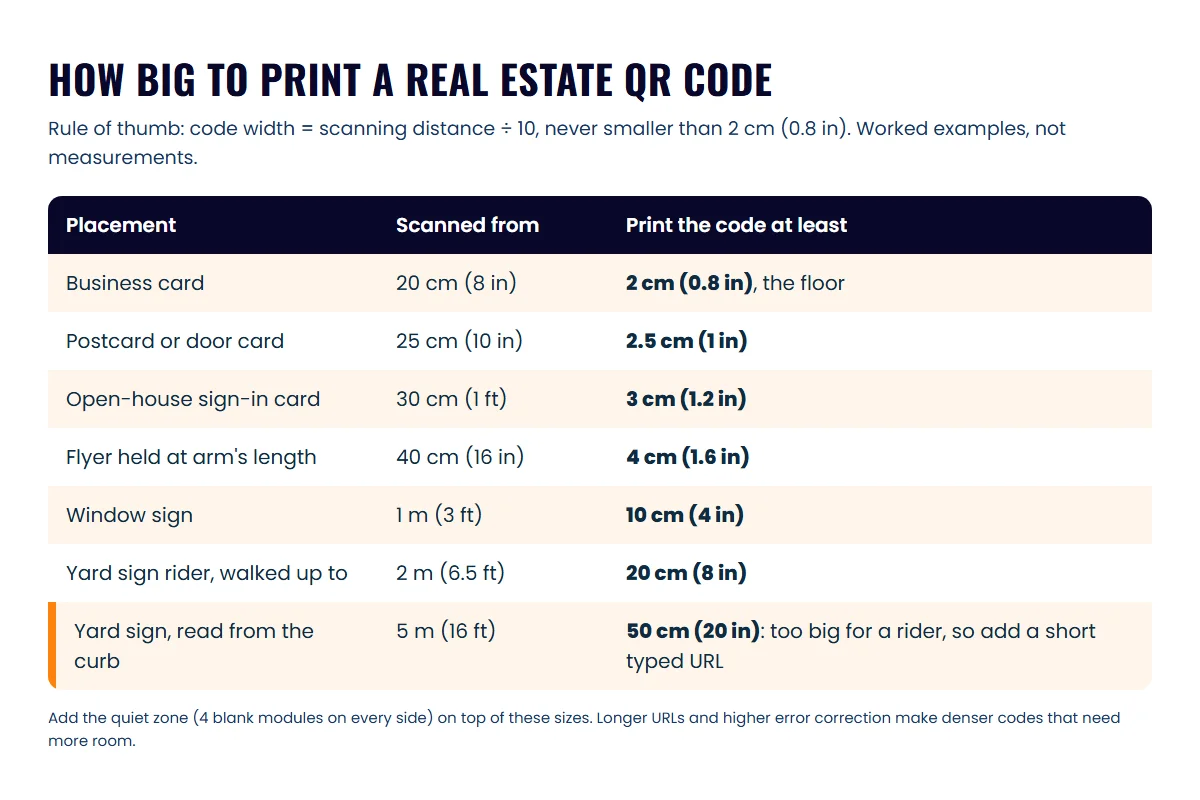
Print rules that keep a QR code scannable
Size is one of five things to get right before you send a file to the printer.
- Size: follow the 10:1 rule and never go under 2 cm. Longer links make denser codes, so keep URLs short.
- Quiet zone: leave a blank margin around the code. DENSO WAVE’s QR code site says the code requires a four-module wide margin on all sides. Don’t let your designer crop it or run a border into it.
- Contrast: dark code on a light background. If you switch to brand colors or reverse it, test before you print.
- Error correction: pick the level for the conditions (see below).
- Testing: scan the printed proof with at least three phones, iPhone and Android, old and new, in daylight and at the distance people will really stand.
Which error-correction level should you pick?
Error correction lets a scuffed or dirty code still scan, at the cost of a denser pattern. BarTender’s help pages list the four standard levels as L, M, Q and H, restoring about 7%, 15%, 25% and 30% of codewords.
DENSO WAVE notes on its error correction page that Level M is the one most often chosen, with Q or H suited to places where codes get dirty. For agents, that means M for cards, flyers and slides, and Q or H for yard signs that face rain, sun and sprinklers. Higher levels make the code denser, so print a little bigger.
How do you track scans from a static QR code?
You track a static QR code by adding UTM parameters to the link it opens. Your analytics then reports each visit under the source, medium and campaign you named, so you can see which sign or mailer worked.
Google’s help page on collecting campaign data with custom URLs says to always set the source, medium and campaign tags. It also notes that values are case sensitive: Google and google show up as two different sources. Pick lowercase and stick to it.
A naming scheme that works for listings:
| Parameter | What it records | Example value |
|---|---|---|
| utm_source | The printed piece | yard_sign, flyer, postcard, business_card |
| utm_medium | How they arrived | qr |
| utm_campaign | The listing or campaign | 123_main_st, fall_farm_mailer |
| utm_content | Which version, if you test two | rider_a, rider_b |
So the yard sign for 123 Main St would open yourdomain.com/123-main?utm_source=yard_sign&utm_medium=qr&utm_campaign=123_main_st. The flyer for the same home changes only utm_source.
UTM tags count visits to your page, not scans. Someone who scans with no signal won’t show up. That’s close enough to compare one sign or mailer with another.
What MLS and brokerage rules apply to QR codes?
A QR code on a sign, flyer or postcard is advertising, so the same rules apply as to the rest of the piece. Check your MLS rules, your state license law and your brokerage’s policy before printing.
Three areas come up most:
- Firm name. NAR’s Code of Ethics, Standard of Practice 12-5, bars REALTORS from advertising real estate services or listed property “without disclosing the name of that REALTOR®‘s firm in a reasonable and readily apparent manner.” Put your brokerage name on the printed piece and on the page the code opens. See the NAR Code of Ethics and Standards of Practice. Your state may add its own rules on license numbers and brokerage name size.
- MLS media rules. Some MLSs limit agent branding and contact details in listing photos and virtual tours. Don’t add a QR code to MLS photos until you’ve checked. The rules for mentioning listings on a podcast cover the seller-consent side too.
- Where the code goes. Signs and riders may have their own rules from your HOA, city or brokerage. Ask before you order.
For the full list of rules a podcasting agent touches, from firm disclosure to recording consent, see the real estate podcast compliance map. This isn’t legal advice; your broker has the final word.
How do you make a QR code for a real estate sign?
Making a QR code for a real estate sign takes about five minutes with a free static generator, provided the page behind it is ready first.
- Publish the page. Make sure the listing page, form or episode page is live and loads fast on a phone, with your brokerage name on it.
- Build the link. Add your UTM parameters, lowercase, with
utm_medium=qr. - Make the code. Paste the link into the free QR code generator for realtors, set error correction to Q or H for outdoor signs, keep the quiet zone on and pick dark-on-light colors.
- Download SVG for print. Send the SVG to your sign or print shop so it stays sharp at any size. Use PNG for slides and email.
- Test a proof. Print one at real size, scan it with three phones from the distance in the size table, then order the full run.
- Print your domain under the code. People who won’t scan an unknown code can type it, and people who do scan can see where it goes first.
Frequently asked questions
Do QR codes expire?
A static QR code never expires, because the link is stored in the pattern itself. What breaks is the page behind it. Keep that page live, or redirect it, for as long as the print is out in the world.
Is the Icons QR code generator free?
Yes. It runs in your browser and makes static codes from any URL or text, with PNG and SVG downloads. It doesn't make dynamic codes or count scans; use UTM parameters for that.
Should I download a QR code as PNG or SVG?
Use SVG for anything a printer will scale, such as signs, riders and flyers, because a vector file stays sharp at any size. PNG is fine for slides, emails and social posts.
Will people trust a QR code on a sign?
Some won't, because QR scams are common enough that the FTC tells people to check the link before opening it. Print your own domain under the code so scanners can see where it goes.
Sources
- What's the Minimum Size for a QR Code? — Bitly (accessed October 21, 2026)
- Error Correction (QR Code) — Seagull Scientific BarTender Help (accessed October 21, 2026)
- Error correction feature — QRcode.com (DENSO WAVE) (accessed October 21, 2026)
- Information capacity and versions of QR Code — QRcode.com (DENSO WAVE) (accessed October 21, 2026)
- URL builders: Collect campaign data with custom URLs — Google Analytics Help (accessed October 21, 2026)
- 2026 Code of Ethics & Standards of Practice — National Association of REALTORS (accessed October 21, 2026)
- Scammers hide harmful links in QR codes to steal your information — Federal Trade Commission (accessed October 21, 2026)
Done-for-you podcast production
Want a podcast that brings in referrals, not just downloads?
Icons of Real Estate plans, produces and publishes business-growing podcasts for agents. You record. We handle the rest.
Launch Your Podcast
Written by
Co-Founder and Podcast Guru, Icons of Real Estate
Tomás Fonseca co-founded Icons of Real Estate in 2021 and is its Podcast Guru. He has a background in marketing, with stints at companies like Nintendo and Ardor SEO, and is one of the hosts of the Icons of Real Estate Podcast.

How we research, write, fact-check and correct articles: our editorial standards.