On this page
- What is the one-clip, three-format workflow?
- Which podcast clip works in all three formats?
- How do you turn a podcast clip into a YouTube Short?
- How do you turn podcast clips into LinkedIn posts for realtors?
- How do you write a newsletter note from the same clip?
- In what order should the three versions go out?
- Who should do this work each week?
- Next step
To turn podcast clips into LinkedIn posts, Shorts and newsletter notes, realtors should pick one short moment and rewrite the words around it three times. A Short speaks to local buyers and sellers. LinkedIn retells the moment for lenders and other partners. Your newsletter gives your sphere the main point and the episode link.
Picking the moment is its own skill, covered in which podcast clips get real estate agents DMs. This page starts after that: you have one good moment and you want it to reach three different groups of people without posting the same thing three times.
What is the one-clip, three-format workflow?
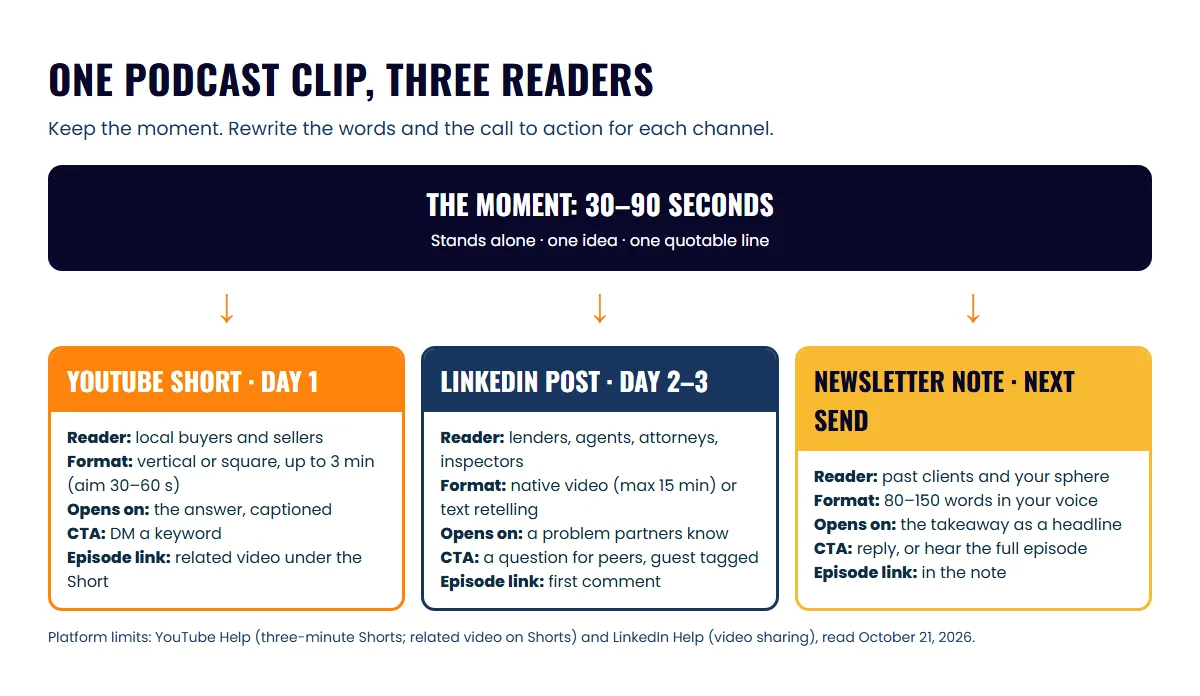
The one-clip, three-format workflow takes a single podcast moment and adapts it for three channels, each with its own reader and its own call to action. Your video file barely changes. What changes is every word around it.
This table shows how the three versions differ.
| YouTube Short | LinkedIn post | Newsletter note | |
|---|---|---|---|
| Reader | Local buyers and sellers | Lenders, agents, attorneys, inspectors | Past clients and your sphere |
| Format | Vertical or square video | Native video or text retelling | 80 to 150 words of text |
| Opening | The answer, on screen in the first second | A one-line hook about the problem | A one-line setup in your own voice |
| Call to action | DM a keyword or watch the full episode | A question for other professionals | Reply, or listen to the full episode |
| Link to the episode | Related video under the Short | First comment or end of post | In the note itself |
Which podcast clip works in all three formats?
A podcast clip works in all three formats when it makes one clear point that a stranger could follow cold. Test it by writing the point in one sentence. If you can’t, the clip will only work as a video, and the LinkedIn and newsletter versions will be weak.
Three quick tests before you start:
- It stands alone. Someone who never heard the episode understands it.
- It has one idea. A clip covering two points splits the reader’s attention and muddles the caption.
- It has a quotable line. Your newsletter and LinkedIn versions need a sentence you can quote or paraphrase.
Partner-facing moments work best here. A lender explaining what a clean file looks like, or an inspector naming the repair that kills deals, reads well to consumers and to professionals.
How do you turn a podcast clip into a YouTube Short?
Turning a podcast clip into a YouTube Short means cutting the moment to a vertical or square frame, adding captions and on-screen text, and linking the Short to the full episode. YouTube treats square or vertical uploads of up to three minutes as Shorts, according to its help page on three-minute Shorts.
Long is allowed, but short usually wins for agents. Aim for 30 to 60 seconds and cut anything before the answer.
- Open on the answer. Drop the host’s question and start on the guest’s first strong sentence.
- Add captions and a text hook. Captions let the clip work with the sound off, and the first line on screen should say what the clip answers.
- Write a short caption that names the local topic and the call to action.
- Link the full episode. YouTube lets you add a related video to a Short, which appears as a clickable link below your channel handle. The feature needs advanced feature access, so check your channel first.
How do you turn podcast clips into LinkedIn posts for realtors?
Realtors turn podcast clips into LinkedIn posts by retelling the moment for other professionals, not for consumers. On LinkedIn, your best readers are lenders, attorneys, inspectors, relocation managers and agents in other markets. They refer business, so the post should show how you work and give them something useful.
Write the post in four parts:
- Hook: one line naming a problem partners recognize (“Most deals I’ve seen fall apart in week three, not week one.”).
- The moment: two or three sentences on what the guest said. Name and tag the guest.
- Your take: one or two sentences on what you do differently because of it.
- A question: ask other professionals how they handle it. Peers answer questions more readily than they act on a pitch.
Native video fits when the guest’s delivery matters. LinkedIn’s video sharing help page lists a maximum length of 15 minutes, a 5 GB file limit and aspect ratios from 1:2.4 to 2.4:1. That means your vertical Shorts cut uploads as it is.
Tag the guest in the post itself. They’re likely to comment or share, which puts the post in front of their own partners.
How do you write a newsletter note from the same clip?
A newsletter note from a podcast clip is one short paragraph that gives your sphere the main point and a reason to hear the full conversation. It can sit inside your regular email or be posted as a short note on a platform such as Substack.
Those two places behave differently. Substack’s Notes FAQ (2023) describes Notes as a space for short-form posts and says readers are never notified by email when you post a new note. So a Substack Note is for discovery, and your email newsletter is what actually lands in a past client’s inbox. If you only do one, do the email.
Write it in your voice, as you would talk to a past client. Don’t paste the transcript.
In what order should the three versions go out?
Post the Short first, the LinkedIn post one or two days later, and the newsletter note in your next scheduled send. Spacing them out lets each version find its own readers instead of three channels lighting up on the same afternoon.
Use this checklist for every clip:
- Moment passes the three tests (stands alone, one idea, quotable line)
- Short cut with captions, text hook and related video set
- LinkedIn post written for partners, guest tagged, question at the end
- Newsletter note drafted in your voice with the episode link
- Captions and text checked for Fair Housing words to avoid and your brokerage’s advertising rules
- Short scheduled for day 1, LinkedIn for day 2 or 3, note added to the next send
A scheduler saves you from posting by hand; see the social media scheduling tools for real estate agents compared. Over a month, three or four clips run through this workflow give you a full calendar; the plan for turning one episode into a month of content shows how they fit around the release.
Who should do this work each week?
You should pick the moment and approve the words, and someone or something else should do the cutting and first drafts. Picking takes five minutes right after the recording; cutting and drafting three versions of three clips can take a few hours a week.
There are three common setups:
- Software: clipping and transcript tools find moments and draft captions. You rewrite the captions and schedule. Our podcast repurposing tools comparison covers which ones fit agents.
- ICONS Social: if you guested on an ICONS show or use ICONS DIY Podcast, ICONS Social drafts posts from the episode in your own words: quote cards, carousels and short clips. You edit and approve. It then publishes them on schedule across your LinkedIn, Instagram, Facebook, TikTok and YouTube accounts.
- A production team: for your own show, our podcast production service handles editing, social repurposing and episode articles, so your part is recording and approval.
For where clips fit in a full video show, read the real estate video podcast playbook.
Next step
Open your latest episode, find one moment that passes the three tests, and write the LinkedIn version first. It’s the hardest of the three, and once it’s done the Short caption and newsletter note take minutes.
Frequently asked questions
Should the LinkedIn version include the video or just text?
Try both over a month and keep what gets replies from partners. Native video suits a moment where the guest's delivery matters; a text retelling suits a point that reads well and needs no face.
Where do I put the episode link on LinkedIn?
A common habit is to put it in the first comment and keep the post itself link-free. Test both on your own account and keep what gets more replies.
Can I reuse the same caption on Instagram Reels and Shorts?
Mostly, yes. Both reach consumers on a phone, so the same hook and on-screen text usually fit. Adjust hashtags and the call to action to each platform.
Do I need the guest's permission to post their clip?
Ask before you record, in your guest booking email, and repeat it on the call. Most guests want the exposure, but a clear yes protects the relationship.
Sources
- Understand three-minute YouTube Shorts — YouTube Help (accessed October 21, 2026)
- Add a related video to your YouTube Shorts — YouTube Help (accessed October 21, 2026)
- Video sharing troubleshooting — LinkedIn Help (accessed October 21, 2026)
- Notes questions answered — On Substack (accessed October 21, 2026)
Done-for-you podcast production
Want a podcast that brings in referrals, not just downloads?
Icons of Real Estate plans, produces and publishes business-growing podcasts for agents. You record. We handle the rest.
Launch Your Podcast
Written by
Co-Founder and Podcast Guru, Icons of Real Estate
Tomás Fonseca co-founded Icons of Real Estate in 2021 and is its Podcast Guru. He has a background in marketing, with stints at companies like Nintendo and Ardor SEO, and is one of the hosts of the Icons of Real Estate Podcast.

How we research, write, fact-check and correct articles: our editorial standards.