On this page
Frame.io vs ICONS Review comes down to who edits your show. Frame.io has a free plan for 2 members and paid plans from $15 per member a month (October 2026), so it suits agents or editors who run their own review process. ICONS Review is free, and ICONS production clients approve every episode there by link.
How do Frame.io and ICONS Review compare at a glance?
Frame.io and ICONS Review both let a client comment on an exact moment of an edit through a link, but one is sold per member and the other is free. The table draws on Frame.io’s pricing and help pages as of 9 October 2026, and on the ICONS Review page.
| Frame.io | ICONS Review | |
|---|---|---|
| Price | Free; Pro $15 and Team $25 per member/mo + tax; annual $156 and $264 per member/yr + tax; Enterprise custom | Free |
| Free plan | Up to 2 members, 2 GB storage, up to 2 projects | Everything; no paid tier |
| Who can use it | Anyone who signs up | Production clients, as part of each edit; other hosts ask through the form on the ICONS Review page |
| Reviewer account needed | No; name and email after first comment | No; name, email optional |
| Frame-accurate comments | Yes, plus range comments | Yes, plus range comments |
| Drawing on the frame | Yes (annotations) | Yes: pen, arrow, rectangle, circle |
| Approval status | “Needs Review”, “In Progress”, “Approved” | In review, Needs changes, Approved |
| Link passphrase and expiry | Paid plans only | Included |
| Watermark | Static watermark on paid plans | Viewer-name watermark on the link |
| Subtitles | Transcription in 27 languages; edit captions; SRT, VTT, TXT export | Suggest word-level subtitle fixes; download corrected SRT or VTT |
| DaVinci Resolve | Comment export as Resolve EDL | Comment export as Resolve EDL, CSV or SRT |
| Email alerts | Digest emails to reviewers | None; the team sends the link |
What does Frame.io cost?
Frame.io has a free plan, and its paid plans are priced per member, starting at $15 a month plus tax, as of October 2026. Its pricing page listed these plans on 9 October 2026:
- Free: $0 for up to 2 members, with 2 GB of storage and up to 2 projects. No credit card is required.
- Pro: $15 per member a month plus tax, or $156 per member a year plus tax. It allows up to 5 members, with 2 TB included plus 2 TB per additional member.
- Team: $25 per member a month plus tax, or $264 per member a year plus tax. It allows up to 15 members, with 3 TB included plus 2 TB per additional member.
- Enterprise: custom members and storage.
Annual plans carry a 13% discount, per the pricing FAQ. For a solo agent and one editor, the free plan’s 2-member limit fits. The 2-project limit and the missing link controls are the limits most likely to matter for a podcast.
What does ICONS Review cost?
ICONS Review is free, with no seats, no plan tiers and nothing to install. If ICONS produces your show, the review links come with the process: every episode, trailer and clip reaches you as a link to approve. For the habits behind that process, read what producing agent podcasts has taught ICONS. Otherwise, the ICONS Review page has a short form for requesting access. The same tool handles review inside ICONS DIY Podcast.
The honest framing, then: Frame.io is a tool you choose and run. ICONS Review is the approval step inside ICONS production, open to other hosts on request.
How does each tool handle comments and sign-off?
Frame.io and ICONS Review both pin comments to exact frames and track approval, so the core review loop is the same in each. Every Frame.io plan lists frame-accurate and range-based comments and annotations. The help center describes a status field with “Needs Review”, “In Progress” and “Approved”, and its page on shares says share links don’t require reviewers to sign up or log in.
ICONS Review works like this:
- Pinned comments. Every comment sits on an exact frame and timecode. Range comments cover a stretch between an in and an out point.
- Drawing. Pen, arrow, rectangle and circle in several colours, saved with the comment.
- A to-do list. Replies, resolve and hide-resolved turn comments into a list the editor works through.
- Versions. Each new upload becomes v2, v3 and so on, each with its own comments and a status of In review, Needs changes and Approved.
- Version checks. The ICONS team can play two versions side by side, or run a sliding wipe across them.
For a real estate interview, that covers the usual notes: cut a slip about a listing, fix a name on screen, move the call to action. The three-part note format in how to review a podcast edit works in either tool.
How do they compare on links, subtitles and editor handoff?
ICONS Review includes link controls that Frame.io keeps for paid plans. Frame.io’s pricing page lists passphrase-protected shares, share link expiration and static watermarking on Pro, Team and Enterprise, not Free.
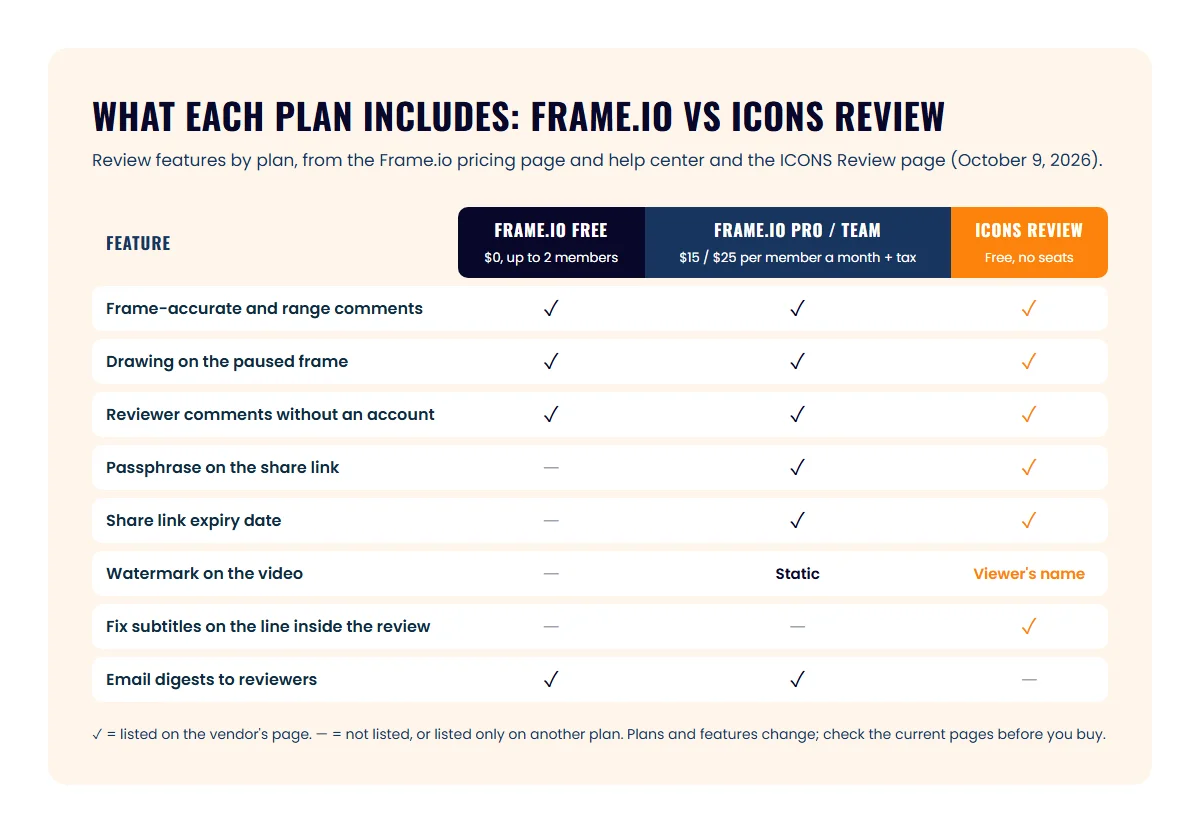
ICONS Review links carry a passphrase, an expiry date, an on-screen watermark with the viewer’s name or email, and an instant switch-off. Passphrases are stored in scrambled form. Per-link permissions set whether the viewer can comment, approve, download originals or see earlier versions.
On subtitles, the tools take different approaches:
- Frame.io transcribes in 27 languages. It lets you edit transcriptions and captions and exports SRT, VTT and TXT.
- ICONS Review lets a client cross out, replace or add words on a subtitle line, like suggesting mode in a document. The team accepts or rejects each change and downloads the corrected file.
For the editor, both export comments as DaVinci Resolve EDL markers. ICONS Review also exports CSV and SRT.
Where Frame.io does more
Frame.io does more as a general-purpose review platform you control yourself. These are real advantages:
- Anyone can sign up. The free plan is live today, and it works with any editor, agency or freelancer.
- Integrations. Frame.io lists Premiere and Final Cut Pro integrations on all plans, and Premiere 25.6 and later has the panel built in.
- Apps. iOS and tvOS apps are listed, though the help center says there is no Android app.
- Notifications. Reviewers get digest emails once they have commented, and the team sets its own frequency.
- More languages. Transcription covers 27 languages.
- Scale. Team plans hold up to 15 members with terabytes of storage, and Enterprise adds advanced watermarking and rights management.
Where ICONS Review does more
ICONS Review suits an agent who wants link privacy and subtitle fixes without paying per seat. Its advantages are cost and fit:
- No seats to buy. The tool is free, and clients need no account.
- Link controls included. Passphrase, expiry, viewer watermark and switch-off are on every link.
- Subtitle suggestions. You fix captions inside the review instead of retyping them.
- Large files. Uploads of up to 50 GB per file accept video, audio, images and PDFs, and resume if interrupted.
- Connected to ICONS Live. A finished recording moves into review with its transcript, without a download.
- Link activity. The team can see who opened, commented or approved, and when.
Which tool fits your show?
Frame.io fits an agent who hires an editor and runs review alone; ICONS Review fits any show ICONS produces, and any host who asks for access. Three typical setups:
- Solo agent with a freelance editor: Frame.io Free covers 2 members and 2 projects. Move to Pro if you need passphrases or expiring links for unreleased episodes.
- Show produced by ICONS: ICONS Review. Approvals, subtitle fixes and versions are already built into each episode.
- Editor already working in Frame.io: keep it. Switching only makes sense if you move production to ICONS.
Frame.io is one of three tools we measured against ICONS Review; the others are Vimeo review links and Filestage vs ICONS Review, and all four sit in one table in the podcast review and approval tools round-up. Where review sits in the whole process is laid out in the real estate podcast production overview and the episode production workflow and tracker. If you would rather not run any of it, Podcast Production includes the editing and the review.
Frequently asked questions
Is Frame.io free for reviewing podcast edits?
Frame.io has a free plan. As of October 2026 its pricing page lists up to 2 members, 2 GB of storage and up to 2 projects, with frame-accurate comments, annotations, version stacks and transcription included. Passphrase-protected shares, share link expiration and static watermarking need a paid plan.
Can I use ICONS Review without hiring ICONS?
Yes, and it is free. If ICONS produces your show, review links are part of the process; if not, ask for access through the form on the ICONS Review page. It is also the review tool inside ICONS DIY Podcast.
Do my clients or guests need an account to leave feedback?
No, with either tool. Frame.io says share links don't require reviewers to sign up or log in, and asks for a name and email after the first comment. ICONS Review asks for a name, with email optional, the first time someone comments.
Will I get an email when a new edit is ready?
Frame.io sends reviewers email digests, every 15 minutes, once they have commented on a shared asset. ICONS Review does not send email or other alerts; the ICONS team sends you the link when an edit is ready.
Sources
- Frame.io pricing (accessed October 9, 2026)
- Frame.io Help: Shares in Frame.io (accessed October 9, 2026)
- Frame.io Help: commenting on your media (accessed October 9, 2026)
- Frame.io Help: player page features (accessed October 9, 2026)
- Frame.io Help: transcription overview (accessed October 9, 2026)
- Frame.io Help: import comments into Resolve with EDL (accessed October 9, 2026)
- Frame.io Help: Android app (accessed October 9, 2026)
- Frame.io Help: share notifications (accessed October 9, 2026)
Done-for-you podcast production
Want a podcast that brings in referrals, not just downloads?
Icons of Real Estate plans, produces and publishes business-growing podcasts for agents. You record. We handle the rest.
Launch Your Podcast
Written by
Co-Founder and Podcast Guru, Icons of Real Estate
Tomás Fonseca co-founded Icons of Real Estate in 2021 and is its Podcast Guru. He has a background in marketing, with stints at companies like Nintendo and Ardor SEO, and is one of the hosts of the Icons of Real Estate Podcast.

How we research, write, fact-check and correct articles: our editorial standards.