Filestage vs ICONS Review pits a team approval platform against a review tool that comes with podcast production. Filestage has a free plan, with paid plans from $199 a month billed yearly (October 2026), so it suits brokerages with multi-step sign-off. ICONS Review is free, and ICONS production clients sign off each episode in it.
How do Filestage and ICONS Review compare at a glance?
Filestage and ICONS Review share the same approval statuses, but Filestage is built for teams routing files through several reviewers. The table draws on Filestage’s pricing page, site and help center, all checked by us on October 9, 2026, and on what ICONS Review includes.
| Filestage | ICONS Review | |
|---|---|---|
| Price | Free; Starter $199/mo and Business $329/mo billed yearly; $249 and $399 billed monthly; Enterprise tailored | Free |
| Free plan | 1 active project, 5 new files/month, 2 reviewer groups, 10 team members, 2 GB | No tiers; the whole tool is free |
| Pricing basis | Flat per team; 10 seats included | No seats |
| Who can use it | Anyone who signs up; 14-day trial | Production clients, with each edit; other hosts request access on the ICONS Review page |
| Reviewer account needed | No; email address (password if already registered) | No; name, email optional |
| Comments | Timestamps on video and audio; frame view; annotations | Frame-accurate and range comments; drawing |
| Status | In review, Needs changes, Approved | In review, Needs changes, Approved |
| Version compare | Side by side on Starter and up | Side by side or sliding wipe |
| Password links | Starter and up | Passphrase, expiry and viewer watermark on every link |
| Due dates and reminders | Starter and up | Not offered |
| Subtitles | Not listed on the pages checked | Suggest word-level fixes; download corrected file |
| File size | 20 GB limit; video above 1080p scaled to 1920x1080 | Up to 50 GB; review copy up to 1080p |
What does Filestage cost?
Filestage offers a free plan; paid plans start at $199 a month on yearly billing (October 2026 prices). Its pricing page gave these flat team prices on October 9, 2026:
- Free: $0. It includes 1 active project, 5 new files a month, 2 reviewer groups, 10 team members, 2 GB of storage and unlimited reviewers.
- Starter: $199 a month billed yearly, or $249 billed monthly. It adds unlimited active projects and files, 2 reviewer groups and 1 TB of storage.
- Business: $329 a month billed yearly, or $399 billed monthly. It adds 3 reviewer groups and 3 TB of storage.
- Enterprise: tailored pricing, with unlimited reviewer groups and 10 TB of storage.
The home page, though, says “Our paid plans start from $99/month”, which doesn’t match the pricing page, so check before you buy. Yearly billing is labelled “2 months free” on the pricing page. Its help center says each plan includes 10 seats, and a 14-day trial switches to the Free plan afterwards.
What does ICONS Review cost?
ICONS Review is free, with no team price and no seat count. When ICONS produces a show, every edit arrives as a review link, so the approval step is already in place. If that’s not you, the ICONS Review page has a form where you ask for access. The tool also handles review inside ICONS DIY Podcast.
So these two don’t compete for the same buyer. You buy Filestage to run approvals across your own team and vendors. ICONS Review is the sign-off step in ICONS production, available to other hosts on request.
Comments and approvals: how do the two differ?
Filestage and ICONS Review both pin feedback to a moment in the file and use the same three statuses, so the differences sit in timing, markup and workflow. Filestage lets you set each file to “In review”, “Needs changes” or “Approved”. Reviewers submit “Approve Version” or “Request Changes”, and Business adds extra decisions.
Each tool handles the details its own way:
- Timing. Filestage adds timestamps automatically when you annotate video and audio, and shows time as standard, timecode or frames. ICONS Review pins every comment to an exact frame and timecode, with range comments.
- Markup. Filestage offers freehand drawing, rectangles, arrows and lines. ICONS Review offers pen, arrow, rectangle and circle.
- Versions. Filestage keeps unlimited versions on every plan, with side-by-side compare from Starter. ICONS Review numbers versions and compares them with a sliding wipe or side by side.
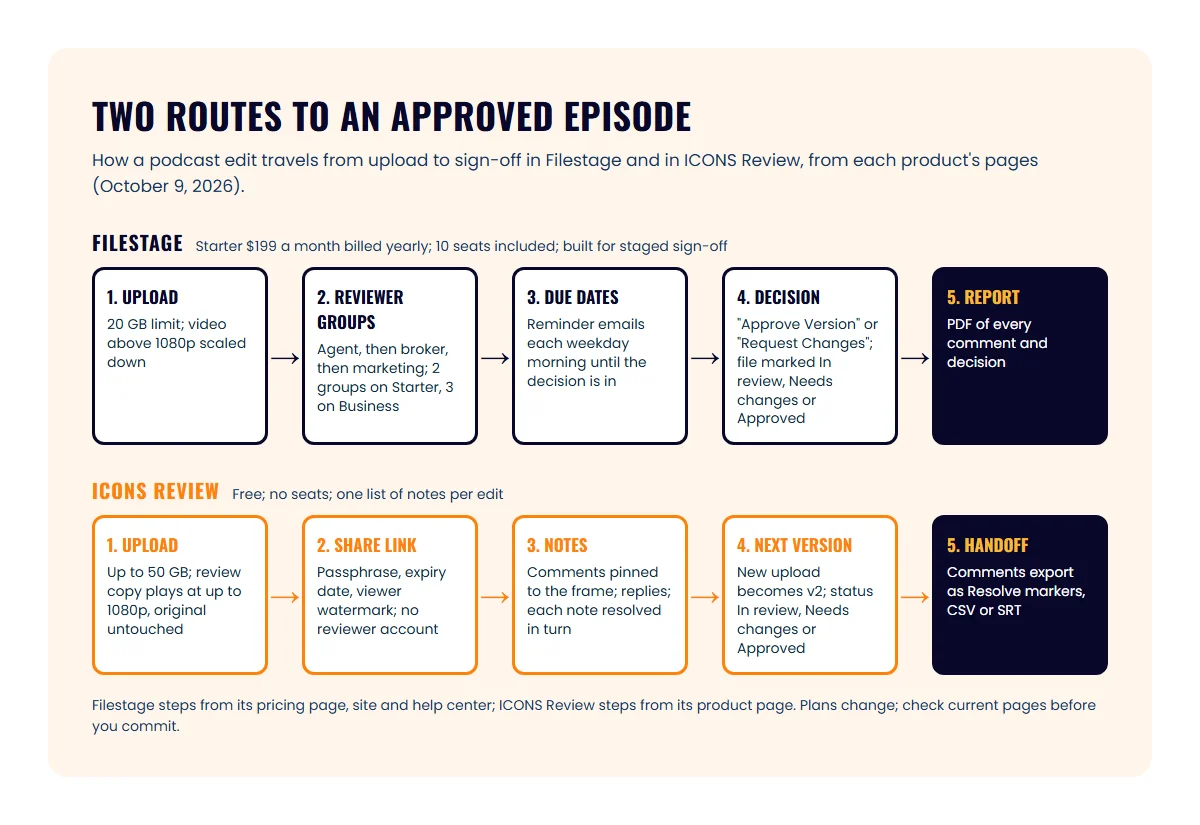
- Workflow. Filestage routes files through reviewer groups, sets due dates, sends reminder emails and produces a PDF report of comments and decisions. ICONS Review keeps one list of notes per edit, with replies and resolve.
For an agent’s show, the reviewer may be just you, or you plus your broker’s compliance contact. The three-part note format for edit feedback works in either tool.
How do they compare on links, subtitles and files?
ICONS Review includes link controls and subtitle fixes, while Filestage leans on reviewer workflows and email. Filestage offers password-protected review links on Starter and higher. Its pages checked for this article did not list link expiry or watermarks.
ICONS Review links carry:
- a passphrase, an expiry date and an instant switch-off;
- an on-screen watermark with the viewer’s name or email;
- per-link permissions for commenting, approving, downloading and earlier versions.
Subtitles are a clear difference. ICONS Review lets a client cross out, replace or add words on a subtitle line, then the team downloads the corrected file. The Filestage pages checked did not list transcripts or subtitle editing.
On files, Filestage’s help center mentions a 20 GB limit and scales video above Full HD down to 1920x1080. ICONS Review accepts up to 50 GB per file and plays a review copy at up to 1080p, keeping the original untouched.
Where Filestage does more
Filestage does more for organisations with several approvers and deadlines. These are real advantages:
- Reviewer groups. You can route a file through stages, for example the agent, then the broker, then marketing.
- Due dates and reminders. Reviewers get reminder emails each weekday morning, per Filestage’s help center.
- Notifications. Project activity emails go out at intervals from 10 minutes to 8 hours.
- Approval reports. A PDF records every comment and decision.
- Wide file support. Images, PDFs, video and audio are accepted, plus Premiere Pro and After Effects integration on every plan.
- Sign up today. A free plan and a 14-day trial are both available without talking to sales.
Where ICONS Review does more
ICONS Review does more for a podcast that needs one clean approval loop rather than a routing system. Its advantages:
- Free, with no team price. Clients never need an account.
- Link privacy included. Passphrase, expiry, viewer watermark and switch-off are on every link.
- Subtitle suggestions on each caption line.
- Editor exports. Comments export as DaVinci Resolve EDL markers, CSV or SRT.
- Bigger uploads. Files up to 50 GB are accepted, and uploads resume if interrupted.
- Connected to ICONS Live. Recordings arrive in review with their transcript, without a download.
Where does each one fit?
Filestage fits a brokerage or team that needs staged approvals across many files; ICONS Review fits shows ICONS produces, plus hosts who request access. How that plays out:
- Solo agent with one freelance editor: Filestage Free covers 1 active project and 5 new files a month. That may be enough for a monthly show, but the paid jump is large.
- Show produced by ICONS: ICONS Review. Approvals, versions and subtitle fixes are built into every edit.
- Brokerage that already runs marketing approvals in Filestage: keep it for listing materials. If ICONS produces the brokerage podcast, episode review happens in ICONS Review.
Brokerage shows have their own sign-off needs, covered in brokerage and team podcasts. For the other review tools agents ask about, read Frame.io vs ICONS Review and Vimeo review links vs ICONS Review, or the round-up of podcast review and approval tools. The production overview for agent podcasts shows where review sits in the process, and Podcast Production is the route where ICONS handles editing and review for you.
Frequently asked questions
Does Filestage have a free plan?
Yes. As of October 2026 Filestage's pricing page lists a Free plan with 1 active project, 5 new files a month, 2 reviewer groups, 10 team members, 2 GB of storage and unlimited reviewers. Its help center says a 14-day trial of all features switches to the Free plan unless you upgrade.
Is Filestage priced per user?
No. Filestage prices each plan as a flat team price, and its help center says each plan includes 10 seats. On Starter, Business and Enterprise you can add seats in bundles of 5, and each bundle adds 1 TB of storage.
Can I use ICONS Review without hiring ICONS?
Yes, and it is free. When ICONS produces a show, every edit arrives as a review link; if that's not you, the ICONS Review page has a form for requesting access. It is also the review tool inside ICONS DIY Podcast.
Do reviewers need an account on Filestage or ICONS Review?
Usually not. Filestage says reviewers only enter their email address, unless that email already has a Filestage account, in which case they are asked for the password. ICONS Review asks for a name, with email optional, the first time someone comments.
Sources
- Filestage pricing (accessed October 9, 2026)
- Filestage home page (accessed October 9, 2026)
- Filestage video review software (accessed October 9, 2026)
- Filestage supported file types (accessed October 9, 2026)
- Filestage Help: why some reviewers need to log in (accessed October 9, 2026)
- Filestage Help: submit your review decision (accessed October 9, 2026)
- Filestage Help: uploading a very large video file (accessed October 9, 2026)
- Filestage Help: what happens to my file during upload (accessed October 9, 2026)
- Filestage Help: managing your seats (accessed October 9, 2026)
Done-for-you podcast production
Want a podcast that brings in referrals, not just downloads?
Icons of Real Estate plans, produces and publishes business-growing podcasts for agents. You record. We handle the rest.
Launch Your Podcast
Written by
Co-Founder and Podcast Guru, Icons of Real Estate
Tomás Fonseca co-founded Icons of Real Estate in 2021 and is its Podcast Guru. He has a background in marketing, with stints at companies like Nintendo and Ardor SEO, and is one of the hosts of the Icons of Real Estate Podcast.

How we research, write, fact-check and correct articles: our editorial standards.