Zoom vs ICONS Live for podcast recording comes down to file quality and the 40-minute free cap. Zoom Basic is free with a 40-minute meeting limit and Pro is $16.99 per user a month on monthly billing (October 2026), which suits agents whose guests live on Zoom. ICONS Live costs nothing, records each person locally and serves ICONS-produced shows.
How is a Zoom recording different from an ICONS Live one?
Zoom and ICONS Live both put you and a guest on a video call, but they save very different files. Zoom’s column uses its pricing page, the price file that page loads, and Zoom support articles, all read on October 9, 2026; ICONS Live’s column reflects the ICONS Live page.
| Zoom | ICONS Live | |
|---|---|---|
| Price | Basic free; Pro $16.99 per user/mo billed monthly or $169.90 per user/yr billed annually; Business $21.99 per user/mo billed monthly | Free |
| Meeting length | Basic 40 minutes max; Pro 30 hours | No meeting cap stated |
| How you get it | Sign up on zoom.us | Ask for access through the form on the ICONS Live page |
| Where the recording is made | Computer or cloud recording of the meeting | On each person’s own device |
| Separate audio per person | Optional, computer recording only: M4A per participant | Default: uncompressed 48 kHz WAV per person |
| Separate video per person | No; captures the meeting “as the participant recording sees the meeting” | Yes, MP4 per person plus a combined video |
| Cloud recording | Paid plans (Pro, Business, Enterprise) | Uploads to ICONS during the call |
| People | 100 per meeting on Basic and Pro | Up to 6 on camera, plus a watch-only audience link |
| Transcripts | Cloud recordings produce a VTT transcript file | Per speaker, TXT, SRT and VTT; English only |
| Built for | Meetings | Podcast and video interviews |
What does Zoom cost?
Zoom’s Basic plan costs nothing; Pro, as of October 2026, is $16.99 per user a month billed monthly. The Zoom pricing page loads its prices from a price file on zoom.us, which on October 9, 2026 listed:
- Basic: free, for 1 user, with meetings up to 40 minutes and up to 100 participants.
- Pro: $16.99 per user a month billed monthly, or $169.90 per user a year billed annually. It allows meetings up to 30 hours, up to 100 participants and 10 GB of cloud storage, plus unlimited AI note-taking.
- Business: $21.99 per user a month billed monthly, or $219.90 per user a year billed annually, with up to 300 participants.
The 40-minute cap is the catch for podcasters. For example, a 45-minute interview plus five minutes of setup chat would run past it, so a free Zoom meeting can end mid-conversation. Cloud recording also needs a paid licence, per Zoom’s support page.
Does ICONS Live cost anything?
ICONS Live is free, and there is no licence to buy or renew. To use it, request access using the ICONS Live page’s contact form, and the ICONS team will set you up. ICONS records its network shows and production clients on it, and ICONS DIY Podcast users run their own recordings on it.
For production clients, setup sits with the ICONS team; ICONS DIY Podcast users set up their own. Either way it is a one-time session or a standing room for a regular show. Each person gets their own invite link, by role: host, guest, producer or watch-only audience.
What happens to the recording when a guest’s wifi drops?
On Zoom, the glitch is recorded because Zoom saves the meeting as it arrives; on ICONS Live, each person’s own computer keeps recording, so the saved file has no gap. That one difference decides most of what an editor can do afterwards.
Zoom’s support pages describe what you get:
- Default files: a computer recording produces a video MP4 and an audio M4A by default.
- Separate audio: the host can turn on “Record a separate audio file for each participant” for computer recordings. Each person’s track is saved as an M4A file.
- Video: a computer recording captures “the meeting as the participant recording sees the meeting,” so speaker view or gallery view is baked in.
- Connection problems: Zoom records the meeting stream, so a guest’s frozen or garbled moment can be recorded as it happened.
ICONS Live works differently:
- Audio. Each person’s microphone is recorded locally as uncompressed 48 kHz WAV.
- Video. Each person’s camera is recorded locally as MP4, targeting 8 Mbps (about 1080p), and a shared screen gets its own video.
- Connection problems. A weak connection affects the live call but not the saved files, which upload in 4-second pieces in the background.
- Processing. Files are aligned, drift-corrected, levelled at -16 LUFS and joined into a combined video.
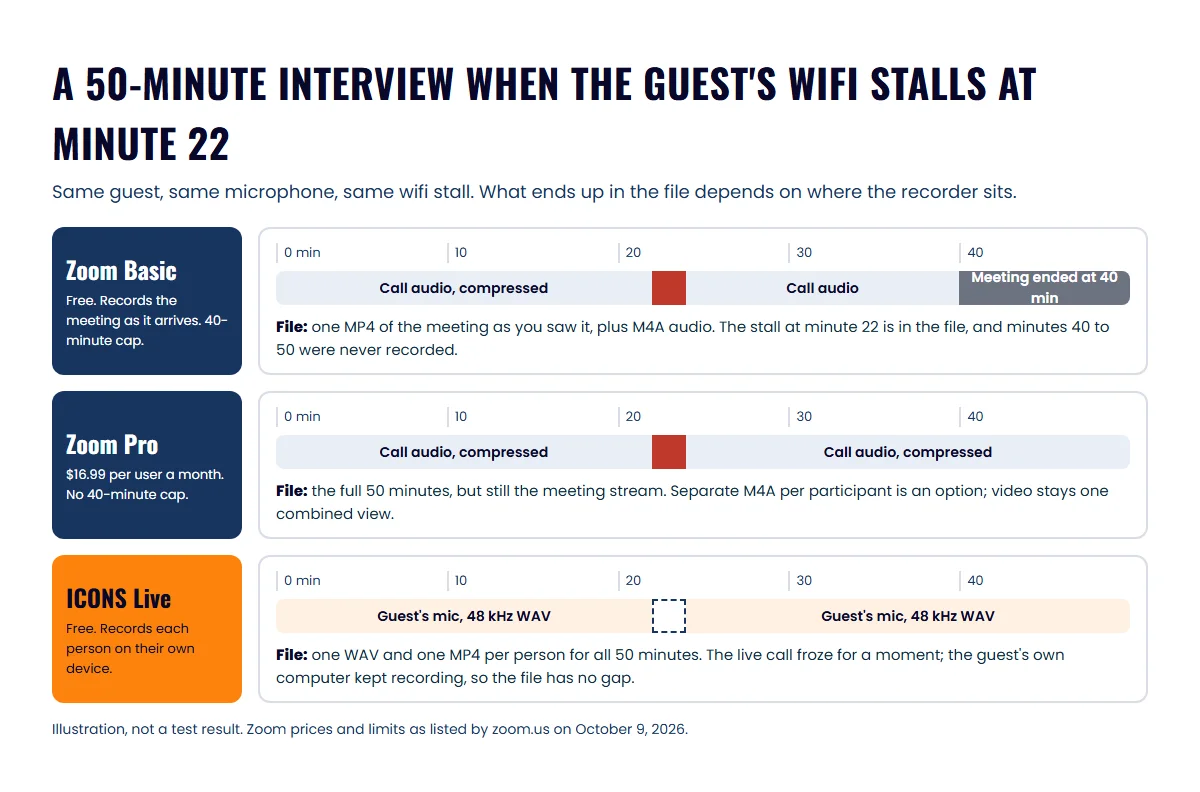
The fuller explanation of why the call recording carries the damage is in why remote recordings sound bad.
How do they compare on limits and features?
Zoom handles bigger meetings, and ICONS Live handles podcast production work. Zoom allows 100 participants on Basic and Pro and 300 on Business. ICONS Live allows up to 6 on camera, with extra people on a watch-only link that isn’t recorded.
On features beyond the call:
- Zoom: AI note-taking and summaries on paid plans, and a VTT transcript file with cloud recordings. Zoom’s mobile apps can start cloud recordings.
- ICONS Live: a transcript per speaker in English, show-note drafts (titles, summary, takeaways, chapters, LinkedIn and X posts) and ranked clip moments of 20 to 60 seconds. It has no editor and no live streaming, and runs in a browser only.
Where Zoom does more
Zoom does more as a general meeting tool that many guests already use for work. For an agent, these are real advantages:
- Familiarity. Guests who use Zoom for work, from lenders to past clients, already know how to join.
- Size. Zoom allows 100 participants per meeting, or 300 on Business, so it fits a panel or a team training session.
- Phone apps. Zoom has iOS and Android apps, and they can start cloud recordings.
- One tool for everything. The same licence covers client meetings, team calls and the occasional recorded interview.
- Open sign-up. Basic is free to start today.
Where ICONS Live pulls ahead
ICONS Live pulls ahead the moment the recording has to become a polished episode. These are its strengths for a podcast:
- Separate audio and video for every speaker by default, so an editor can fix one voice or cut one camera without touching the other.
- Lossless audio. Uncompressed 48 kHz WAV, where Zoom’s per-participant option saves M4A.
- No 40-minute cap, and you don’t pay for a licence.
- Files ready to edit. Recordings are aligned and levelled, with a combined video and a transcript per speaker.
- One link that lasts. A recurring room keeps the same link for a weekly show, and each session is stored separately under its date.
- Straight into production. Recordings go to ICONS Review, ICONS Podcast Hosting or the graphics editor without a download.
Zoom or ICONS Live: the decision
Use ICONS Live for interview episodes the ICONS team produces, and keep Zoom for meetings or large groups. How that lands for three kinds of agent:
- Solo agent testing the idea: a paid Zoom licence you already have is enough for a first few episodes. Turn on separate audio files per participant, and record each person’s video locally once you get serious.
- Agent whose episodes ICONS produces, or who has a producer: ICONS Live. The producer gets per-speaker WAV and MP4 files instead of a meeting recording.
- Agent who pays for Zoom Pro anyway: keep it for client calls and big panels. For produced interviews, the files ICONS Live produces are the stronger starting point.
If you’d rather compare ICONS Live with a purpose-built recording studio than with a meeting tool, Riverside vs ICONS Live does that, and the recording software comparison for real estate agents lines up all six tools.
Get consent before you press record. A number of US states require every person on a call to agree, not just the host; that’s a general caution, not legal advice, so see the real estate podcast compliance guide and check with your broker. For microphones and cameras, the real estate podcast equipment guide covers what to buy. To hand off everything after the call, see done-for-you production from Icons.
Frequently asked questions
Can you record a podcast on Zoom's free plan?
Yes, with limits. Zoom's support pages say computer recording is available to free and paid subscribers, while cloud recording needs a Pro, Business or Enterprise licence. The Basic plan caps each meeting at 40 minutes, per Zoom's pricing page in October 2026, which is tight for a full interview.
Does Zoom record each person on a separate track?
It can. Zoom's support page says the host can turn on Record a separate audio file for each participant for computer recordings, producing one M4A audio file per person. Video is still captured as the recording participant sees the meeting, in speaker or gallery view.
Why do podcast producers prefer local recording to Zoom?
Zoom computer recording captures the call as it arrives, so a guest's weak connection can end up in the file. Local recording, which ICONS Live uses, records each person on their own device and uploads in the background, so connection problems stay out of the saved files.
Is ICONS Live harder for guests than Zoom?
Guests open an ICONS Live invite link in their web browser, with no download. They allow the camera and microphone, check their setup in a green room and wait for the host to let them in. Guests who already use Zoom for work may find it more familiar.
Do I need my guest's permission to record?
Tell every guest before you press record, whichever tool you use. Some US states require all parties on a call to agree to being recorded, not only the host. This is general information, not legal advice, so check the rules where you and your guests are.
Sources
- Zoom pricing (accessed October 9, 2026)
- Zoom plan price data (loaded by the pricing page) (accessed October 9, 2026)
- Zoom Support: understanding recording file formats (accessed October 9, 2026)
- Zoom Support: recording locally (computer recording) (accessed October 9, 2026)
- Zoom Support: cloud recording (accessed October 9, 2026)
Done-for-you podcast production
Want a podcast that brings in referrals, not just downloads?
Icons of Real Estate plans, produces and publishes business-growing podcasts for agents. You record. We handle the rest.
Launch Your Podcast
Written by
Co-Founder and Podcast Guru, Icons of Real Estate
Tomás Fonseca co-founded Icons of Real Estate in 2021 and is its Podcast Guru. He has a background in marketing, with stints at companies like Nintendo and Ardor SEO, and is one of the hosts of the Icons of Real Estate Podcast.

How we research, write, fact-check and correct articles: our editorial standards.