On this page
StreamYard vs ICONS Live depends on whether you want to go live. StreamYard streams and records, with a free plan and Core at $35.99 a month on the billed-yearly tab (October 2026 prices), so it suits real estate agents who broadcast market updates or Q&As. ICONS Live is free, records only, and feeds shows the ICONS team produces.
What separates StreamYard from ICONS Live?
StreamYard and ICONS Live can both capture each guest locally, but StreamYard is a live studio first and ICONS Live is a recording studio only. StreamYard’s column is built from its pricing page and help center as they stood on October 9, 2026, while ICONS Live’s comes from the recording studio’s own page.
| StreamYard | ICONS Live | |
|---|---|---|
| Price | Free; Core $35.99/mo and Advanced $68.99/mo on the billed-yearly tab; Business: talk to sales | Free |
| Free plan | StreamYard logo, streaming limits, local recordings 2 hours/mo, 6 on-screen, 1 seat | The tool itself is free |
| Billing | Yearly or monthly; 7-day free trial on Core; 7-day money-back guarantee | No billing |
| How you get it | Sign up on streamyard.com | Ask for access through the form on the ICONS Live page |
| Live streaming | Yes: 3, 8 or 10 destinations on Core, Advanced, Business | No |
| Separate local files | Yes, an audio (WAV) and a video file per participant | Yes, WAV and MP4 per speaker |
| Video | Core Full HD (1080p); Advanced 4K (2160p) local recordings | Targets 8 Mbps, about 1080p |
| People on screen | Free 6; Core 10; Advanced 10 (15 backstage) | Up to 6 on camera, plus a watch-only audience link |
| Transcripts | Paid plans; download on Advanced and up; 15 languages | Per speaker, TXT, SRT and VTT; English only |
| Editing | Trim in the Video Library; export project files | No editor |
| Podcast RSS feed | “StreamYard does not offer RSS feeds” | No (ICONS Podcast Hosting is a separate tool) |
What does StreamYard cost?
StreamYard has a free plan, and its paid plans start at $35.99 a month on the billed-yearly tab, as of October 2026. Prices come from the StreamYard pricing page as it stood on October 9, 2026, where billed yearly is selected by default with a “22% Off” badge:
- Free: no charge. The plan carries the StreamYard logo, streaming limits, 2 hours a month of local recordings, 6 on-screen participants and 1 seat.
- Core: $35.99 a month billed yearly, shown beside a greyed-out $44.99. It is for individuals only, with a 7-day free trial.
- Advanced: $68.99 a month billed yearly, shown beside a greyed-out $88.99. StreamYard labels it “Most popular”.
- Business: no public price; you talk to StreamYard.
The page doesn’t label the greyed-out figures, so check the monthly tab yourself before you budget. StreamYard says Core and Advanced are for individual use only, charges in USD or Indian rupees only, and offers a 7-day money-back guarantee.
Read the free-plan limits closely. The pricing page lists local recordings on Free, but StreamYard’s help center lists “No ability to download recordings” among free-plan limits, and removes free recordings older than 12 months.
How do you get ICONS Live, and what does it cost?
ICONS Live is free to agents, and access is requested via the form at the bottom of the ICONS Live page rather than a sign-up on a pricing page. The ICONS team then sets you up. It is the studio behind the ICONS network’s shows and the episodes ICONS produces for clients, and ICONS DIY Podcast users run their own recordings in it.
There is no seat policy and no recording-hour allowance to track. For production clients the ICONS team creates a single session or a standing room for a regular show; ICONS DIY Podcast users set up their own. Each person gets a role-based invite link that expires after 30 days.
What do the files look like from each tool?
StreamYard and ICONS Live can both record each person on their own device, which keeps internet glitches out of the files. StreamYard says local recording lets you “download an individual audio file and an individual video file (with audio) for each participant.”
The files compare like this:
- Audio: StreamYard local recordings save each participant’s audio as WAV. On ICONS Live, each person’s microphone becomes an uncompressed 48 kHz WAV.
- Video: StreamYard local recordings follow the studio resolution, 1080p on Core and up to 4K on Advanced. ICONS Live targets 8 Mbps, about 1080p.
- When it records locally: StreamYard’s help center says free-plan local recording works with its Recording feature, not live streams; all paid plans include unlimited local recording.
- Processing: ICONS Live aligns every file, corrects clock drift, levels loudness at -16 LUFS and assembles a combined video. StreamYard offers project-file export for DaVinci Resolve, Premiere Pro and Final Cut.
Why the local file beats a recording of the call itself is the subject of why local recording keeps remote interviews clean.
How do they compare on streaming, transcripts and publishing?
StreamYard streams live and ICONS Live doesn’t, which is the biggest difference between them. StreamYard streams to Facebook, YouTube, Instagram, LinkedIn, X, Twitch and more. Its help center lists 3 destinations on Core, 8 on Advanced and 10 on Business, plus custom RTMP on Core.
Transcripts differ too. StreamYard shows transcripts on all paid plans, lets you download them on Advanced and higher, supports 15 languages, and says transcripts can’t be edited in the app. ICONS Live writes a transcript per speaker from each person’s own track, in English only, as TXT, SRT and VTT. It also drafts titles, a summary, chapters, LinkedIn and X posts, and ranked clip moments.
Neither tool is a podcast host. StreamYard’s help center says it does not offer RSS feeds. ICONS Live hands recordings to ICONS Podcast Hosting for ICONS shows.
Where StreamYard does more
StreamYard does more for agents who want to be live on social video. These are real advantages:
- Multistreaming. Stream to several destinations at once, up to 10 on Business.
- More people on screen. Core and Advanced allow 10 on screen, and Advanced allows 15 backstage.
- 4K local recordings on Advanced.
- AI clips and quick publishing. StreamYard says long-form clips up to 20 minutes publish straight to Facebook, LinkedIn and YouTube.
- Project files for DaVinci Resolve, Premiere Pro and Final Cut.
- Fifteen transcript languages.
- A guest app. An iOS app is available for guests; StreamYard says hosts must use the browser.
- Start today. The free plan needs no request form.
What ICONS Live adds
ICONS Live adds the file preparation a recorded interview show needs when someone else produces it:
- Free, with no plan tiers. There are no seat or local-recording caps to manage.
- Files ready to edit. Everyone is aligned on one timeline with loudness set to -16 LUFS, and a combined video is included.
- Upload recovery. Recordings upload in 4-second pieces and resend after a crash or reload on the same device.
- A transcript per speaker. It is built from each person’s own track, so every line is labelled.
- A permanent link for a regular show. The recurring room stays the same week to week, and each session is saved on its own under its date.
- Straight into production. The recording goes to ICONS Review, ICONS Podcast Hosting or the graphics editor without a download.
Which one is right for you?
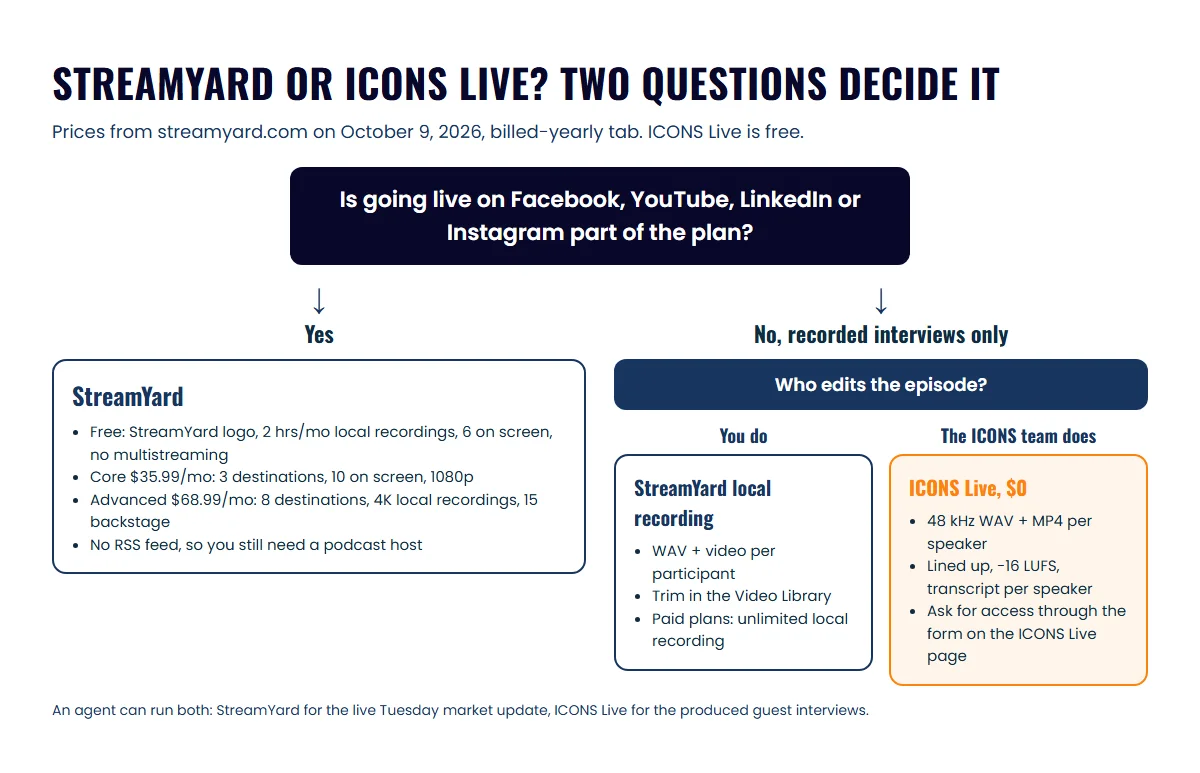
StreamYard is right if live video is part of your plan; ICONS Live is right if you want a recorded interview show produced by the ICONS team. Three agents, three answers:
- Solo agent who wants to go live: StreamYard. Start free, then move to Core when you need multistreaming or more on-screen guests.
- Agent whose interviews the ICONS team produces: ICONS Live. Your producer gets per-speaker WAV files already lined up.
- Agent already streaming on StreamYard: keep it for live shows. If you add a produced interview podcast with ICONS, it records on ICONS Live alongside.
If video is the main goal, the real estate video podcast guide covers publishing everywhere from one recording. Before you decide, check which goals a long-form podcast serves. For the recording-only studios agents compare StreamYard with, see Riverside vs ICONS Live, or the recording software round-up for agents for all six tools on one page.
Tell guests you are recording before you start, on either tool. Some US states require consent from every person on the call rather than just the host, and this is general information, not legal advice, so check with your broker. Gear is covered in the real estate podcast equipment guide, and the Ongoing Production service takes over after you press stop.
Frequently asked questions
Can I record a podcast on StreamYard without going live?
Yes. StreamYard's help center describes creating a recording studio, turning on Local Recordings and pressing Record, with no stream needed; local recordings give an MP4 video and a WAV audio file for each participant, recorded on their own device. StreamYard also says it does not offer RSS feeds, so you still need a podcast host.
Is StreamYard free?
StreamYard has a free plan. As of October 2026 its pricing page lists the StreamYard logo in your streams, streaming limits, 2 hours a month of local recordings, 6 on-screen participants and 1 seat. Its help center also lists no multistreaming on Free, and paid plans start with Core at $35.99 a month billed yearly.
Can I go live on Facebook or YouTube with ICONS Live?
No. ICONS Live records conversations and does not stream them. If live video to Facebook, YouTube, LinkedIn or Instagram is part of your plan, for example a weekly market update, StreamYard is built for that and ICONS Live is not.
How many guests can join each tool?
StreamYard's help center lists 6 on-screen participants on Free, 10 on Core and 10 on Advanced, with up to 15 backstage on Advanced. ICONS Live allows up to 6 people on camera, plus watch-only viewers who are not recorded.
Do I need my guest's permission to record?
Tell every guest before you press record, whichever tool you use. Some US states require all parties on a call to agree to being recorded, not only the host. This is general information, not legal advice, so check the rules where you and your guests are.
Sources
- StreamYard pricing (accessed October 9, 2026)
- StreamYard home page (accessed October 9, 2026)
- StreamYard Help: local recording (accessed October 9, 2026)
- StreamYard Help: can I use StreamYard to create a podcast (accessed October 9, 2026)
- StreamYard Help: how many people can I have on StreamYard (accessed October 9, 2026)
- StreamYard Help: feature limits on the free plan (accessed October 9, 2026)
- StreamYard Help: how to multistream (accessed October 9, 2026)
- StreamYard Help: accessing and downloading video transcripts (accessed October 9, 2026)
- StreamYard Help: iOS guest app (accessed October 9, 2026)
Done-for-you podcast production
Want a podcast that brings in referrals, not just downloads?
Icons of Real Estate plans, produces and publishes business-growing podcasts for agents. You record. We handle the rest.
Launch Your Podcast
Written by
Co-Founder and Podcast Guru, Icons of Real Estate
Tomás Fonseca co-founded Icons of Real Estate in 2021 and is its Podcast Guru. He has a background in marketing, with stints at companies like Nintendo and Ardor SEO, and is one of the hosts of the Icons of Real Estate Podcast.

How we research, write, fact-check and correct articles: our editorial standards.