On this page
- What are the five checks before a video podcast recording?
- How do you sound good on a podcast with a basic microphone?
- How do you light your face for a video podcast?
- How do you make a room quiet enough to record?
- How do you keep your connection stable during a remote recording?
- How high should the camera be, and where do you look?
- What checklist should you send a guest?
- Next step
To look and sound good on a podcast, check five things before you press record: a microphone a hand’s width from your mouth, light in front of your face, a room with soft surfaces, a wired or strong internet connection, and a camera at eye level. Each check takes minutes and needs little gear beyond a basic microphone.
The checklist below is for recording day. If you still need to decide what to buy, start with the podcast equipment guide for agents and come back once the box has arrived.
What are the five checks before a video podcast recording?
The five checks before a video podcast recording are microphone, light, room, connection and camera height, listed in the order that most affects how you come across. Audio comes first because listeners forgive a soft image long before they forgive a thin, echoing voice.
- Microphone: an external mic, a hand’s width from your mouth, with headphones on
- Light: the brightest light in the room is in front of you, not behind
- Room: small, door closed, soft surfaces, fans and phones off
- Connection: a cable to the router where possible, every other app closed
- Camera: lens at eye level, head and shoulders in frame, a tidy background
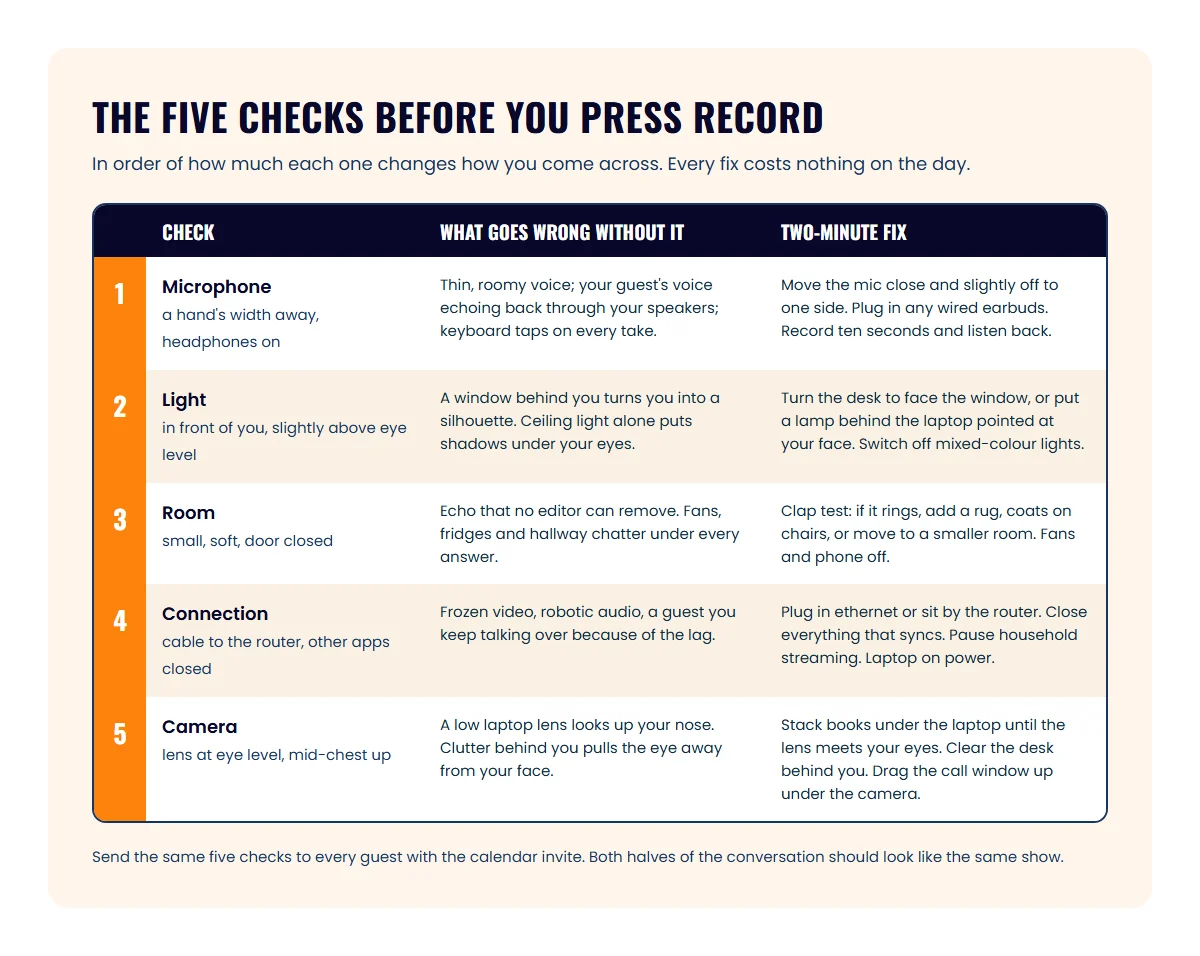
Run the same five checks on your guest’s side. The guest preparation steps show where the checklist fits in your booking emails.
How do you sound good on a podcast with a basic microphone?
Sounding good on a podcast depends more on where the microphone sits than on what it cost. Put the mic a hand’s width from your mouth, slightly off to one side so you aren’t breathing straight into it, and keep that distance when you lean back to laugh.
A dynamic microphone with a cardioid pattern is the usual choice for a home or office setup. Cardioid means it picks up what is in front of it and rejects most of what is behind and beside it, which is what you want in a room that isn’t treated. The Samson Q2U, for example, is a dynamic cardioid mic with both a USB output for a computer and an XLR output for a mixer, and it ships with a tripod stand and a foam windscreen.
Three habits matter more than the next microphone up:
- Wear headphones. Without them, your guest’s voice plays out of your speakers and back into your mic, and the editor hears both of you twice. Any wired earbuds work.
- Record a ten-second test and listen back. Say your name and the show name, play it, and listen for hum, room echo or clipping. Fix it now, not after the interview.
- Silence everything that pings. Phone on silent and face down, desktop notifications off, smart speaker unplugged.
Laptop mics and wireless earbuds pick up the whole room and the keyboard, so treat them as a last resort for a guest who has nothing else.
How do you light your face for a video podcast?
Lighting your face for a video podcast comes down to one rule: the brightest light in the room should be in front of you, slightly above eye level.
Sit facing a window during the day and you have a free, soft key light. Turn the desk around if the window is behind you, because a bright window behind your head makes the camera expose for the window and turns you into a silhouette. If you record after dark or in an internal office, a desk lamp or a small LED panel behind the laptop, pointed at your face, does the same job. The same window light works when you record a video testimonial from a client.
Avoid lighting that comes only from the ceiling, which puts shadows under your eyes and nose. Mixed sources, such as a warm lamp on one side and a cool window on the other, make skin tones look odd, so turn one off. If you wear glasses, raise the light above the frames to lose the reflection. Then check the result in your camera preview: an evenly lit face with the background a little darker than you.
How do you make a room quiet enough to record?
A room is quiet enough to record when a clap in the middle of it dies instantly instead of ringing. Small rooms with carpet, curtains, a sofa or a bed almost always pass. Conference rooms with glass walls and hard floors almost never do.
Here is what helps, in order of effort:
- Close the door and the windows, and tell the household or the office what time you’re recording.
- Turn off fans, air conditioning and the fridge if it shares a wall, and turn them back on between takes.
- Add soft surfaces where you can: a rug, a blanket over the desk, coats on the chair backs, a bookcase behind you.
- Sit closer to the mic. A cardioid mic a hand’s width away picks up far less of the room than one across the desk.
- If the room still rings, move. A walk-in closet full of clothes is the classic fix, and it works.
How do you keep your connection stable during a remote recording?
A stable connection for a remote recording means a cable from your computer to the router wherever possible, and a strong, uncrowded Wi-Fi signal where it isn’t. Dropped frames and robotic audio usually start here, not at the camera or the mic.
Zoom’s system requirements list 2.6 Mbps up and 1.8 Mbps down for 720p group video, and 3.8 Mbps up and 3.0 Mbps down for 1080p. Most home plans clear that on paper. The problem is what else shares the line: a cloud backup uploading in the background, someone streaming in the next room, or the office Wi-Fi at 10 a.m. Run a speed test at the time of day you’ll record, and look at the upload figure, because that is the one carrying your face and voice out.
Before you join: plug in an ethernet cable or sit in the same room as the router; close every other application and browser tab, especially anything that syncs files; pause the household’s streaming for the hour; and plug the laptop into power, because battery-saving modes throttle the processor and the camera. The video podcast production guide compares recording platforms for agents, including those that record each person locally so a dip in the line doesn’t reach the final files.
How high should the camera be, and where do you look?
The camera should sit at eye level, which for a laptop means raising it on a stack of books or a stand until the lens is level with your eyes. A lens below eye level looks up your nose.
Frame yourself from mid-chest up, with a little space above your head, an arm’s length from the lens so your gestures stay in frame. Behind you, aim for something plain or something that says who you are, such as a bookshelf or your market’s skyline, as long as that window isn’t the brightest thing in shot. A phone on a small tripod at eye level often beats a laptop webcam.
Look at the lens when you ask a question or make your main point, then let your eyes drop to your guest’s face while they answer, with the call window dragged up under the camera so the two spots sit close together. If the camera itself is the problem rather than the setup, the plan for camera-shy agents who still want a show starts with audio-only formats and works up.
What checklist should you send a guest?
Send guests a short version of the five checks with the calendar invite, worded so it takes a minute to read and nothing to buy.
If you’re the one being booked, the same list is your prep for someone else’s show. The podcast guesting guide for agents covers what to prepare beyond the tech, and agents who guest regularly through the ICONS Hub booking service can reuse this checklist for every appearance.
Hosts who run their own show can keep the checklist next to the recording link. In ICONS DIY Podcast, the do-it-yourself podcast workspace from ICONS, you record in the browser with each person captured separately, so a guest who followed the five checks comes through as a clean track of their own.
Next step
Ten minutes before your next recording, join early, confirm the right mic and camera are selected, record ten seconds and play it back. If the five checks pass, stop fiddling and talk to your guest.
Frequently asked questions
Do I need a second light?
Not to start. One soft light in front of you, slightly above eye level, covers most desk setups. Add a second only if one side of your face is in deep shadow and moving the first light doesn't fix it.
Can I record from my car?
A parked car is quiet and the soft seats absorb echo, so the audio can be fine. The video usually isn't: light is uneven and the camera ends up too low. Save the car for audio-only guest spots.
Should I wear a lapel mic instead of a desk mic?
A clip-on lapel mic works when you move around or stand, and it keeps the mic out of the frame. At a desk, a mic on a stand close to your mouth is simpler and usually sounds fuller.
What if my guest only has a laptop?
Ask them to use the wired earbuds that came with a phone, if they have any, sit close to the laptop in a small room, and face a window. A wired connection matters more than the mic in that case.
Sources
- System requirements for Windows, macOS, and Linux — Zoom Support (accessed October 9, 2026)
- Q2U USB/XLR Dynamic Microphone — Samson Technologies (accessed October 9, 2026)
Done-for-you podcast production
Want a podcast that brings in referrals, not just downloads?
Icons of Real Estate plans, produces and publishes business-growing podcasts for agents. You record. We handle the rest.
Launch Your Podcast
Written by
Co-Founder and Podcast Guru, Icons of Real Estate
Tomás Fonseca co-founded Icons of Real Estate in 2021 and is its Podcast Guru. He has a background in marketing, with stints at companies like Nintendo and Ardor SEO, and is one of the hosts of the Icons of Real Estate Podcast.

How we research, write, fact-check and correct articles: our editorial standards.