Wavve vs ICONS Design Studio for audiograms comes down to self-serve scheduling versus a free clip tied to the episode. Wavve plans start at $7.99 a month after a free trial (October 2026), with a built-in social scheduler, so it suits agents promoting their own episodes. ICONS Design Studio costs nothing and makes audiograms from the episode’s own audio.
Wavve and ICONS Design Studio at a glance
Wavve and ICONS Design Studio both turn podcast audio into waveform videos, but Wavve is self-serve with monthly caps, while Design Studio is a podcast design editor with no plan tiers. Wavve’s cells come from its own site (October 9, 2026); ICONS details are taken from the Design Studio product page.
| Wavve | ICONS Design Studio | |
|---|---|---|
| Price | Starter $7.99/mo; Wavve Pro $19.99/mo; Agency $98.99/mo (each shown reduced from $9.99, $24.99, $129.99) | Free |
| Free option | Free trial, no credit card; no free plan listed | The tool itself is free |
| Billing | Monthly, 6-month or annual; annual has the highest discount, 20% | No billing |
| Who can use it | Anyone | Anyone who asks: free, access through the form on the Design Studio page; hosts review by link |
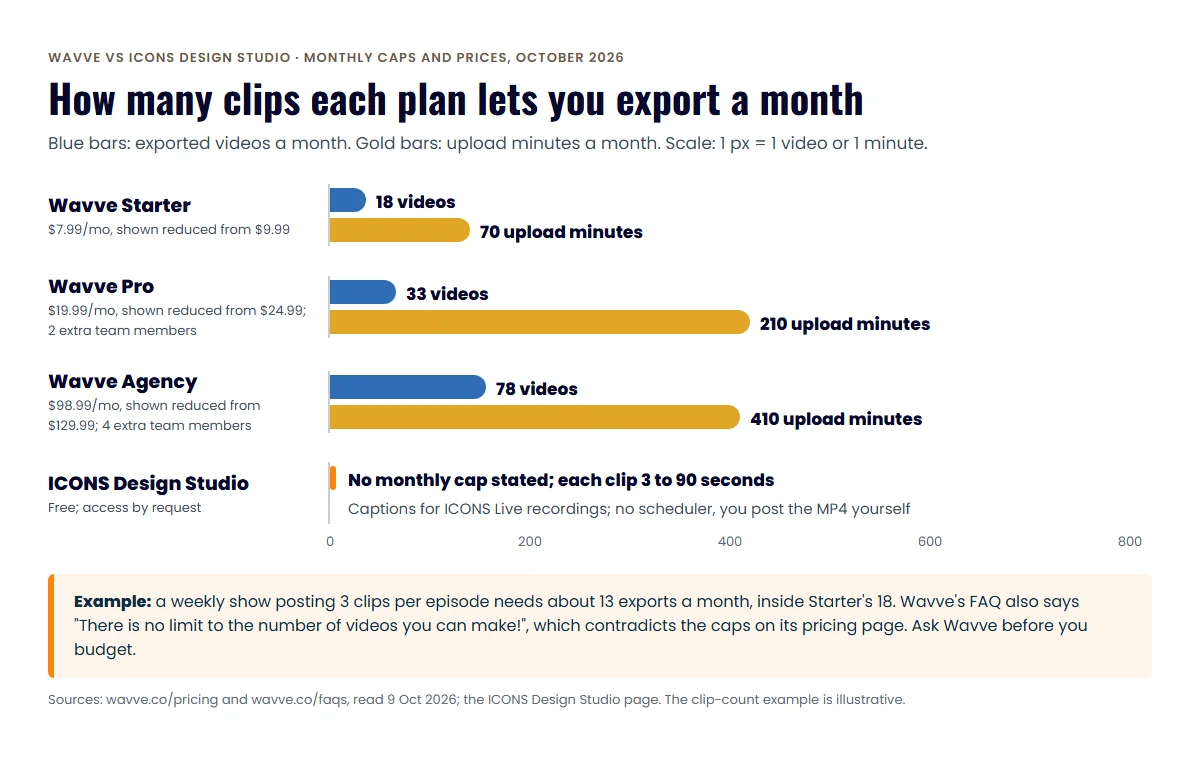
| Monthly limits | Starter: 70 upload minutes, 18 exported videos; Pro: 210 and 33; Agency: 410 and 78 | No monthly cap stated |
| Audiogram length | Up to about 2 hours, per its FAQ | 3 to 90 seconds |
| Captions | Captions on all plans; dozens of speech-to-text languages; no translation | When the episode was recorded in ICONS Live |
| Scheduling | Social Media Scheduler on all plans | None; exports MP4 |
| Team | Pro: 2 additional team members; Agency: 4 | Brand lock for the designers you invite |
| Other graphics | Templates, auto-resizing | Covers, episode art, thumbnails, quote cards, carousels |
| Mobile | “Wavve does not have an app in any app store at this time” | Browser on a computer only |
What does Wavve cost?
Wavve’s plans start at $7.99 a month, as of October 2026. On October 9, 2026, the Wavve pricing page showed each plan with a struck-through original price, then the current price, labelled “Monthly”:
- Wavve Starter: $7.99 a month (shown reduced from $9.99). It includes 70 upload minutes and 18 exported videos a month, SRT and transcript downloads, AI hot spot identification, the social media scheduler, auto-resizing, Wavveforms, templates and captions.
- Wavve Pro: $19.99 a month (shown reduced from $24.99). It raises the caps to 210 upload minutes and 33 exported videos a month, with 2 additional team members.
- Agency: $98.99 a month (shown reduced from $129.99). This plan allows 410 upload minutes and 78 exported videos a month, with 4 additional team members.
Wavve’s FAQ adds billing options: “You can choose monthly, 6-month, or annual billing. Annual plans receive the highest discount of 20% off.” There’s also a Pause plan for quiet periods.
Two details in Wavve’s own FAQ don’t match the pricing page. The FAQ says “There is no limit to the number of videos you can make!”, while the pricing page caps exported videos per month. It also says “Each subscription type includes 2 team members,” with extra users at $4 a month, while the pricing page lists additional members only on Pro and Agency. Ask Wavve before you budget.
Is ICONS Design Studio free for audiograms?
ICONS Design Studio is free to use, audiograms included. Access is by request: fill in the form on the Design Studio page. Hosts and guests approve the result through a private link, without an account.
You can make the audiograms yourself at a computer, or the ICONS team makes them when it produces your show. There is no subscription to manage and no export count to watch.
How do they compare on making audiograms?
Wavve covers more video types and lengths, while ICONS Design Studio keeps audiograms short and tied to the episode. Wavve says it “turns any content into social media-ready videos,” with Wavveform graphics and progress bars. It accepts mp3, mp4, wav, m4a, flac and ogg files, and its FAQ says you can import files up to 150MB.
ICONS Design Studio audiograms work like this:
- Short clips. Each one uses 3 to 90 seconds of the episode’s own audio, with a moving waveform.
- Social sizes. Videos go up to 1920 px a side, using the Studio’s presets, including Story and Reel at 1080x1920.
- Branded templates. Designs fill from the episode and switch to the show’s colours, fonts and logos.
- Captions from ICONS Live. Episodes that were recorded in ICONS Live get captions from their transcript.
- Approved by link. The host clicks Approve or Request changes on a private page.
For ideas on which moments to clip, read podcast clips for real estate agents. The same moment can also become a LinkedIn post and a newsletter note.
How do they compare on captions, scheduling and teams?
Wavve offers wider captions and built-in scheduling, while ICONS Design Studio leaves posting to you. Wavve includes captions on all plans and lists dozens of speech-to-text languages in its FAQ, with “3 default styles of captions.” It also says “Wavve does not support translations at this time.” Its Social Media Scheduler lets you “Create, schedule and post on social media.”
ICONS Design Studio’s limits:
- captions only for episodes recorded in ICONS Live;
- no posting or scheduling to social media, so you download the MP4;
- browser on a computer only;
- access by request through the form, rather than instant sign-up.
On teams, Wavve lists additional team members on Pro and Agency. Design Studio adds brand lock, so invited designers can change only the words and photos in a locked design.
Where Wavve does more
Wavve does more as a self-serve tool for regular social posting. These are real advantages:
- Built-in scheduler. Create, schedule and post in one place, on every plan.
- Longer videos. Its FAQ says videos can typically run up to about 2 hours.
- Many caption languages, listed in its FAQ, with SRT and transcript downloads.
- Auto-resizing. One design adapts to each social channel.
- Flexible billing, including 6-month terms and a Pause plan.
- Start today. The free trial needs no credit card and no access request.
What ICONS Design Studio adds
ICONS Design Studio adds what matters when audiograms sit alongside the rest of a produced show. Its advantages:
- Free, with no monthly caps stated. You don’t count upload minutes or exports.
- One editor for every graphic. Covers, episode art, thumbnails, quote cards, carousels and audiograms share the same brand and episode data.
- Bulk generate. One template can run across up to 200 episodes.
- Checked quotes and guest stills from ICONS Live recordings.
- Client approval by private link, with no account needed.
Which tool for which agent?
Wavve is the better buy if you post your own clips on a schedule and want one tool to make and publish them. ICONS Design Studio wins on price if your clips can be short and you post them yourself. Whichever tool you pick, remember that a viral clip can’t build your business by itself; the full episode and your follow-up do that.
- Solo agent promoting a weekly show: Wavve Starter’s 18 exports a month cover several clips per episode, with scheduling built in. Confirm the plan caps with Wavve first.
- Show with a producer: Design Studio. Audiograms arrive branded, alongside episode art and thumbnails.
- Agent already scheduling posts in Wavve: keep it for scheduling, ask for Design Studio access, and post the Studio’s audiograms through Wavve.
Turning one episode into weeks of posts is covered in the podcast repurposing checklist, and the video side in real estate video podcasts. Headliner, Wavve’s closest rival, is weighed in Headliner vs ICONS Design Studio. To have clips and graphics made for you, Icons podcast production covers them.
Frequently asked questions
Is Wavve still available?
Yes. Wavve's site loaded on October 9, 2026, describing itself as powered by Disctopia, with a footer saying Wavve is a subsidiary of Disctopia Inc. Its pricing page listed Starter, Wavve Pro and Agency plans, and its home page advertised a free trial.
Does Wavve have a free plan?
No free plan is listed. Wavve's pricing page says you can try it for free with no credit card required, and its FAQ says the free trial allows full unlimited content creation. The trial length was not stated on the pages we checked.
Can I use ICONS Design Studio myself?
Yes. ICONS Design Studio is free: ask for access through the form on the Design Studio page and sign in with Google in a browser on a computer. Hosts and guests review and approve designs, including audiograms, through a private link without an account.
How long can an audiogram be?
ICONS Design Studio audiograms run 3 to 90 seconds. Wavve's FAQ says the longest video you can generate is typically around 2 hours, though its plans cap upload minutes and exported videos each month, from 70 minutes and 18 videos on Starter.
Sources
- Wavve pricing (accessed October 9, 2026)
- Wavve FAQs (accessed October 9, 2026)
- Wavve home page (accessed October 9, 2026)
Done-for-you podcast production
Want a podcast that brings in referrals, not just downloads?
Icons of Real Estate plans, produces and publishes business-growing podcasts for agents. You record. We handle the rest.
Launch Your Podcast
Written by
Co-Founder and Podcast Guru, Icons of Real Estate
Tomás Fonseca co-founded Icons of Real Estate in 2021 and is its Podcast Guru. He has a background in marketing, with stints at companies like Nintendo and Ardor SEO, and is one of the hosts of the Icons of Real Estate Podcast.

How we research, write, fact-check and correct articles: our editorial standards.