On this page
Canva vs ICONS Design Studio is a choice between a general design editor and a free editor built for podcast episodes. Canva is free at US$0, with Pro at US$144 a year and Business at US$250 a year per person (October 2026). ICONS Design Studio is free, fills graphics from episode data and suits real estate agents with a podcast.
How do Canva and ICONS Design Studio compare at a glance?
Canva and ICONS Design Studio both make podcast covers and social graphics, but Canva is a general editor with huge libraries, while Design Studio works from the episode. Canva’s cells come from its US pricing page, read in a browser on October 9, 2026 (yearly billing, tax excluded); ICONS cells come from the ICONS Design Studio page.
| Canva | ICONS Design Studio | |
|---|---|---|
| Price | Free US$0; Pro US$144/year; Business US$250/year per person; Enterprise by sales | Free |
| Free plan | US$0 for one person: 1.6M+ templates, 4.7M+ stock assets, 5GB storage, 1 Brand Kit (3 colors only) | The tool itself is free |
| Who can use it | Anyone | Anyone who asks: free, access through the form on the Design Studio page; hosts review by link |
| Templates | 1.6M+ on Free; 3.6M+ including premium on Pro | 76 (12 originals plus 64 in 10 styles) |
| Fill from episode data | Not listed on the pricing page | Title, number, season, date, guest, from ICONS Podcast Hosting |
| Sizes | 1,000+ design types; custom dimensions on Free and Pro | 12 presets, plus custom 64 to 8000 px |
| Stock library | 4.7M+ photos, videos, graphics and audio on Free; 141M+ premium on Pro | None |
| Brand kit | 1 Brand Kit (3 colors) on Free; 5 on Pro; 100 on Business | Show colours, fonts and logos; brand lock |
| Storage | 5GB Free; 100GB Pro; 500GB Business | Not stated |
| AI image tools | Up to 20 Standard or Premium AI uses on Free; 10x more on Pro; 20x more on Business | Generate, restyle, enhance, Magic Layers; “made with AI” tag on PNG and JPG |
| Audiograms | Not listed on the pricing page | 3 to 90 seconds, up to 1920 px |
| Client approval | “Approvals” listed on Business; details not on the pricing page | Private review link with Approve or Request changes |
| Devices | Not listed on the pricing page; “Canva Offline” listed on all plans | Browser on a computer only |
What does Canva cost?
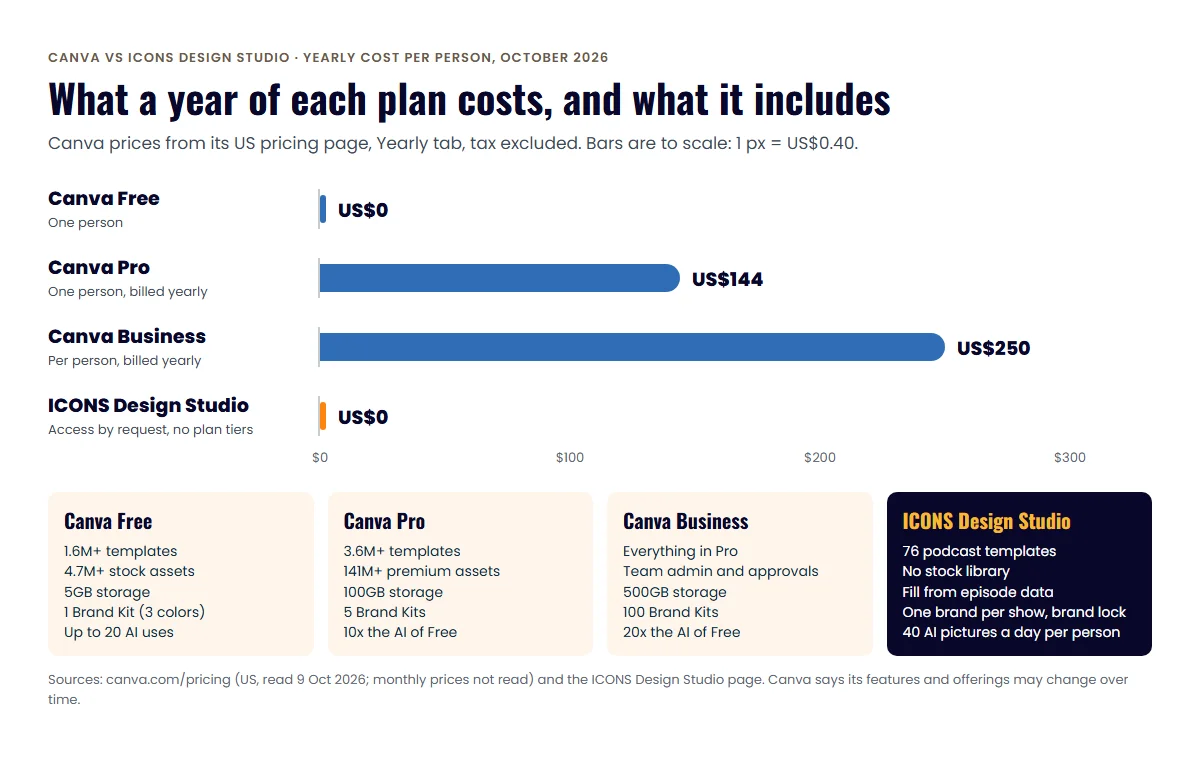
Canva costs US$0 on Free, US$144 a year on Pro and US$250 a year per person on Business, as of October 2026. Those are the figures on Canva’s US pricing page with the Yearly tab selected, which the page shows by default; prices exclude applicable tax.
- Canva Free: US$0 a year for one person. The page lists an “Easy drag-and-drop editor and 1,000+ design types”, “1.6M+ templates to start fast”, “4.7M+ photos, videos, graphics, and audio”, “1 Brand Kit (3 colors only)”, “5GB of cloud storage” and “Up to 20 Standard or Premium AI uses”.
- Canva Pro: US$144 a year for one person, with a free trial. It adds AI tools such as resize, translate and remove background, “3.6M+ templates (including premium)”, “141M+ premium photos, videos, graphics, and audio”, 5 Brand Kits, social content scheduling, 100GB of cloud storage and “10x more AI than Canva Free”. An AI Pass add-on costs extra.
- Canva Business: US$250 a year per person, with a free trial. It adds collaboration and team admin tools, “100 Brand Kits and approvals”, access to Flourish, a 10% discount on print orders, 500GB of cloud storage and “20x more AI than Canva Free”.
- Canva Enterprise: priced through sales (“Let’s talk”), with SSO and SCIM provisioning, 1,000 Brand Kits with tiered approvals and 1TB of cloud storage.
Monthly prices weren’t read; the page says yearly billing saves from 16% against monthly. Each plan includes everything in the plans before it. Canva also notes that its features and offerings may change over time, so recheck before you buy.
What does ICONS Design Studio cost?
ICONS Design Studio is free, and you get access by asking through the form on the Design Studio page. You then sign in with Google in a browser on a computer. Hosts and guests see designs through a private review link, without an account, when you send one.
That changes the question for an agent. Instead of asking which editor to buy, ask which graphics you make: listing flyers and general social posts suit a general tool, while episode graphics are faster in an editor that already knows the episode.
What does ICONS Design Studio make, and how?
ICONS Design Studio makes podcast covers, episode art, YouTube thumbnails, quote cards, social posts, carousels and audiograms. Its main trick is filling designs from the episode itself.
How a design comes together for a show in ICONS Podcast Hosting:
- Pick a size and template. There are 12 ready-made sizes, including 3000x3000 cover and episode art and a 1280x720 YouTube thumbnail.
- Let it fill. The title, episode number, season, date, guest name and photos drop in, in the show’s colours and fonts. Anything missing gets a yellow dashed outline.
- Edit. You can change words, swap photos, remove a background, add shapes and text styles, or add an AI image.
- Get approval. A private review link lets the host or guest pin comments and click Approve or Request changes.
- Export. Download PNG, JPG, PDF, GIF or MP4. Magic resize copies a design into up to 12 sizes, and Bulk generate runs one template across up to 200 episodes.
Export rules are built in. Covers export as 3000x3000 JPGs under 512 KB, and YouTube thumbnails as 1280x720 JPGs under 1.9 MB, with safe-zone guides. The platform rules behind those numbers are in our cover art dimensions guide.
How does Design Studio handle AI images and listing photos?
ICONS Design Studio labels AI images and asks users not to pass AI-edited photos off as real property. PNG and JPG exports that contain an AI picture carry an embedded “made with AI” tag. The editor also offers the caption “Illustrative AI image, not the actual property.”
Its AI tools include:
- Generate. Make an image from a description, with presets such as interior, exterior, skyline and lifestyle.
- Restyle. Edit with AI for twilight, bright and airy, blue sky and other looks; the original is kept.
- Enhance. Sharpen a small picture and double its size.
- Magic Layers. Split a flat image, such as an old cover, into an editable background, text and cut-out.
Each person can make up to 40 AI pictures a day. Pictures sent to the AI tools are processed by a third-party AI provider. Canva’s pricing page, by contrast, counts AI by plan: up to 20 uses on Free, 10x that on Pro and 20x on Business. For the rules on using AI images in real estate marketing, read our guide to honest AI images in listing marketing, and check your MLS and broker rules.
Where Canva does more
Canva does more as a general design tool, and its pricing page makes the gaps in Design Studio easy to see:
- Stock library. Canva Free lists 4.7M+ photos, videos, graphics and audio, and Pro 141M+ premium assets. Design Studio has none.
- Templates. 1.6M+ on Free and 3.6M+ on Pro, against 76 in Design Studio, which are built for podcast marketing only.
- Brand Kits. 1 on Free, 5 on Pro and 100 on Business, so a team with several brands has room. Design Studio saves one brand per show.
- Social content scheduling on Pro. Design Studio exports files; it doesn’t post them.
- Print. Business includes a 10% discount on print orders. Design Studio doesn’t offer print or CMYK output.
- Team admin, approvals and collaboration tools on Business. In Design Studio, two people can’t edit the same design at the same moment; it warns you instead of overwriting.
- Cloud storage: 5GB, 100GB or 500GB by plan. Design Studio doesn’t state a limit.
- Design in bulk and Canva Offline, both listed on Canva’s compare table. The Studio runs in a browser on a computer only, with no phone or tablet apps.
Where ICONS Design Studio does more
ICONS Design Studio does more for podcast graphics specifically. Its advantages, from the product page:
- Free, with no plan tiers. There are no seats, credits or yearly bills.
- Fill from episode. Titles, numbers, dates and guest names come straight from ICONS Podcast Hosting, so there’s no retyping.
- Podcast rules built in. Cover sizes, file-size limits and safe zones are set for podcast apps and YouTube.
- Bulk generate. One template can run across up to 200 episodes in a single pass.
- Brand lock. Invited designers can change only the words and photos in a locked design.
- Guest stills and checked quotes. For episodes recorded in ICONS Live, the team can grab 1 to 24 stills of the guest. Quote suggestions are checked word for word against the transcript.
- Approval by link. Hosts approve without an account, and links last 30 days by default.
Which should you choose?
Choose Canva when most of your graphics are listings, flyers and general social posts, and ICONS Design Studio for anything tied to an episode. Both can sit side by side, because one of them is free.
- Solo agent making graphics for listings, social and a podcast: Canva Free or Pro for the listing and social work, plus Design Studio for episode art, so the podcast side costs nothing.
- Team with a producer: Design Studio for the show. Episode art fills itself, and the host approves by link.
- Agent already on Canva Pro or Business: keep it. Ask for Design Studio access for the podcast graphics and leave your Canva plan as it is.
For a round-up that puts Canva beside Adobe Express, Headliner and Wavve, read the podcast graphics tools comparison. Your podcast graphics are part of a bigger brand system, covered in personal branding for real estate agents. Graphics alone won’t set you apart, though; standing out in a saturated market comes from being known for one specific conversation in your town. If you’d rather the graphics, editing and publishing were handled for you, that is what podcast production from Icons includes.
Frequently asked questions
How much does Canva cost?
Canva's US pricing page, read on October 9, 2026, shows Free at US$0, Pro at US$144 a year for one person and Business at US$250 a year per person, on yearly billing with tax excluded. Enterprise is priced through sales. The page says yearly billing saves from 16% against monthly.
Can I use ICONS Design Studio myself?
Yes. ICONS Design Studio is free: ask for access through the form on the Design Studio page, then sign in with Google in a browser on a computer. Hosts and guests review and approve designs through a private link, without an account.
What sizes does ICONS Design Studio make?
Ready-made sizes include podcast cover and episode art at 3000x3000, YouTube thumbnail at 1280x720, YouTube banner, Instagram square and portrait, Story or Reel, LinkedIn, X and Facebook posts, and quote cards. Custom sizes from 64 to 8000 pixels per side are also possible.
Can I use AI to edit a listing photo in Design Studio?
You can restyle a photo, for example as twilight or with a blue sky, but the result must never be presented as how the real property looks. ICONS asks users to add the caption 'Illustrative AI image, not the actual property' whenever an AI-edited property photo is shared. Check your MLS and broker rules too.
Sources
- Canva pricing (accessed October 9, 2026)
Done-for-you podcast production
Want a podcast that brings in referrals, not just downloads?
Icons of Real Estate plans, produces and publishes business-growing podcasts for agents. You record. We handle the rest.
Launch Your Podcast
Written by
Co-Founder and Podcast Guru, Icons of Real Estate
Tomás Fonseca co-founded Icons of Real Estate in 2021 and is its Podcast Guru. He has a background in marketing, with stints at companies like Nintendo and Ardor SEO, and is one of the hosts of the Icons of Real Estate Podcast.

How we research, write, fact-check and correct articles: our editorial standards.