On this page
Zencastr vs ICONS Live is a choice between two free tools built for different workflows. Zencastr’s free Vibecastr plan (as of October 2026) bundles recording, editing, live streaming and hosting, so it suits real estate agents who run the whole show themselves. ICONS Live costs agents nothing either, and it records interviews that the ICONS team then produces.
How does Zencastr stack up against ICONS Live?
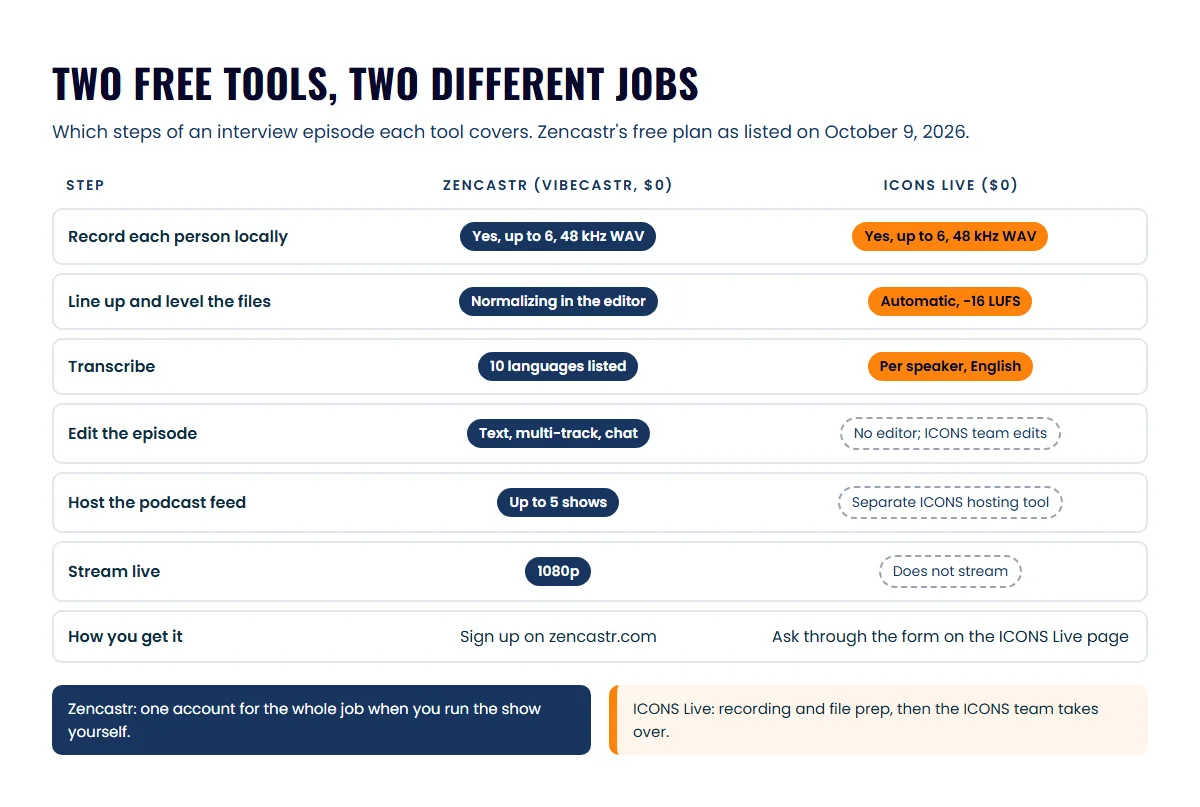
Zencastr and ICONS Live match closely on recording, then split on everything after it. Every Zencastr cell below comes from Zencastr’s pricing and feature pages as of October 9, 2026, while the ICONS Live cells match the ICONS Live studio page.
| Zencastr | ICONS Live | |
|---|---|---|
| Price | Vibecastr: free; Enterprise: custom, through sales | Free |
| Paid self-serve plans | None shown on the pricing page | None; no billing |
| How you get it | Sign up on zencastr.com | Ask for access through the form on the ICONS Live page |
| People per recording | 6 participants | Up to 6 on camera, plus a watch-only audience link |
| Separate local tracks | Yes, “recorded on their own separate track” | Yes, recorded on each person’s device |
| Audio and video | 48 kHz WAV and 44 kHz MP3; up to 4K video | Uncompressed 48 kHz WAV; video targets 8 Mbps, about 1080p |
| Editing | Text-based, multi-track and chat-based editing | No editor; editing happens afterwards |
| Transcripts | Unlimited hours; 10 languages listed on pricing | Per speaker, TXT, SRT and VTT; English only |
| Live streaming | Yes, 1080p | No |
| Podcast hosting | Yes, up to 5 shows | No (ICONS Podcast Hosting is a separate tool) |
| Apps | Web and iOS | Browser only |
What does Zencastr cost?
Zencastr costs nothing on its self-serve plan, as of October 2026. The Zencastr pricing page showed two options on October 9, 2026:
- Vibecastr: Free. This is the only self-serve plan on the page.
- Enterprise: Custom. You get it by talking to sales.
The page shows no monthly or annual toggle and no paid self-serve tier. The free plan lists 4 seats, 5 podcast shows, unlimited separate-track recording and unlimited transcription hours. Two hosting rows read “Unlimited Video RSS 6,000” and “Unlimited Video Views 60,000”, which look like caps despite the word “unlimited”. If you plan to publish video through Zencastr, ask it what those numbers mean before you rely on them. Prioritized processing is marked as not included on the free plan.
How much is ICONS Live?
ICONS Live costs nothing, and there is no sign-up page to go through. Agents request access from the ICONS Live page’s form, and the ICONS team sets the studio up for them. ICONS records its own network shows on it, along with the episodes it produces for clients, and ICONS DIY Podcast users run their own recordings on it.
For production clients, the ICONS team builds each recording; ICONS DIY Podcast users build their own. Either way it is a single session or a room with a permanent link for a weekly show. Each person gets their own invite link by role: host, guest, producer or watch-only audience. Links expire after 30 days and can be cancelled one at a time.
How do the recordings compare?
Zencastr and ICONS Live record the same way: each person on their own machine, so a weak connection affects the live call but not the saved file. Zencastr says it “records locally directly on your device for reliably great audio and video, no matter the wifi.”
Here is how the files compare:
- Audio: Zencastr records 48 kHz WAV and 44 kHz MP3. ICONS Live writes an uncompressed 48 kHz WAV for each person.
- Video: Zencastr lists 4K on desktop and mobile. ICONS Live targets 8 Mbps per person, about 1080p, depending on the camera and computer.
- Uploads: Zencastr lists progressive uploading and automatic cloud backups. ICONS Live uploads in 4-second pieces and resends missing pieces after a crash or reload on the same device and browser.
- Processing: ICONS Live lines every file up on one timeline, corrects small clock drift, brings loudness to -16 LUFS and stitches a combined video. Zencastr’s pricing lists audio level normalizing and background noise removal among its editing tools.
For a talking-head agent interview, either gives an editor clean files. The reason local tracks matter in the first place is laid out in local recording versus recording the call.
How do they compare on editing, hosting and streaming?
Zencastr covers editing, hosting and streaming on its free plan, and ICONS Live covers none of them. Zencastr’s pricing page lists:
- text-based and multi-track editing, plus chat-based editing (“Edit audio and video, just by chatting”);
- chapter, title and description generation, filler word removal, eye contact correction and animated captions;
- audio and video hosting, an embeddable player, analytics and distribution to major podcast platforms;
- live streaming in 1080p.
ICONS Live hands an editor separate WAV and MP4 files per speaker, a transcript per speaker and some drafts to start from:
- title ideas, a summary, takeaway bullets, keywords and chapters;
- LinkedIn and X posts;
- ranked clip moments of 20 to 60 seconds.
The clip moments are timestamps, not cut clips. Hosting is a separate ICONS tool, and there is no live streaming.
Where Zencastr does more
Zencastr does more if you want one free tool for the whole job. These are real advantages:
- Editing in the same place. Text-based, multi-track and chat-based editing mean no file handover.
- Hosting included. Hosting covers up to 5 shows, with an RSS feed, analytics and distribution, so you may not need a separate host.
- Live streaming. Zencastr streams to Twitch, YouTube, TikTok and Instagram, per its streaming page.
- 4K video for cropping vertical clips.
- An iOS app for recording from an iPhone or iPad.
- More languages. Its pricing page lists 10 transcription languages.
- Open sign-up. You can start today with no request form.
Where ICONS Live wins
ICONS Live wins on what happens after you stop recording, provided your show is produced by the ICONS team:
- Files ready to edit. Everyone’s files are lined up, drift-corrected and levelled at -16 LUFS, with a combined video built too.
- A transcript per speaker. Each one is built from that person’s own track, so every line shows who spoke.
- One link for a weekly show. A recurring room keeps the same link, and each session lands as a separate recording with the date in its name.
- Role-based invite links that expire after 30 days. Each guest’s upload permission is tied to them, so a forwarded link cannot write into someone else’s recording.
- A direct path into production. The recording can go to ICONS Review for client sign-off, become a draft episode in ICONS Podcast Hosting, or open in the graphics editor with episode details filled in.
Can you use Zencastr and ICONS Live together?
Zencastr and ICONS Live can sit side by side, because they cover different jobs. You could record your own short solo episodes or live Q&As and keep interview episodes with a producer.
A split that works:
- Zencastr for what you run alone: a weekly market update you record and publish yourself, or a live stream to YouTube or Instagram.
- ICONS Live for produced interviews: guest episodes where the ICONS team edits, writes the notes, makes the graphics and publishes.
The catch is that your episodes then live in two places. Before you split, decide which host holds your podcast’s RSS feed, because listeners subscribe to one feed. A feed you move later needs a redirect from the old host. If the show itself moves to ICONS Podcast Hosting, its import keeps your feed’s identifiers, dates and episode numbering.
So which one fits you?
Zencastr fits if you will record, edit and publish yourself; ICONS Live fits if the ICONS team produces your show. Three typical cases:
- Solo agent starting out, doing it yourself: Zencastr. Its free plan covers recording, editing, hosting and streaming in one account.
- Agent whose show has a producer, in-house or at ICONS: ICONS Live. The producer gets lined-up, levelled files per speaker, and the recording flows into review and publishing.
- Agent already recording on Zencastr: stay unless you hand production to ICONS. In that case recording moves to ICONS Live as part of the service.
Riverside is the other self-serve studio agents ask about, and Riverside vs ICONS Live covers its paid tiers; the recording software comparison for agents puts all six tools on one table.
Before you record, tell guests, whichever tool you use. In several US states everyone on the call has to agree to being recorded, not just the host. Treat that as background, not legal advice, and read the real estate podcast compliance guide and check with your broker. Microphones and cameras are covered in the real estate podcast equipment guide, and if you’d rather only show up and talk, see ICONS podcast production.
Frequently asked questions
Is Zencastr really free?
Zencastr's pricing page, checked October 9, 2026, shows a free plan called Vibecastr and a custom-priced Enterprise plan, with no paid self-serve tier listed. The free plan includes up to 6 participants, 4K video, 48 kHz WAV recording, text-based editing, hosting for up to 5 shows and live streaming.
Can my guest join ICONS Live from a phone?
ICONS Live runs in a web browser only, with no phone or desktop app. Guests open an invite link, allow the camera and microphone and check their setup in a green room. Zencastr lists a web app and an iOS app for iPhone and iPad.
Can I host my podcast on Zencastr instead of a separate host?
Zencastr's pricing page lists audio and video hosting, a secure RSS feed, analytics, up to 5 podcast shows and distribution to major podcast platforms on its free plan. ICONS Live does not host episodes; for ICONS shows, a finished recording can become a draft episode in ICONS Podcast Hosting.
Which one transcribes more languages?
Zencastr's pricing page lists 10 supported transcription languages, although its transcription page mentions 15 in one heading. ICONS Live transcribes in English only, with a separate transcript for each speaker delivered as plain text and SRT and VTT subtitle files.
Do I need my guest's permission to record?
Tell every guest before you press record, whichever tool you use. Some US states require all parties on a call to agree to being recorded, not only the host. This is general information, not legal advice, so check the rules where you and your guests are.
Sources
- Zencastr pricing (accessed October 9, 2026)
- Zencastr home page (accessed October 9, 2026)
- Zencastr recording features (accessed October 9, 2026)
- Zencastr transcription (accessed October 9, 2026)
- Zencastr live streaming (accessed October 9, 2026)
- Zencastr mobile app (accessed October 9, 2026)
Done-for-you podcast production
Want a podcast that brings in referrals, not just downloads?
Icons of Real Estate plans, produces and publishes business-growing podcasts for agents. You record. We handle the rest.
Launch Your Podcast
Written by
Co-Founder and Podcast Guru, Icons of Real Estate
Tomás Fonseca co-founded Icons of Real Estate in 2021 and is its Podcast Guru. He has a background in marketing, with stints at companies like Nintendo and Ardor SEO, and is one of the hosts of the Icons of Real Estate Podcast.

How we research, write, fact-check and correct articles: our editorial standards.