SquadCast by Descript vs ICONS Live is a question of whether you want recording bundled with an editor. SquadCast now comes with a Descript plan, free or $16 to $50 per person a month on annual billing (October 2026 prices), so it suits agents who edit themselves. ICONS Live is also free and records interviews the ICONS team produces.
How do SquadCast by Descript and ICONS Live differ?
SquadCast by Descript and ICONS Live both record each person on their own device, but Descript wraps recording inside an editing app with plan limits. Descript’s plans were read on SquadCast’s and Descript’s own pages on October 9, 2026; ICONS Live’s details are from the ICONS Live page.
| SquadCast by Descript | ICONS Live | |
|---|---|---|
| Price | Free; Hobbyist $16, Creator $24, Business $50 per person/mo billed annually ($24, $35, $65 monthly); Enterprise custom | Free |
| How it’s sold | “SquadCast is included in your Descript subscription” | Ask for access through the form on the ICONS Live page |
| Recorder name today | Descript Rooms (SquadCast still runs at squadcast.fm) | ICONS Live |
| Separate local tracks | Yes, “a separate file, recorded on their own machine” | Yes, recorded on each person’s device |
| Audio | 48 kHz; lossless WAV option in Chromium browsers | Uncompressed 48 kHz WAV |
| Video | Up to 4K | Targets 8 Mbps, about 1080p |
| People per recording | 10 room participants | Up to 6 on camera, plus a watch-only audience link |
| Recording hours | Per drive: Free 2 h; 5, 15, 25 h/month on paid plans | No hour cap stated |
| Editing | Text-based editing in Descript | No editor |
| Transcripts | 25 languages | Per speaker, TXT, SRT and VTT; English only |
| Phones | “Rooms isn’t supported on mobile devices” | Browser only |
What does SquadCast by Descript cost?
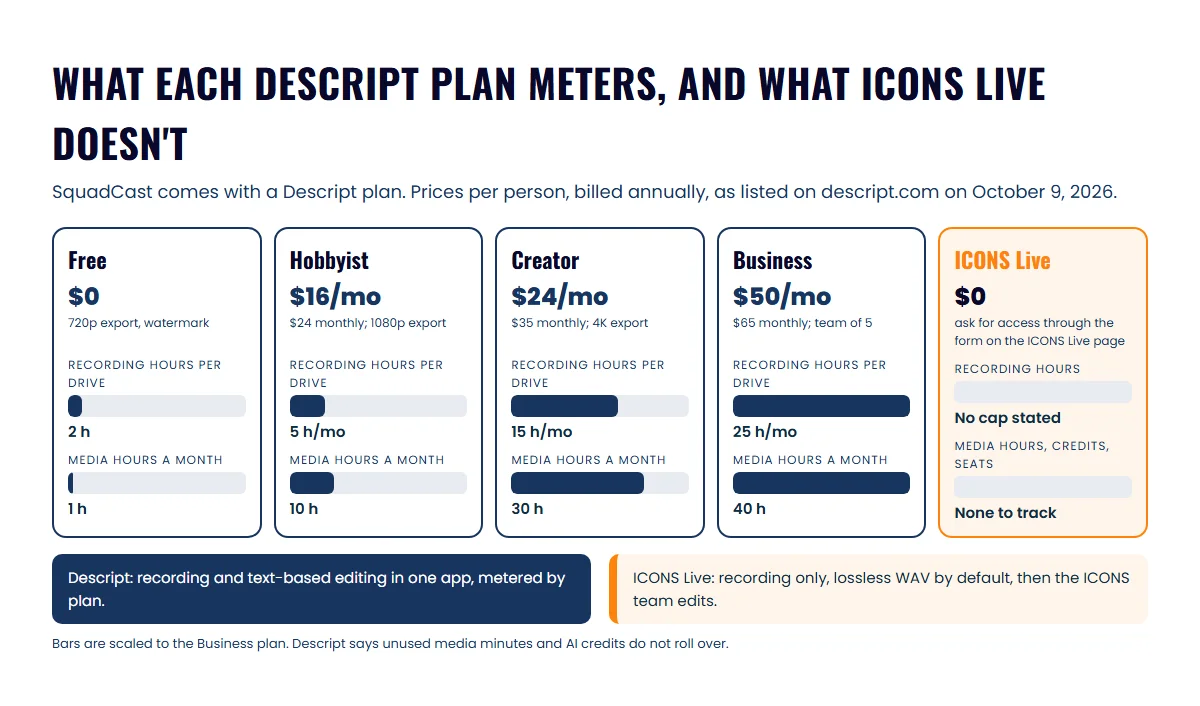
SquadCast by Descript costs whatever your Descript plan costs, because SquadCast’s pricing page now says “SquadCast has joined Descript!” and shows Descript’s plans. Prices from the Descript pricing page, as listed on October 9, 2026, are per person per month:
- Free: $0. The plan gives 1 media hour a month, 100 AI credits one time, and 720p export with a watermark.
- Hobbyist: $16 billed annually or $24 billed monthly. You get 10 media hours a month and 1080p export.
- Creator: $24 billed annually or $35 billed monthly. It includes 30 media hours a month and 4K export, and scales to a team of 3, billed separately.
- Business: $50 billed annually or $65 billed monthly. It includes 40 media hours a month, and scales to a team of 5.
- Enterprise: custom.
Recording has its own allowance per drive: 2 hours on Free, then 5, 15 and 25 hours a month on Hobbyist, Creator and Business. Descript’s help center says unused media minutes and AI credits don’t roll over. Descript says annual billing saves “up to 35% over monthly plan.”
What do you pay for ICONS Live?
ICONS Live is free to use, with no plan, seat or credit to buy. Fill in the ICONS Live page’s form to ask for access, and the ICONS team gets you set up. ICONS uses the studio for its own network shows and for production clients, and ICONS DIY Podcast users run their own recordings on it.
There are no media hours, AI credits or seats to track. For production clients, setup is handled by the ICONS team, as a single session or a standing room, and afterwards the files go into the ICONS team’s review, episode and graphics tools. ICONS DIY Podcast users set up and run their own recordings. Each person receives a role-based invite link.
What does each tool actually save?
SquadCast by Descript and ICONS Live both record locally at 48 kHz, so a guest’s shaky connection does not reach the saved file. Descript’s help center says Rooms and SquadCast “record a separate file from each participant’s device” and upload it progressively.
The differences are in the details:
- Lossless audio: Descript records 48 kHz and offers a lossless WAV option in Chromium browsers such as Chrome and Edge; you turn it on before recording. ICONS Live saves uncompressed 48 kHz WAV for every person by default.
- Video: Descript Rooms records up to 4K. ICONS Live targets 8 Mbps, about 1080p.
- Recovery: Descript says guests can resume uploading their main recording for up to 7 days after a session. ICONS Live resends missing pieces when the person reopens the page on the same device and browser.
- Processing: ICONS Live lines every file up, matches loudness at -16 LUFS and produces a combined video automatically.
The case for recording each guest locally, rather than recording the call, is made in the local-vs-call recording explainer.
How do they compare on editing and limits?
Descript is an editor first, and ICONS Live has no editor at all. Descript’s pricing lists text-based editing (“Edit video by editing a doc”), Studio Sound, filler word removal, clip creation, and drafts of social posts, blog posts and show notes.
ICONS Live gives an editor separate WAV and MP4 files per speaker plus drafts to work from:
- title ideas, a summary, takeaways and chapters;
- LinkedIn and X posts;
- ranked clip moments of 20 to 60 seconds, as timestamps rather than cut clips.
On limits, Descript meters recording hours, media hours and AI credits by plan, and allows 10 room participants. ICONS Live caps the camera at 6 people and transcribes in English only. Recordings are processed one at a time, so busy periods may take longer.
Where SquadCast by Descript does more
SquadCast by Descript does more when you want to record and edit in one app. These are real advantages:
- Text-based editing. You cut the transcript and the video follows, which makes tidying an interview easier for a non-editor.
- AI clean-up. Studio Sound, filler word removal and clip suggestions are built in.
- More participants. Descript allows 10 per room, against ICONS Live’s 6 on camera.
- More languages. Transcripts come in 25 languages, useful for a bilingual market.
- 4K recording. Higher resolution gives more room to crop vertical clips.
- Publishing integrations. Descript says you can publish to your hosting service directly, and its help center lists hosts including Buzzsprout, Captivate, Podbean and Transistor.
- Free to try. The Free plan needs no request form.
ICONS Live’s advantages
ICONS Live’s advantages are about cost and handover, and they pay off most when the ICONS team produces your show:
- No plan limits to manage. You don’t track recording hours, media hours, credits or seats, and the tool is free.
- Lossless by default. Every person’s audio is uncompressed WAV without changing a setting.
- Files ready to edit. Recordings are lined up, drift-corrected and matched at -16 LUFS, with a combined video.
- Weekly shows get a standing room. The link doesn’t change, and every session is saved separately under its date.
- A direct path into production. Recordings move to ICONS Review for sign-off, become draft episodes in ICONS Podcast Hosting, or open in the graphics editor with episode details filled in.
Which should you pick?
SquadCast by Descript if you will edit the show yourself; ICONS Live if the ICONS team produces it. Three situations I see most often:
- Solo agent starting out, doing it yourself: try Descript Free to learn text-based editing. Move to Hobbyist when the watermark and 1 media hour get in the way.
- Agent with a producer, or an episode ICONS produces: ICONS Live. Nobody pays per seat, and the producer gets lossless per-speaker files.
- Agent already paying for Descript: keep recording in Rooms if you also edit there. Switch only when you hand production to ICONS.
If you’re weighing editing hours against paying someone, the producer-vs-DIY cost comparison runs the numbers. For the two other local-recording studios agents ask about, see Riverside vs ICONS Live and Zencastr vs ICONS Live, or the round-up of recording software for agents.
One more thing before you record: tell your guests. A number of US states need every person on the call to consent, not just the host; treat this as a reminder rather than legal advice and check with your broker. For mics and cameras, see the real estate podcast equipment guide; having the episode produced for you covers everything after the recording.
Frequently asked questions
Is SquadCast still available?
SquadCast's site was still live on October 9, 2026, but its pricing page says SquadCast has joined Descript and shows Descript's plans. Descript's help center says SquadCast is included in a Descript subscription. A 2023 SquadCast post said it would later be wound down as a standalone service, with recording moving into Descript.
How much does SquadCast cost now?
SquadCast comes with a Descript plan. As of October 2026, Descript lists Free at $0, Hobbyist at $16, Creator at $24 and Business at $50 per person a month billed annually, or $24, $35 and $65 billed monthly. Enterprise pricing is custom.
Can guests record on a phone with Descript Rooms or ICONS Live?
Descript's help center says Rooms isn't supported on mobile devices. ICONS Live also runs in a web browser only, with no phone app, and is built for guests on a computer. For either tool, ask guests to join from a laptop or desktop with headphones.
Does ICONS Live include editing like Descript?
No. ICONS Live records, lines up, loudness-matches and transcribes, then hands separate speaker files to an editor, usually the ICONS team for production clients. Descript's main product is an editor, so recording and text-based editing happen in one app.
Do I need my guest's permission to record?
Tell every guest before you press record, whichever tool you use. Some US states require all parties on a call to agree to being recorded, not only the host. This is general information, not legal advice, so check the rules where you and your guests are.
Sources
- SquadCast pricing (SquadCast has joined Descript) (accessed October 9, 2026)
- SquadCast blog: SquadCast joins Descript (accessed October 9, 2026)
- Descript pricing (accessed October 9, 2026)
- Descript Rooms (accessed October 9, 2026)
- Descript Help: recording quality (accessed October 9, 2026)
- Descript Help: Rooms overview (accessed October 9, 2026)
- Descript Help: other export destinations (accessed October 9, 2026)
- Descript Help: SquadCast billing (accessed October 9, 2026)
Done-for-you podcast production
Want a podcast that brings in referrals, not just downloads?
Icons of Real Estate plans, produces and publishes business-growing podcasts for agents. You record. We handle the rest.
Launch Your Podcast
Written by
Co-Founder and Podcast Guru, Icons of Real Estate
Tomás Fonseca co-founded Icons of Real Estate in 2021 and is its Podcast Guru. He has a background in marketing, with stints at companies like Nintendo and Ardor SEO, and is one of the hosts of the Icons of Real Estate Podcast.

How we research, write, fact-check and correct articles: our editorial standards.