Skip to content
Icons of Real Estate

"What Can I Afford?" Calculator + Pre-Approval Checklist

A simple affordability calculator and the exact documents a lender will ask for, so the pre-approval takes days, not weeks.

Who it is for: Borrowers who listen to a lending or mortgage show and want a number before they talk to anyone.

[site].com/affordText or comment AFFORDStart the brief →
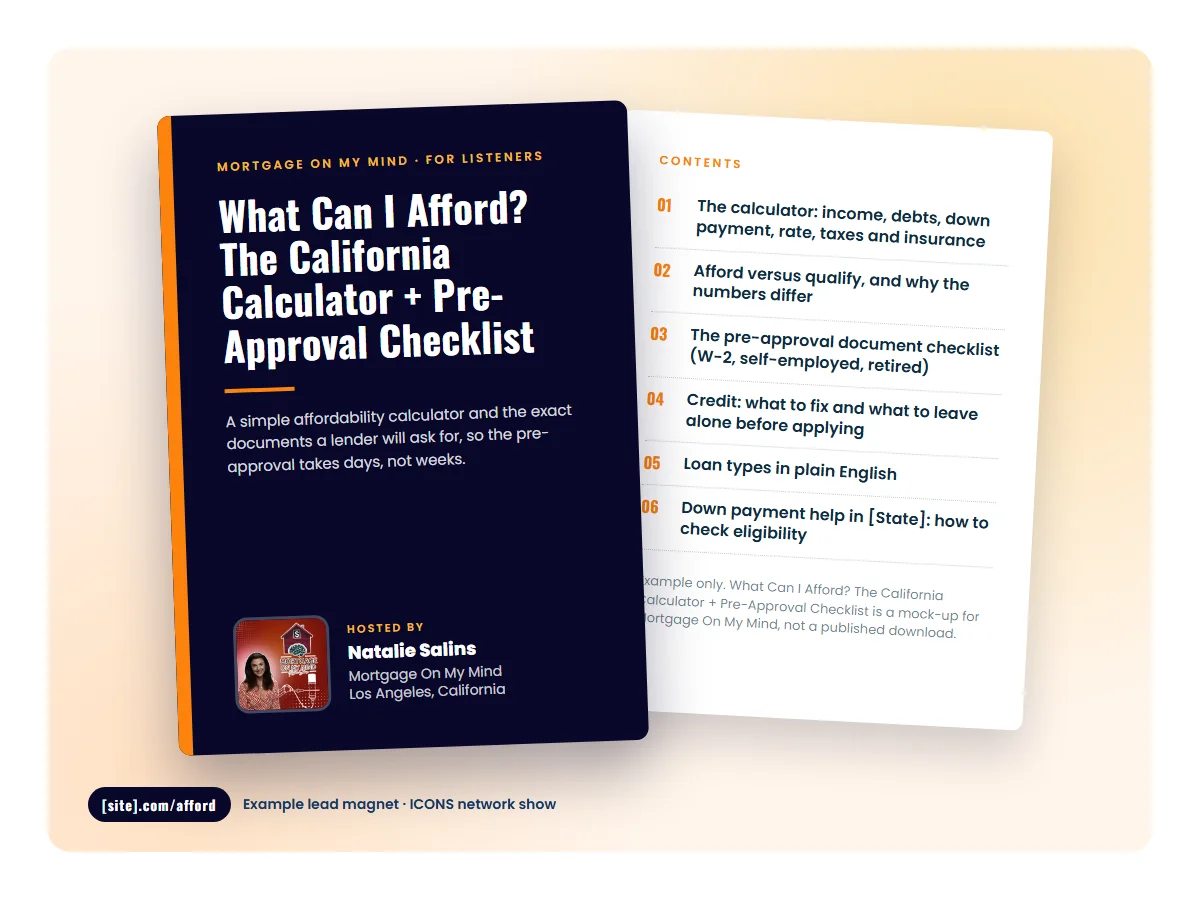
Mock cover of What Can I Afford? The California Calculator + Pre-Approval Checklist, an example lead magnet for Mortgage On My Mind
Mock-up of What Can I Afford? The California Calculator + Pre-Approval Checklist for Mortgage On My Mind (Natalie Salins, Los Angeles, California). Cover and first page; the full contents are below.

Why it works

Why this magnet fits this audience

'What can I afford' is the first question every borrower asks and the one they are most embarrassed to ask out loud. A calculator answers it privately, and the document checklist turns a curious listener into a complete file, which is the point for a lending show.

Before you publish

Lender and agent co-marketing has RESPA rules, and lending content has advertising rules of its own. Check with compliance before the page goes live.

Best for

Lending or mortgage show, or an agent-and-lender co-hosted local show.

Effort

To create
A few hours for the checklist from a template; the calculator follows the brief's 6 to 10 hour range, and a web version is a natural ICONS-built tool
To refresh
Rates and programs each quarter
Basis
Brief estimate for a calculator; the brief gives no separate figure for the checklist

What's inside

A sample table of contents

Bracketed items are placeholders. The real version uses your market, your show and your numbers.

"What Can I Afford?" Calculator + Pre-Approval Checklist

Template contents · e.g. What Can I Afford? The California Calculator + Pre-Approval Checklist

Contents

  1. 01The calculator: income, debts, down payment, rate, taxes and insurance
  2. 02Afford versus qualify, and why the numbers differ
  3. 03The pre-approval document checklist (W-2, self-employed, retired)
  4. 04Credit: what to fix and what to leave alone before applying
  5. 05Loan types in plain English
  6. 06Down payment help in [State]: how to check eligibility
  7. 07What happens after pre-approval
  8. 08Questions to ask any lender, including us
Sample page
Start with the calculator. Put in your income, your monthly debts, what you have for a down payment and a rate, and it gives you a monthly payment and a price range to think about. Then read the page on afford versus qualify, because the number a lender approves and the number you should spend are not the same. The checklist is the full list of documents we ask for; if you gather them now, the pre-approval is quick. The credit page tells you what to leave alone. Do not pay off that card the week before you apply without reading it.
On air

How to mention it on air

Same read, every episode, at the end. Say the URL twice and give the keyword for anyone who is driving. The editor drops the QR code over the closing line in the video version.

  1. 1.Put the magnet on a short URL. Create a landing page for the "What Can I Afford?" Calculator + Pre-Approval Checklist at [site].com/afford: under 15 characters, no dashes or numbers, not the homepage.
  2. 2.Choose one keyword. Set up AFFORD as a text keyword or a comment-to-DM keyword so listeners can get the magnet without typing a URL.
  3. 3.Add the 20-second read to every episode. The script on the right.
  4. 4.Show a QR code and pin the link. Overlay a QR code during the closing line of the video version, and put the link in the YouTube description and a pinned comment.
  5. 5.Tag the link per episode. Use a UTM-tagged link on each placement so the hosting stats show which episode produced each sign-up.

The 20-second read, as Natalie Salins would say it

about 20 seconds

“If you want to know what you can afford in California before you talk to anyone, use our calculator and grab the pre-approval checklist, every document a lender will ask for. Both are free at [site].com/afford. That's [site].com/afford. Or text AFFORD to [number].”

[site].com/affordAFFORD

Example read for Mortgage On My Mind; [site] and [number] are filled in once the show website and text keyword line exist.

Generic version, with [Show] and [City] placeholders

“If you want to know what you can afford before you talk to anyone, use our calculator and grab the pre-approval checklist, every document a lender will ask for. Both are free at [site].com/afford. That's [site].com/afford. Or text AFFORD to [number].”

[site].com/affordAFFORD

Placements

Where to put it

  • Landing page at [site].com/afford: calculator above the fold, checklist behind a short form
  • Mentioned in every borrower-question episode; linked in show notes
  • YouTube description, pinned comment and QR during the closing CTA
  • Reels: one document or credit tip per reel, ending with 'Comment AFFORD'
  • Quote cards from agent guests carry the short URL

Follow-up

The five emails after the download

A magnet without follow-up is a download, not a lead. Subject lines and the point of each email.

  1. 1Your checklist, and the first thing to gather

    Deliver it; point at the simplest document to start with.

  2. 2Afford versus qualify

    The difference, with a labeled example.

  3. 3Don't touch your credit yet

    Credit chapter summary.

  4. 4Loan types in one page

    Plain-English comparison; link an episode.

  5. 5Ready for a real pre-approval?

    Offer the application call.

The brief

What we need from you to build it

A short questionnaire, about 10 minutes. Skip anything you don't know; we'll ask on the call. This is what it covers.

For every magnet

  • Your show name
  • Your website (where the magnet will live)
  • Who can add a page to your website?
  • Brand kit
  • Where should new leads go?
  • CRM name (if any)
  • Phone number for the text keyword (optional)
  • Instagram / Facebook handle for the comment keyword
  • Preferred short URL path
  • Does your brokerage need to approve consumer-facing material?
  • Broker or compliance contact (if needed)
  • When do you want to start mentioning it on air?

For the "What Can I Afford?" Calculator + Pre-Approval Checklist

  • Lender (if the show is lender-hosted, your company and NMLS details)
  • Rate, tax, insurance and DTI assumptions, with source and date
  • Required disclosures and the compliance contact who approves them
  • Web calculator or PDF checklist?
Start the brief

Your answers are saved in your browser as you type, so you can come back to it.

Use this for my show

Tell us about your show and your market and we'll build the "What Can I Afford?" Calculator + Pre-Approval Checklist around it: the document, the short URL on your show website, the QR overlay, the keyword and the follow-up emails.

No obligation.

Use this for my show